

Plugin info
Maintenance & Compatibility
Maintenance score
Possibly abandoned • Last updated 4627 days ago
Is Deskero for WordPress abandoned?
Possibly abandoned (last update 4627 days ago).
Compatibility
Similar & Alternatives
Explore plugins with similar tags, and compare key metrics like downloads, ratings, updates, support, and WP/PHP compatibility.
Description
Deskero for WordPress is a customized widget to integrate your Deskero help desk directly into your WordPress website. Deskero for WordPress is available only to Business or Power users.
Installation
For an automatic installation through WordPress:
- Go to the ‘Add New’ plugins screen in your WordPress admin area
- Search for ‘Deskero for WordPress’
- Click ‘Install Now’ and activate the plugin
For a manual installation via FTP:
- Upload the deskero folder to the
/wp-content/plugins/directory - Activate the plugin through the ‘Plugins’ screen in your WordPress admin area
To upload the plugin through WordPress, instead of FTP:
- Upload the downloaded zip file on the ‘Add New’ plugins screen (see the ‘Upload’ tab) in your WordPress admin area and activate.
To set up the widget after having installed it: 1. Go to the ‘Deskero’ menu in your WordPress admin area 2. Insert your Deskero domain 3. Login to Deskero (using a Business or Power plan), go to the Customize tab in the Setting menu and choose Feedback widget
4. Paste the code you’ll obtain from the ‘Embed this code’ grey window into the ‘Paste widget code here’ box 5. Choose where to insert the widget: you can decide to use it in every page of your website or by inserting the code manually into the single pages where it’s needed
Frequently Asked Questions
What is Deskero?
Deskero is a cloud-based software that offers simple yet effective tools to integrate requests coming from different channels (emails, chats, websites, social networks) into a single database and put some order into the chaos of modern customer care. Our aim is to create a new kind of relationship with customers, engaging them in an innovative and personal way, also through smart and simple use of social networks.
Don’t have a Deskero Account? You can create on here: http://www.deskero.com
I can’t find the widget in my Configuration menu!
Deskero for WordPress is only available to Business or Power users. If you are currently using a Free or Social account you should consider an upgrade before using it.
I can’t find the Deskero menu in my WordPress admin area!
Please check that Deskero is installed in your WordPress website. If you still have trouble please repeat the installation through WordPress or FTP.
It doesn’t work at all! I do not know how to set it up! Please help!
Don’t panic, we are here! Write us at [email protected] and we’ll take care of you
Review feed
Screenshots
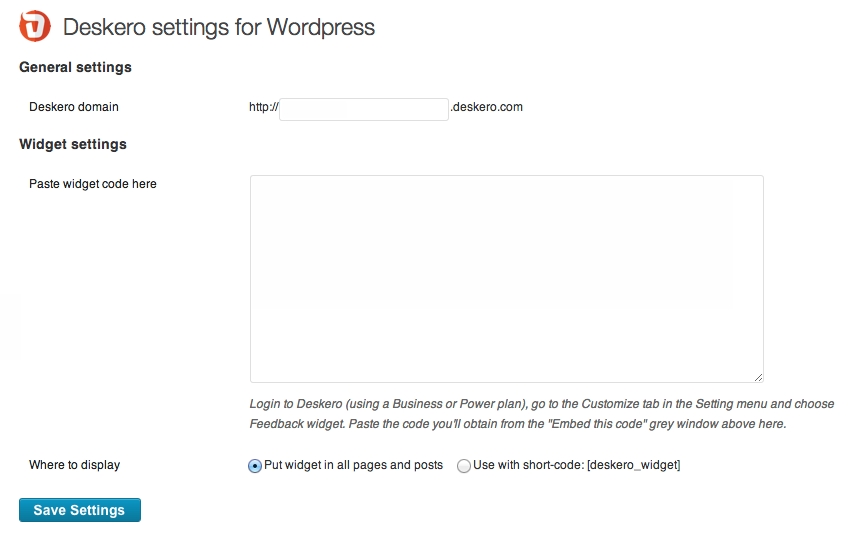
All the options in the Setting Page
Changelog
1.0
- First release