

Device-Based Redirect
Redirect users to your app pages in app store or play store based on their device type with custom URLs and page-specific redirects.
Plugin info
Maintenance & Compatibility
Maintenance score
Stale • Last updated 310 days ago • Support resolved 0% • 3 reviews
Is Device-Based Redirect abandoned?
Likely maintained (last update 310 days ago).
Compatibility
Similar & Alternatives
Explore plugins with similar tags, and compare key metrics like downloads, ratings, updates, support, and WP/PHP compatibility.
Description
Device Based Redirect allows you to easily set up redirects to your mobile apps or mobile-friendly URLs based on the user’s device type. Perfect for promoting your mobile apps to website visitors and implementing platform-specific deep linking through a single URL.
Features:
- Page-specific redirects – Configure different redirects for different pages on your site
- Custom URL redirects – Create custom URLs that redirect users based on their device
- Set different destinations for iOS and Android users. Can be used to send users to iOS and Android app store pages.
- Deep linking support – Direct users to specific sections of your app through platform-specific deep links
- Fallback URLs for other devices – Specify where non-mobile users should be redirected
- Easy-to-use admin interface – Simple configuration through WordPress admin panel
- Bulk enable/disable option – Quickly turn all redirects on/off
- Transient Cache for end-user redirects – Reduces database load for high traffic sites
- Titles for Custom URL Redirects for better organizing of redirects
Use Cases:
- App Store Promotion: Direct mobile users to your app’s store listing while showing desktop users your website
- Deep Linking: Create a single URL that opens different app screens on iOS and Android
- Redirect users to mobile-friendly URLs based on their device type
- Marketing Campaigns: Share one link that works across all platforms
- Cross-Platform Navigation: Seamlessly guide users to the right platform-specific destination
- 302 redirects – Redirects are of 302 type as they are not permanent.
The plugin handles user agent detection and routing automatically, making it easy to implement complex platform-specific navigation through simple WordPress configuration.
Installation
- Upload the plugin files to
/wp-content/plugins/device-based-redirect - Activate the plugin through the ‘Plugins’ screen in WordPress
- Go to Settings -> Device Redirect to configure redirects
Frequently Asked Questions
No, this plugin requires the use of pretty permalinks.
Yes, you can configure page-specific redirects as well as custom URL redirects.
Yes, use the bulk actions to disable redirects in bulk. Alternatively, you can deactivate the plugin temporarily.
No, there is no limit to the number of redirects you can set.
No, it is optional. If not set, users will be redirected to the current page for Page redirects and home page for Slug redirects in non-mobile devices.
Redirects are of 302 type as they are not permanent.
No, the redirection happens when the page is loaded and not on dynamic resizing of pages in web.
Review feed
Screenshots

Accessing Device Redirect Settings Page

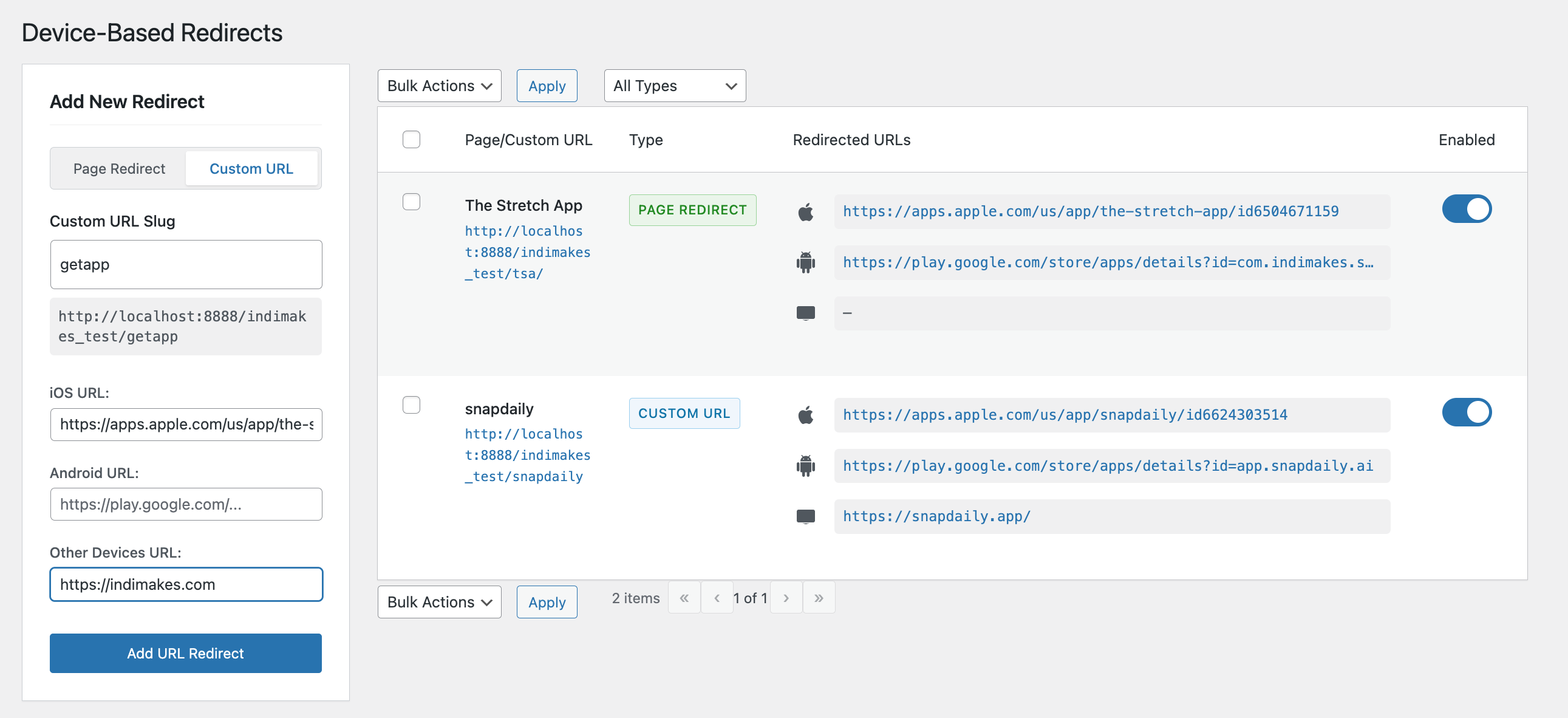
Configuring Pages or URLs for Device Specific Redirection

Edit URL Redirects within table itself in Edit mode.
Hover to access Edit and Remove actions

Add Slug or Page Redirects on left sidebar
Changelog
1.2.1
- Fixed issue with Params added in redirect URLs by Hosting Providers
1.2.0
- Compatibility with WordPress 6.8
1.1.6
- Added Title option for Custom URL Redirects
1.1.5
- Added a Dismissible Section for Requesting Reviews and gathering Feature Requests
1.1.4
- Updated Redirect Template for Custom URL Intermediate Page
1.1.3
- Moved Admin to top of menu
1.1.2
- Added Plugin Links for Support and Settings Page
1.1.1
- Support for DB Migration during auto upgrades without deactivation
1.1.0
- Migrated to separate database table for redirects
- Added transient Cache for fetching redirects on end-user pages
- Added new and improved admin UI for managing redirects
- Added pagination for URL redirects in admin
- Added Bulk Actions for Disable/Enable/Delete
- Added Filter for Redirect Types
- Added smooth scrolling to top of page when navigating between pages
- URL validation limited to basic patterns for better flexibility
1.0.0
- Initial release