

DH Admin Themes
The DH Admin Themes, WP3.x.x add a theme for the dashboard. You can customize the theme based on the provided sample.
Plugin info
Maintenance & Compatibility
Maintenance score
Possibly abandoned • Last updated 5371 days ago
Is DH Admin Themes abandoned?
Possibly abandoned (last update 5371 days ago).
Compatibility
Similar & Alternatives
Explore plugins with similar tags, and compare key metrics like downloads, ratings, updates, support, and WP/PHP compatibility.
Description
Add a dashboard theme.
Prepared for a five color scheme.
To use examples, you can add their own customized color scheme.
Arbitrary section
Images and CSS are included in the directory that defines the color scheme too.
WordPress changed to transparent so that the initial images, I can cope with any color scheme.
Localization
Japanese language file has been used only a description.
Installation
- Upload the entire
dh-admin-themesfolder to the/wp-content/plugins/directory. - Activate the plugin through the ‘Plugins’ menu in WordPress
Frequently Asked Questions
Can I change the display name of the scheme?
There is a directory that defined the colors in the plugin directory.
This directory contains the “scheme definition file (colors_define.ini) ” there.
To change the display name, please change the “disp” in the scheme definition file.
To add to the original color?
- Copy the color scheme defined directory, please rename.
- Edit the definition files in the directory.
“Name” is given a unique ID please.
“Disp” is the display name.
“Coloer1-4” is the color scheme. - CSS files in the “name” using the rename.
Ex) colors-XXXX.css - Replace a new color code the CSS file.
directory name for the color scheme does not rule
Review feed
Screenshots
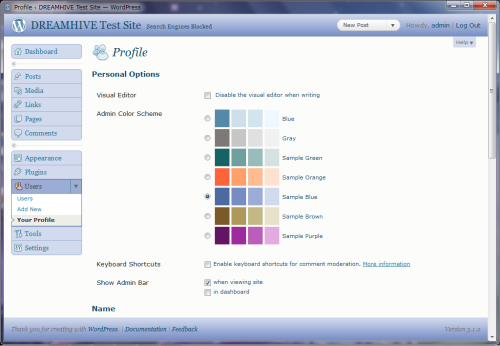
screenshot-1.png Selected control "Sample Blue" color scheme
Changelog
0.5.4
- Add Sample color scheme to work on WordPress 3.2.
0.5.3
- Updated to work on WordPress 3.0 & PHP4.
- Optimized code for constant definitions.
0.5.0
- First stable release.