

Maintenance 20/1004817d since update
Active installs
10
Downloads
1,797
Reviews
0
Age
13.2y
Plugin info
Total downloads: 1,797
Active installs: 10
Total reviews: 0
Average rating: 0
Support threads opened: 0
Support threads resolved: 0 (0%)
Available in: 1 language(s)
Contributors: 1
Last updated: 1/25/2013 (4817 days ago)
Added to WordPress: 1/25/2013 (13 years old)
Minimum WordPress version: 3.0
Tested up to WordPress version: 3.5.2
Minimum PHP version: f
Maintenance & Compatibility
Maintenance score
Possibly abandoned • Last updated 4817 days ago
20/100
Is Diigo Bookmarks Widget abandoned?
Possibly abandoned (last update 4817 days ago).
Compatibility
Requires WordPress: 3.0
Tested up to: 3.5.2
Requires PHP: f
Similar & Alternatives
Explore plugins with similar tags, and compare key metrics like downloads, ratings, updates, support, and WP/PHP compatibility.
Postalicious
Rating 0.0/5 (0 reviews) • Active installs 30
Description
Diigo Online Bookmarking Widget
Display bookmarks from Diigo in your sidebar. Uses Diigo API to fetch the bookmarks.
- First get an API key from here
- Use this key along with your username and password in the widget settings.
- Then click the “Test API” button to test the api response.
- Set widget options. You can mention the ‘User’ input to fetch bookmarks from a particular user or leave it empty to fetch any public bookmark.
Installation
- Upload
diigo-widget.phpto the/wp-content/plugins/directory - Activate the plugin through the ‘Plugins’ menu in WordPress
- Go to Appearance->Widget and use ‘Diigo Widget’ on your siderbar
- Get your diigo API key from http://www.diigo.com/api_keys/new/
- Enter your Diigo account username and password
Frequently Asked Questions
No FAQ available
Review feed
No reviews available
Screenshots
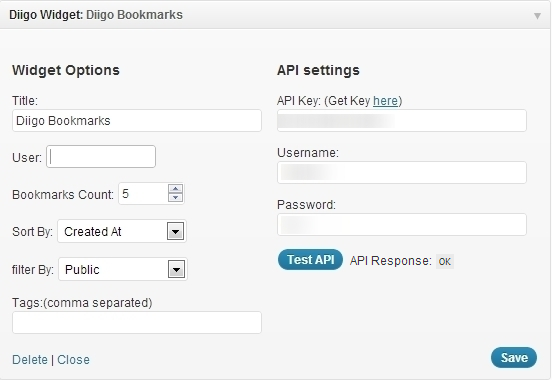
Diigo Widget Settings

Widget Preview
Changelog
No changelog available