

Direct Checkout for WooCommerce – Skip Cart with Buy Buttons
Skip cart & send customers directly to checkout for all products, or create a single buy button anywhere.
Plugin info
Maintenance & Compatibility
Maintenance score
Possibly abandoned • Last updated 1246 days ago
Is Direct Checkout for WooCommerce – Skip Cart with Buy Buttons abandoned?
Possibly abandoned (last update 1246 days ago).
Compatibility
Languages
Similar & Alternatives
Explore plugins with similar tags, and compare key metrics like downloads, ratings, updates, support, and WP/PHP compatibility.
Description
Looking to optimize your WooCommerce store and skip the cart and send your customers directly to the checkout? This plugin makes it super-easy to do that.
The plugin also provides powerful Buy Buttons. You can put these anywhere on your site (not just from a product page) – when a customer clicks them, the product is added to the cart and they are automatically sent straight to the checkout (skipping the cart).
You can send your customers straight to the checkout for allL products – increase your sales as you optimize your checkout process.
Also, you can easily create buttons for individual products, that you can put anywhere on your site. These allow the customer to add them to their cart and go directly to the checkout all in one easy click.
Put the buy buttons on your blog posts, in widgets or anywhere else on your site!
VERY IMPORTANT
Please make sure you DO NOT have Ajax enabled for cart buttons. Go to WooCommerce->Settings->Products and UNCHECK “Enable AJAX add to cart buttons on archives”
Key Features
- Enable Direct Checkout for all products, quickly and easily
- Create buttons for an individual product to go directly to the checkout
Buy Buttons Compatible with
- Simple products
- Variable Products
- External/Affiliate Products
- Simple Subscriptions
- Variable Subscriptions
Plugin is compatible with WooCommerce Subscriptions – create powerful Buy Buttons for your subscriptions and use them anywhere on your site.
Questions?
If you have any questions please contact us here
If you like the plugin, please leave us a review on the review page here – THANKS!
Installation
- Upload
direct-checkout-for-woocommerce.zipto the/wp-content/plugins/directory - Activate the plugin through the ‘Plugins’ menu in WordPress
- Go to WooCommerce-> JEM Direct Checkout, in your WordPress site to see the options
- You are ready to go!!!
Frequently Asked Questions
To create a buy button simply use the shortcode: [jemdc id=”1234″] where 1234 is the Product ID. If you go to the Admin Product page the plugin will show you the EXACT code to use.
Plugin will use default buttons – you can apply a class to the buttons though, simply enter a class name on the Options Page
If you have any questions please contact us here
Review feed
Screenshots
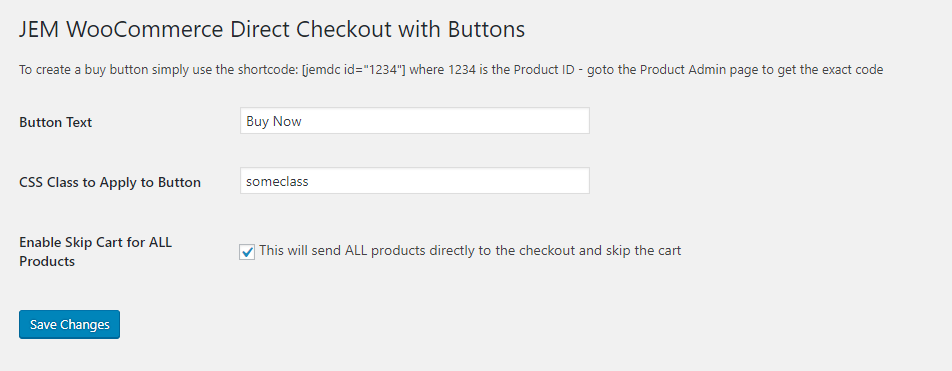
The settings screen

An example of the shortcode on a Simple Product

An example of the shortcode on a Variable Product

An example of a buy button in action
Changelog
1.3
- 2021/10/10
- bug & security fixes
1.2
WordPress 5.5 release
1.1
Minor bug fixes
1.0
- Initial version