

Disable Lost Your Password
License URI: http://www.gnu.org/licenses/gpl-2.0.html Disable Wordpress Login Screen "Lost Yoyr Password?" Option Usign Disable Lost Your P …
Plugin info
Maintenance & Compatibility
Maintenance score
Possibly abandoned • Last updated 2641 days ago
Is Disable Lost Your Password abandoned?
Possibly abandoned (last update 2641 days ago).
Compatibility
Similar & Alternatives
Explore plugins with similar tags, and compare key metrics like downloads, ratings, updates, support, and WP/PHP compatibility.
Description
If you are worried about the security of the wordpress website, then Disable Lost Your Password Plugin can help you with it a little bit.
With this plugin you can disable the lost your password option that appears on the WordPress login screen, so that no one can recover the password from the login screen.
If you forget your password then you have nothing to worry about. You can change wordpress password from phpMyAdmin, here it has been given full information. [change password Using phpMyAdmin] (https://goo.gl/FGwvcQ “change password Using phpMyAdmin”).
All you have to do is install it on your dashboard and activate it.
Help
Do you need any help or you are having trouble using the Disable Lost Your Password plugin, or you want to ask something about it, you can contact us by visiting our website. Use this link for this. [Contact developer] (https://goo.gl/7qa7JH “Contact developer”) or you can send us a mail at [email protected].
We will complete the answers to your questions.
Installation
Go to Plugins -> Add New and search for Disable Lost Your Password.
Activate the plugin through the ?Plugins? screen in WordPress.
now you open the WordPress login screen and see that the Lost Your Password option has been disabled.
Frequently Asked Questions
How can i use it ?
It is very simple to use it
Go to Plugins -> Add New and search for Disable Lost Your Password.
Activate the plugin through the ?Plugins? screen in WordPress.
now you open the WordPress login screen and see that the Lost Your Password option has been disabled.
Review feed
Screenshots
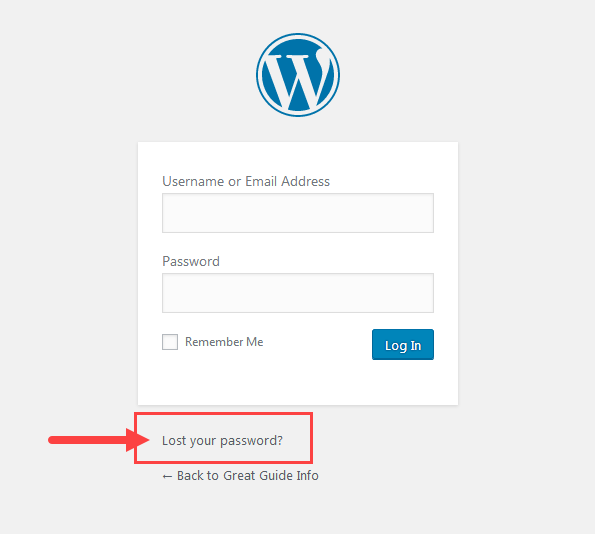
Screenshot-1

Screenshot-2

Screenshot-3