

Disk Usage Sunburst
Visualize and drill down the disk usage of your whole WordPress installation. Find and identify big files immediately!
Plugin info
Maintenance & Compatibility
Maintenance score
Stale • Last updated 237 days ago • Support resolved 100% • 36 reviews
Is Disk Usage Sunburst abandoned?
Likely maintained (last update 237 days ago).
Compatibility
Similar & Alternatives
Explore plugins with similar tags, and compare key metrics like downloads, ratings, updates, support, and WP/PHP compatibility.
Description
This plugin (Tools -> Disk Usage) shows all files of your WordPress installation at once. These are displayed in a so
called “Sunburst Chart”. Each arc of the chart is either a directory or a file. Move your mouse over an arc to see the size
of the file or directory. The bigger the arc is the bigger is the file/directory.
Very useful to determine the biggest files in your WordPress installation!
Click on an arc to zoom in, and click in the circle to zoom out again.
Questions? Drop us a mail: wp-dev (at) raidboxes.de
Thanks
Thanks to Mike Bostock for his great “d3js”: http://d3js.org
Thanks to Mike Bostock for his awesome “Zoomable Sunburst” implementation: http://bl.ocks.org/mbostock/4348373
Thanks to Jeffrey Sambells for his “Human Readable File Size with PHP”: http://jeffreysambells.com/2012/10/25/human-readable-filesize-php
Installation
- Upload
disk-usage-sunburst.zipto the/wp-content/plugins/directory - Activate the plugin through the ‘Plugins’ menu in WordPress
- See it in action under
Tools->Disk Usage!
Frequently Asked Questions
After activation you find the tool under Tools -> Disk Usage
Yes since 1.1 it does. Note: For privacy reasons you need to be a Superadmin to use this on a Multisite.
In this case unfortunately this plugin can’t calculate the sizes of all your WordPress files. Check if there’s a PHP time limit in your WordPress and try to increase it.
Review feed
Useful
Excellent plugin!
Screenshots
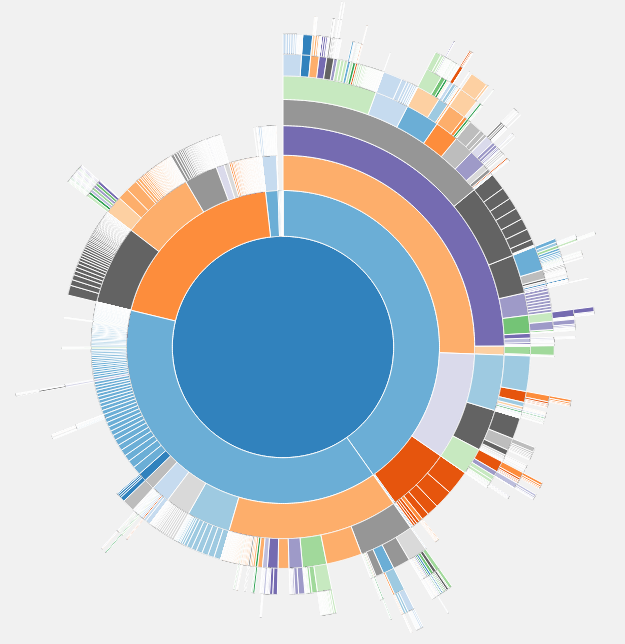
Plugin in action
Changelog
= 1.1.9
* Update: Successfully tested up to WordPress 6.8.1
1.1.8
- Fix: added missing readme.txt changes
1.1.7
- Fix: removing trunk/ folder from plugin source code
1.1.6
- Update: Successfully tested up to WordPress 6.1.1
1.1.5
- Update: renamed RAIDBOXES to raidboxes
1.1.3
- Update: Fixed wrong svn trunk commits
1.1.1
- Update: Removed unused resources
1.1
- Code-rework to make it more efficient and only load resources on it’s plugin page
- Made the plugin multisite compatible (Thanks to @shawfactor for his idea)
- Successfully tested up to WordPress 5.7
1.0.9
- Update: Successfully tested up to WordPress 5.3
1.0.8
- Update: Successfully tested up to WordPress 5.1.1
1.0.7
- Update: Successfully tested up to WordPress 4.8.2
1.0.6
- Update: Successfully tested up to WordPress 4.7.1
1.0.5
- Advice: If you don’t see anything, increase php time limit… This plugin is maintained!
1.0.4
- Bug fixed: browsers without SVG support didn’t see anything. Now these will get a nice red error message 😉
1.0.3
- Bug fixed: Show error message if calculation of file/directory sizes fails (e.g. because of time limit)
1.0.2
- Bug fixed: converted short array syntax to long array syntax to support PHP versions < 5.4.0 (thanks to websupporter, https://wordpress.org/support/topic/parse-error-syntax-error-unexpected-146)
1.0.1
- Code enhanced: replaced code 10 with ‘administrator’ capability when calling add_submenu_page (thanks to doume, https://wordpress.org/support/topic/v100-deprecated-argument-in-function-call)
- User Interface enhanced: tooltip follows mouse cursor when mouse is moving
- Bug fixed: the distance between tooltip and mouse cursor was dependent on the scroll position
1.0.0
- First Version