

Display Author Option
This plugin enables you to overwrite how the author is being displayed. By overwriting the the_author filter.
Maintenance 20/1004978d since update
Active installs
10
Downloads
2,056
Reviews
0
Age
13.6y
Plugin info
Total downloads: 2,056
Active installs: 10
Total reviews: 0
Average rating: 0
Support threads opened: 0
Support threads resolved: 0 (0%)
Available in: 1 language(s)
Contributors: 4
Last updated: 8/14/2012 (4978 days ago)
Added to WordPress: 8/14/2012 (13 years old)
Minimum WordPress version: 3.4.1
Tested up to WordPress version: 2.1
Minimum PHP version: f
Maintenance & Compatibility
Maintenance score
Possibly abandoned • Last updated 4978 days ago
20/100
Is Display Author Option abandoned?
Possibly abandoned (last update 4978 days ago).
Compatibility
Requires WordPress: 3.4.1
Tested up to: 2.1
Requires PHP: f
Languages
Similar & Alternatives
Explore plugins with similar tags, and compare key metrics like downloads, ratings, updates, support, and WP/PHP compatibility.
Posts Page: Use Page Template
Rating 3.0/5 (4 reviews) • Active installs 40
For the visually impaired
Rating 4.9/5 (16 reviews) • Active installs 8,000
Reading progressbar
Rating 5.0/5 (17 reviews) • Active installs 7,000
Worth The Read
Rating 4.3/5 (27 reviews) • Active installs 4,000
WP Reading Progress
Rating 5.0/5 (18 reviews) • Active installs 3,000
Comfortable Reading
Rating 3.6/5 (11 reviews) • Active installs 2,000
Description
You can choose how the author is being displayed without changing the theme.
You can currently choose from these options:
- Default – What the user selected to display publicly
- First Name Last Name
- Last Name First Name
- Nickname
- Username
- First Name
- Last Name
Installation
The usual WordPress install.
- Upload
plugin-name.phpto the/wp-content/plugins/directory - Activate the plugin through the ‘Plugins’ menu in WordPress
- Go to Settings > Reading to change the settings
Frequently Asked Questions
Where are the settings located for the plugin?
You can find them under
Dashboard > Settings > Reading
How can I contribute to the plugin ?
The plugin author is accepting pull request.
The repository can be found at
https://github.com/ubc/display-author-option/
Review feed
No reviews available
Screenshots
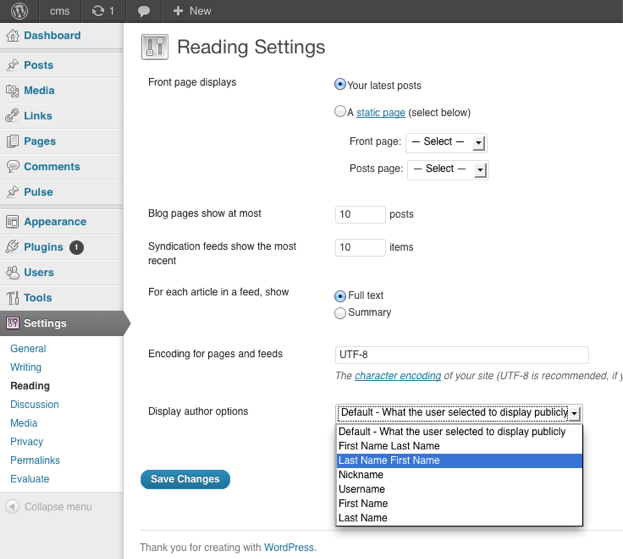
A view at the settings.
Changelog
1.0
- Initial Release