

Dive Sites Manager
Show information about dive sites including a map. Add characteristics, photo, description,...They can also be organized in multiple locations.
Plugin info
Maintenance & Compatibility
Maintenance score
Possibly abandoned • Last updated 528 days ago • 1 reviews
Is Dive Sites Manager abandoned?
Possibly abandoned (last update 528 days ago).
Compatibility
Similar & Alternatives
Explore plugins with similar tags, and compare key metrics like downloads, ratings, updates, support, and WP/PHP compatibility.
Description
This plugins allows you to easily create a list of dive site on the back-end with information like the name, short description and picture.
Additionally you can define some extra information to be added to the dive site, such us, dive type(Drift, Wreck,…), depth, level,…
It is possible to create multiple locations and assign the dive sites accordingly.
Once the list is created, it can be displayed on the front-end using a shortcode.
Features
- Dive Sites
- Maps with custom icons
- Manage multiple Locations
- Define your own characteristics for dive sites
- Multiple layouts available
- Change the style to match your brand
- Intuitive and easy to use
-
Responsive
Installation
From your WordPress dashboard
- Visit Plugins > Add New
- Search for “Dive Sites Manager”
- Install click on “Install Now”
- Activate the plugin when the installation is finished
- Click on the new menu item “Dive Sites” and create your first dive site
- Add the shortcode [cfish-dive-sites] to the page where you want to display the dive site list
Frequently Asked Questions
Dive Sites Manager uses Shortcodes. For the display of the full list of dive sites use [cfish-dive-sites]
Dive Sites Manager uses Short codes. For the display of only the dive sites of one location use [cfish-dive-sites location=”Marsa Alam“]
In the backend, go to “Dive Sites Manager” -> “Display format”.
You can choose the sizes of the full block and the maximum picture size.
It is also possible to choose the colors of the titles, text and icons. All the other style options will be taken from your wp theme.
In the backend, go to “Dive Sites Manager” -> “Dive” Sites characteristics”.
Choose the number of characteristics that you want to have and save. A list will appear to put in the name and an icon.
In the backend, go to “Dive Sites Manager” -> “Dashboard” and activate “Locations manager”.
In the Dive Sites menu you will now find “Locations”. There you can add different location in a hierarchical way.
Once the locations are created, add or edit the dive sites and choose the location for them.
Review feed
Plugin made with lots of love...
Screenshots

Map with watercolor background

Example of a layout (left align) with two columns

Map with standard bacground

Example of the horizontal layout with three columns

Layout options
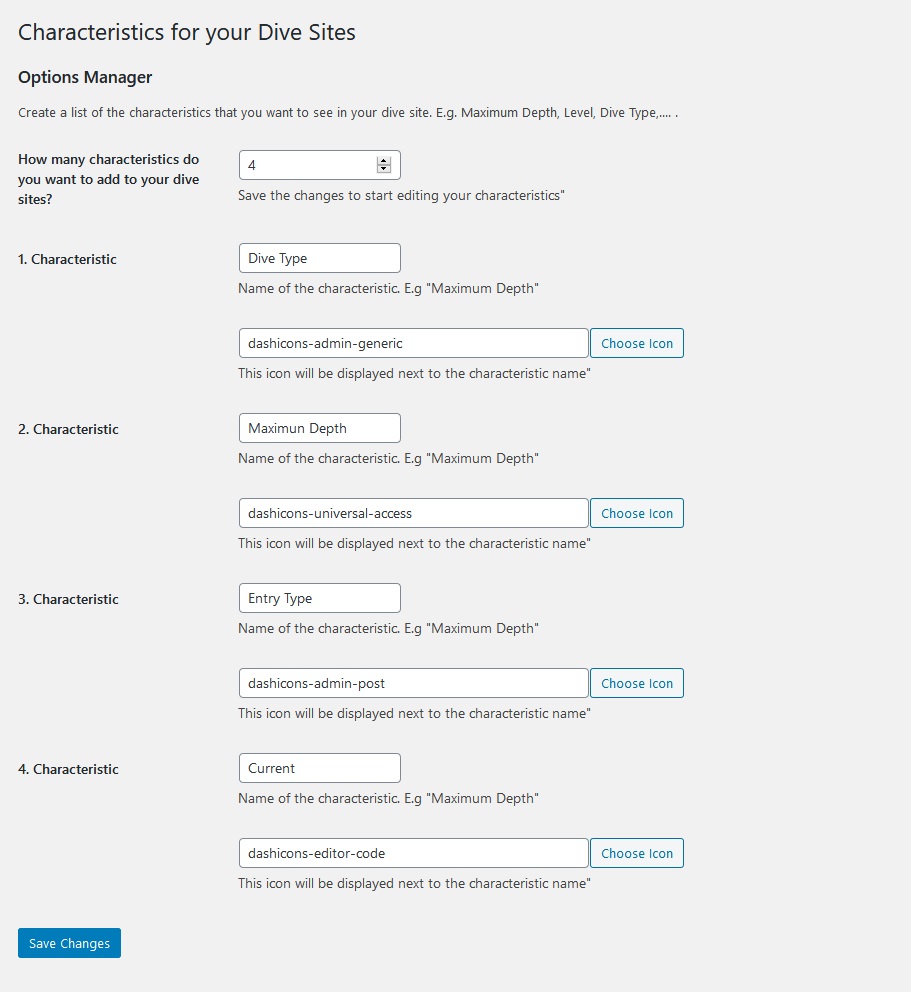
Extra information (characteristics) can be added to the dive sites

Map configuration options

In every dive site you can add a name, short description (excerpt), long description, featured image, location and characteristics
Changelog
1.2.1
- Fixed bug for display dive sites
1.2.0
- Maps
- Shortcode to display the diving maps with the possibility to filter by location
1.1.0
- Multiple layouts available. Change the colors and widths
- Locations. Add locations and assign the dive sites to them. In the front-end is possible to filter the dive sites by location usgin an attribute in the shortcode
- You can define your own characteristics for the dive sites
- Icons in the dive sites characteristics
- Technically ready for translation
- Spanish translation
1.0.0
- Custom Post Type to add the dive sites on the back-end
- Shortcode to display the dive sites on the front-end