
Order Boost — First & Second Order Discounts
Auto-apply a discount to first orders and unlock second-order rewards in Pro. Boost sales with simple, automated WooCommerce incentives.
Plugin info
Maintenance & Compatibility
Maintenance score
Maintained • Last updated 120 days ago
Is Order Boost — First & Second Order Discounts abandoned?
Likely maintained (last update 120 days ago).
Compatibility
Similar & Alternatives
Explore plugins with similar tags, and compare key metrics like downloads, ratings, updates, support, and WP/PHP compatibility.
Description
What Order Boost does
– Detects new customers (logged-in: by user ID & paid-ish orders; guests: by billing email).
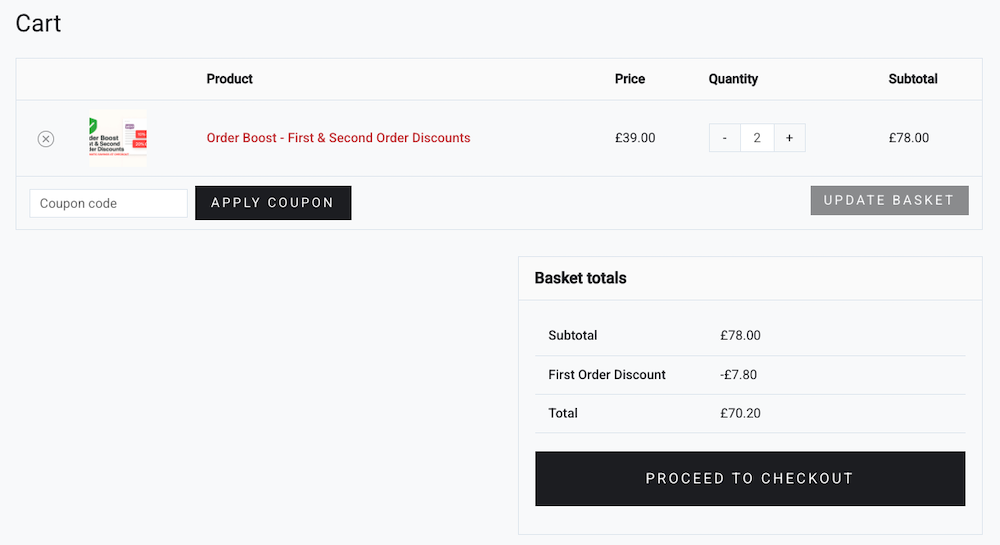
– Applies a negative fee as a discount in the cart/checkout:
– Percentage or Fixed amount
– Minimum subtotal (ex. tax) threshold
– Option to include sale items in the threshold
– Option to skip when coupons are present (prevents stacking)
– Option to mark discount taxable (off by default)
Where to configure
– Go to Marketing First & Second Order Discounts.
Why a fee and not a coupon?
– Predictable totals, minimal conflicts with coupon logic, and clearer reporting. Need a real coupon? You can filter the label or adapt to an auto-applied coupon if preferred.
💡 Note:
– In the block-based checkout, WooCommerce only recalculates totals once enough billing details are entered to validate the customer. Typing an email alone will not immediately update prices — but any eligible discount is always applied automatically before the order is completed.
Pro Version
Enhance your store’s incentives with First & Second Order Discounts Pro, which expands the free plugin’s functionality by allowing discounts to be applied to either the first or the second order.
What the Pro version adds
– Apply the automatic discount to the second order, not just the first
– Use the same configurable rule set (type, amount, minimum subtotal, taxability, sale-item rules, etc.)
– Includes priority support and ongoing updates
Why upgrade?
Rewarding returning customers is an effective way to increase repeat purchases. The Pro version makes this effortless by applying your discount logic to a customer’s second order—no coupons, no manual setup, and no marketing automation required.
Get Pro
Purchase a licence here:
👉 Buy an Order Boost Pro licence
Uninstall
The plugin includes an uninstall.php that fully deletes its saved options (dl-first-order-discount_settings_v1). Multisite-safe.
Author
Created by Digital Lychee — https://digitallychee.com
Installation
- Upload the plugin folder to
/wp-content/plugins/first-second-order-discounts/or install via ZIP. - Activate the plugin.
- Visit Marketing First & Second Order Discounts and set your defaults (type, amount, threshold, etc.).
Frequently Asked Questions
- Logged-in: checks
wc_get_customer_order_count()and also queries for any orders with statusesprocessing,completed, oron-hold. If any exist, they’re not new. - Guest: looks up paid-ish orders by billing email. If found, they’re not new.
processing, completed, and on-hold. You can adjust by editing the status list in the code.
Discount eligibility for guest customers is checked as part of WooCommerce’s checkout totals calculation. Simply entering an email address does not trigger totals to update in the block-based checkout. WooCommerce recalculates totals automatically once the customer completes their billing details
(for example, after address fields are filled or when using autofill). At that point, any eligible
first-order discount will appear. The discount will always be applied before the order is placed
if the customer is eligible.
No. The discount is applied automatically as a fee/discount at checkout when the rules are met.
By default no (there’s a “Skip if coupon applied” option). You can allow stacking by unchecking that option.
By default the discount reduces the pre-tax subtotal (non-taxable fee). You can mark it taxable in settings if your locale/accountant prefers that model.
Runs late enough (priority 20) to play nicely with most currency switchers. Always test on staging with your stack.
Yes, Order Boost declares compatibility with WooCommerce custom order tables / HPOS.
Review feed
Screenshots

Settings page under Marketing → First Order Discount.


Changelog
1.0.1 — 2025-12-04
- Improved discount eligibility detection for guest customers.
- Discount now applies automatically after email entry on checkout (no page reload needed).
- Ensures accurate first-order validation when using the classic checkout AJAX flow.
- Minor code cleanup and improved compatibility with dynamic checkout updates.
1.0.0 — 2025-12-03
- Initial release.