DownloadMusic
Plugin to list all audio files uploaded to a blog, and let users download them in a zip file.
Plugin info
Maintenance & Compatibility
Maintenance score
Possibly abandoned • Last updated 6499 days ago
Is DownloadMusic abandoned?
Possibly abandoned (last update 6499 days ago).
Compatibility
Similar & Alternatives
Explore plugins with similar tags, and compare key metrics like downloads, ratings, updates, support, and WP/PHP compatibility.
Description
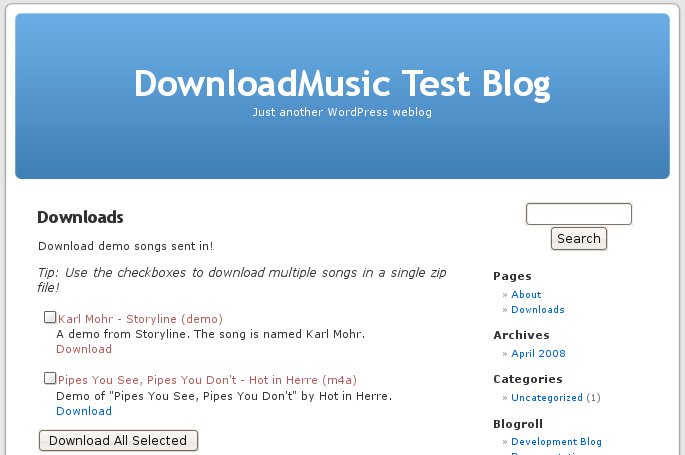
This plugin was created to allow readers to download music that has been uploaded to a blog from a single page.
The plugin looks through the posts table in the wordpress database for all attachments that have a mime type of audio/*. It displays this when the reader looks at a page ( not a post ) named ‘Downloads’. The reader can then select the songs they wish to download, click on “Download All Selected” and download a zip file of all of the files selected, or they can simply download the single song they wish to listen to. The list also lets users view the attachment page for a particular song, letting them leave comments.
Installation
- Upload the DownloadMusic folder to the ‘/wp-content/plugins/’ directory
- Activate the plugin through the ‘Plugins’ menu in WordPress
- Create a page named ‘Downloads’ ( if you don’t already have one )
- Edit the text of the ‘Downloads’ page to whatever you want.
- You’re good to go!
Frequently Asked Questions
Does the page have to be named ‘Downloads’?
Yes. Working on fixing that.
WordPress keeps complaining that the file is too big when I try to upload it
Yeah, that’s a PHP thing. In your php.ini file, change ‘upload_max_filesize’ to something like 6M.
Keep in mind that setting this really big usually isn’t a good idea, because the larger the files you upload, the quicker you can say goodbye to your bandwidth.
What about foo bar?
What about foo bar?