

DSGVO Google Web Fonts GDPR
The Plugin scan yout Theme functions.php file if there any Google Font calls. If there any calls to the Google font serber, the plugin get the font ur …
Plugin info
Maintenance & Compatibility
Maintenance score
Possibly abandoned • Last updated 2566 days ago • 2 reviews
Is DSGVO Google Web Fonts GDPR abandoned?
Possibly abandoned (last update 2566 days ago).
Compatibility
Similar & Alternatives
Explore plugins with similar tags, and compare key metrics like downloads, ratings, updates, support, and WP/PHP compatibility.
Description
The Plugin scan yout Theme functions.php file if there any Google Font calls.
If there any calls to the Google font serber, the plugin get the font url – download the font to your sever/webhost and add a new css file to your theme.
Also the Plugin blocks the calls to the Google font server.
So all fonts there are definied in the themes functions.php file can be used without ANY calls to the Google Servers.
In the free version only WordPress default themes are supported
(Twenty Fifteen, Twenty Seventeen, Twenty Sixteen)
Features Free Version
-
Automatically scans your theme functions.php file if there any Google font calls.
-
The Plugin download the founded fonts in your themes function.php file to your webhost/server.
-
Blocks loading Google Fonts from the Google Server (load fonts from local webhost/server)
-
Adds a new CSS file to you theme via a hook so the fonts can normally be use
Features PRO Version
-
All Features of the free version
-
Supports ALL themes
-
Setup assistance by one of our employees
-
Premium Support & Premium Updates for Lifetime
Costs €6,99,- / Licence for one Domain.
To buy the Pro version please contact me at [email protected].
Installation
- Upload plugin over wordpress
- Activate the plugin through the ‘Plugins’ menu in WordPress
- Configure the Plugin by clicking on the menu point in wordpress admin called “Google Web Fonts”
- Activate “Google Web Fonts usage” and then start the Process via the “start process”.
- Now all Google Web Fonts used by your themes functions.php file saved to your host and the plugin block loading fonts from the google servers.
Frequently Asked Questions
What themes are supported in the free version?
In the free version only the wordpress default themes are supported (Twenty Fifteen, Twenty Seventeen, Twenty Sixteen).
In the pro version ALL themes are supported.
If i use this plugin can i use Google Web Fonts DSGVO / GDPR conform?
Short answer, yes!
Long answer: The plugin scans your themes functions.php file. If the plugin found any Google Font Server calls the plugin download the fonts to your webhost/server.
Also the Pugin create a new CSS file to include the downloaded fonts in WordPress. At last the plugin blocks all calls to the Google Font Server.
So u can use all Google Fonts totally DSGVO / GDPR conform.
Review feed
Screenshots

Plugin settings (after Plugins does Magic - Fonts loaded from Local Server)
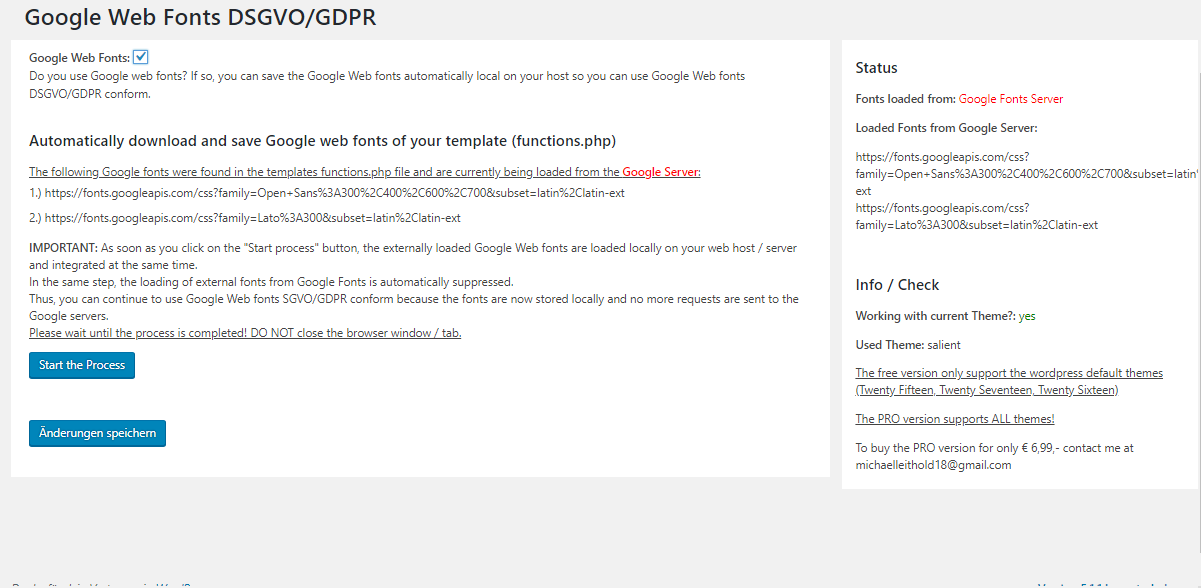
Plugin settings (before Plugins does Magic - Fonts are loaded from Google Server)

Before plugin is activated (Fonts loaded from Google Server)

After plugin is activated (Fonts loaded from Local Server)


Changelog
1.0.0
- released