

Dynamic Year and Copyright Shortcode
This plugins allows you to keep the Copyright year of the website always updated.
Plugin info
Maintenance & Compatibility
Maintenance score
Possibly abandoned • Last updated 2984 days ago • 4 reviews
Is Dynamic Year and Copyright Shortcode abandoned?
Possibly abandoned (last update 2984 days ago).
Compatibility
Similar & Alternatives
Explore plugins with similar tags, and compare key metrics like downloads, ratings, updates, support, and WP/PHP compatibility.
Description
This plugins allows you to keep the Copyright year of the website always updated by getting the current year and storing it in the shortcode [current_year].
There are three variations of this plugin’s shortcode
[current_year] – This shortcode displays the current year. Assuming that the current year is 2015 then the shortcode will display “2015” (without quotes) wherever it is used.
[current_year_with_copyright_symbol] – This shortcode displays the current year with the copyright symbol to its left. Assuming the current year to be 2015 the shorcode will display “© 2015” (without quotes) wherever it is used.
[current_year_with_copyright_symbol_and_title] – This shortcode displays the current year with the copyright symbol and site title to its left. Assuming the current year to be 2015 the shorcode will display “Site Title © 2015” (without quotes) wherever it is used.
Shortcode Features Available
- Current Year
- Current Year with copyright symbol
- Current Year with copyright symbol and title
Installation
Installing directly from wordpress backend
- Goto Plugins -> Add New
- Search for Dynamic Year and Copyright Shortcode
- Install and Activate the plugin
- Use the shorcode variations [current_year], [current_year_with_copyright_symbol] and [current_year_with_copyright_symbol_and_title] wherever you want.
Installing by uploading the plugin to wordpress
- Goto https://wordpress.org/plugins/dynamic-year-and-copyright-shortcode/
- Click on Download to download the plugin to your system
- Upload the plugin to wp-content/plugins/ using FTP or Cpanel and extract the zipped file
- Goto Plugins and Activate the plugin
- Use the shorcode variations [current_year], [current_year_with_copyright_symbol] and [current_year_with_copyright_symbol_and_title] wherever you want.
Frequently Asked Questions
Installation Instructions
Installing directly from wordpress backend
- Goto Plugins -> Add New
- Search for Dynamic Year and Copyright Shortcode
- Install and Activate the plugin
- Use the shorcode variations [current_year], [current_year_with_copyright_symbol] and [current_year_with_copyright_symbol_and_title] wherever you want.
Installing by uploading the plugin to wordpress
- Goto https://wordpress.org/plugins/dynamic-year-and-copyright-shortcode/
- Click on Download to download the plugin to your system
- Upload the plugin to wp-content/plugins/ using FTP or Cpanel and extract the zipped file
- Goto Plugins and Activate the plugin
- Use the shorcode variations [current_year], [current_year_with_copyright_symbol] and [current_year_with_copyright_symbol_and_title] wherever you want.
How to display the current year with copyright symbol?
Please use [current_year_with_copyright_symbol]
How to display the current year with copyright symbol and title?
Please use [current_year_with_copyright_symbol_and_title]
Review feed
Screenshots
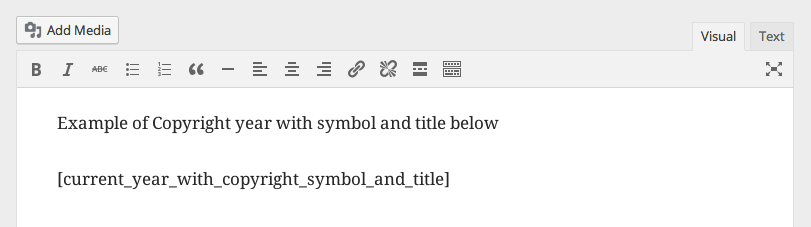
Usage of shortcode in Post/Page Editor
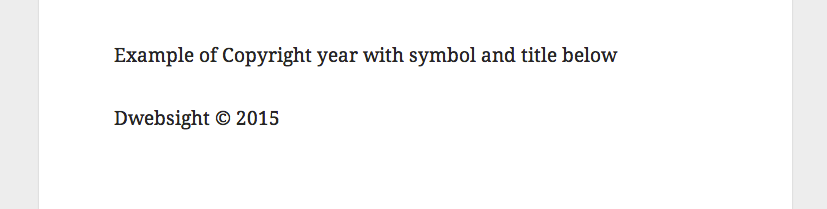
Output of shortcode on front-end
Changelog
0.1
- Initial version