
Dynamic Draft Post
Create draft posts or pages from selected text in the Gutenberg editor and manage link visibility based on user roles and post status.
Plugin info
Maintenance & Compatibility
Maintenance score
Stale • Last updated 281 days ago
Is Dynamic Draft Post abandoned?
Likely maintained (last update 281 days ago).
Compatibility
Similar & Alternatives
Explore plugins with similar tags, and compare key metrics like downloads, ratings, updates, support, and WP/PHP compatibility.
Description
Dynamic Draft Post is a simple button added to the Gutenberg editor, allowing you to create a new draft post or page from selected text. This plugin will enhance your writing workflow by providing quick access to draft creation directly within the editor. Additionally, it manages the visibility of links based on user roles and post statuses.
Features:
- Create draft posts or pages from selected text in the Gutenberg editor.
- Option to create the draft as a post (default) or a page, available upon activation in the settings page of the plugin.
- Automatically add a link to the selected text that points to the new draft.
- Manage link visibility:
- Disable links for visitors and subscribers if the linked post is in draft status.
- Enable links for users who can edit posts and pages.
- Automatically handle link states based on the post status (draft, published, trashed, or deleted).
- Send email notifications to admin when a new draft is created (optional).
Installation
- Upload the plugin files to the
/wp-content/plugins/dynamic-draft-postdirectory, or install the plugin through the WordPress plugins screen directly. - Activate the plugin through the ‘Plugins’ screen in WordPress.
- Configure the plugin settings through the ‘Settings’ > ‘Dynamic Draft Post’ screen in the WordPress admin.
Frequently Asked Questions
In the Gutenberg editor, select the text you want to create a draft from. Click the ‘Create Draft Post’ button in the toolbar, enter the title and content, and click ‘Create’. Optionally, check the ‘Create draft as Page’ checkbox to create a page instead of a post (checkbox need to be activated in the settings page).
Links created by this plugin are automatically managed:
– Disabled for visitors and subscribers if the linked post is in draft status (it will shown a text after the link staying that link is coming soon).
– Enabled for users who can edit posts and pages.
– Enabled for everyone if the post is published.
– Disabled if the post is trashed (it will shown a text after the link staying that link has been trashed).
– Removed if the post is permanently deleted.
Go to ‘Settings’ > ‘Dynamic Draft Post’ and enable the checkbox labeled ‘Enable default post type’ and then select which option will be the default one (Posts or Pages). Save the settings and proceed to create a new draft post by selecting a text in any old or new post/page.
Go to ‘Settings’ > ‘Dynamic Draft Post’ and enable the checkbox labeled ‘Enable admin notifications for new drafts.’ Notifications will be sent to the admin email when a new draft is created.
Review feed
Screenshots

Settings page Settings page by default.

Settings page Settings page with Draft type activated.
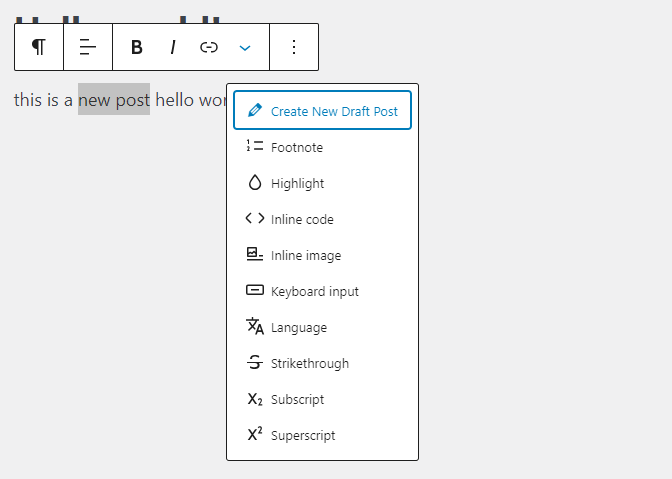
Button location Show the button when open menu after select text.

Modal window Create draft modal window.
Changelog
1.0
- Initial release