

Dynamic Product Category Grid, Slider for WooCommerce
Show woocommerce categories in slider and grid layout with shortcode builder and Elementor widget.
Plugin info
Maintenance & Compatibility
Maintenance score
Stale • Last updated 207 days ago • 2 reviews
Is Dynamic Product Category Grid, Slider for WooCommerce abandoned?
Likely maintained (last update 207 days ago).
Compatibility
Similar & Alternatives
Explore plugins with similar tags, and compare key metrics like downloads, ratings, updates, support, and WP/PHP compatibility.
Description
Enhance your WooCommerce store with Dynamic Product Category Grid, Slider for WooCommerce! Engage visitors with a sleek slider & grid, making category browsing effortless.
Grid Demo | Slider Demo | Support Request
👉 Overview
The Dynamic Product Category Design plugin allows you to display WooCommerce product categories in both grid layouts and sliders. This plugin enables you to create a modern, visually appealing slider that provides detailed information about each category.
You can showcase your product categories with features like thumbnails, child categories, descriptions, and a “Shop Now” button. The plugin includes a straightforward shortcode generator with various options, making it easy to customize and manage WooCommerce categories and their content without any coding skills.Dynamic Product Category Grid, Slider for WooCommerce is free, rapidly growing and comes with great support.
A Dynamic Product Category Grid, Slider for WooCommerce is one of the best ways to highlight your specific product categories and, if put in the strategic or right position, it will certainly allow you to increase the conversion rate in your shop or site.
Why Dynamic Product Category Grid, Slider for WooCommerce is important?
In a WooCommerce store or shop, with numerous products and categories, highlighting product categories effectively is often a challenge. This can leave potential customers unaware of the variety of products available.
The Dynamic Product Category Grid, Slider for WooCommerce addresses this issue by making it easier for visitors to find the categories they are looking for without having to search extensively. This plugin allows you to display multiple product categories simultaneously in an auto-scrolling slider or in a grid/block view. This ensures that prospective customers can easily see all the categories at a glance.
If you can showcase your product categories in the strategic spots of your store or site, it will effectively increase the conversion rate and achieve the goal!
👉 Shortcode:
Display Woocommerce product categories in a grid view or carousel view
[dpcd_category_design id=’XX]
👉 Elementor Widget:
You can use Elementor widget to control the layout and design.
👉 Top Features
- Beautiful Product Categories Carousel
- Beautiful Grid Layout
- ADA Support for Accessibility
- Responsive Slider
- Show Category Name and Image
- Create unlimited category sliders
- Display specific categories in the slider
- Display category content:
- Category name
- Category thumbnail
- Category counter
- Description
- Shop now button
- 6+ Slider Controls:
- AutoPlay
- Show and hide navigation
- Auto height
- Multisite supported
- Multilingual ready
- Compatible with popular WooCommerce themes and plugins
- Frequently updated and secured codebase
- All modern browsers supported
- SEO friendly and fully optimized
- LightWeight
- Fast Loading
- And many more options
Installation
Install From WordPress Dashboard
- Login to your admin panel
- Navigate to Plugins -> Add New
- Search Dynamic Product Categories Design
- Click install and activate respectively.
Minimum Requirements
- PHP 7.3 or greater is recommended
- MySQL 5.6 or greater is recommended
You can install the Dynamic Product Category Design from your WordPress Dashboard or manually upload it through FTP.
OPTION 1: Install the Plugin from WordPress Dashboard
- Navigate to Plugins -> Add New.
- Search for ‘Dynamic Product Category Design’ and click on the Install button to install the plugin.
- Activate the plugin in the Plugins menu.
OPTION 2: Manually Upload Plugin Files
- Download the plugin file from the plugin page: dynamic-product-category-design.zip.
- Upload the ‘dynamic-product-category-design.zip’ file to your ‘/wp-content/plugins’ directory.
- Unzip the file dynamic-product-category-design.zip (do not rename the folder).
Frequently Asked Questions
Yes, We provide shortcode you can use the shortcode in any page builder of the block editor.
Yes, you have the luxury, You can select specific categories which you want to show in the slider or grid.
When you want to display your product category as a carousel or grid section in a proper way to your customers, it attracts them the most. This means you are effectively showing your product categories.
Review feed
Screenshots

Category carousel design

Category grid design
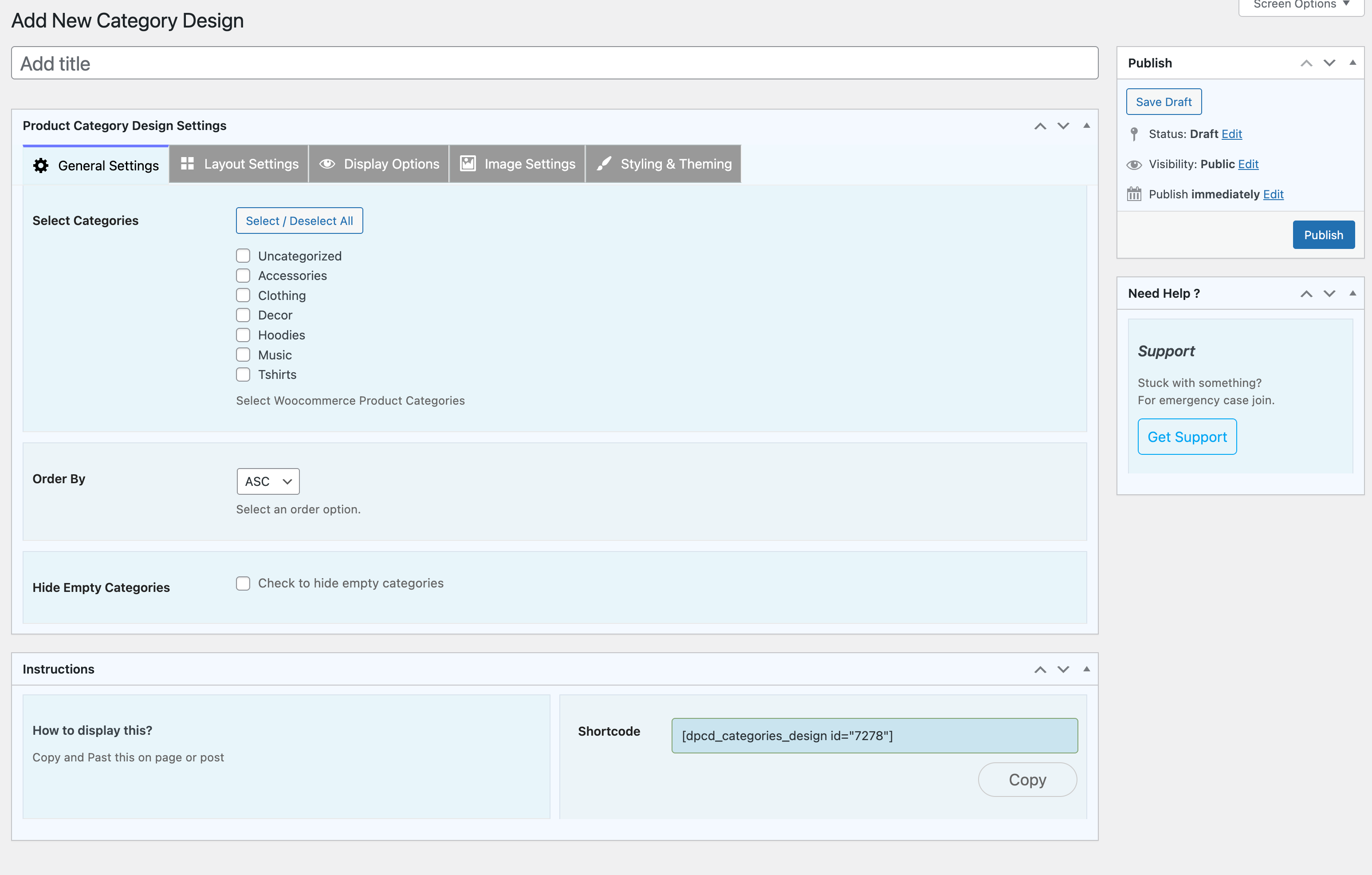
Add a new category design

Changelog
1.1.15
- [UI] – Reorganize settings tab structure to improve UX, added Layout Settings.
- [Update] – Update Get Help section.
1.1.14
- [Update] – Update css for elementor widget.
- [Update] – Added css transition for grid layput 6.
1.1.13
- [UI] – Reorganize settings tab structure to improve UX
- [Enhancement] – Add support for new layout/style separation
- [UX] – Improve admin preview thumbnails for layout selection
- [Update] – Update CMB2 library to latest version
- [Update] – Update Freemius WordPress SDK to latest version
1.1.12
- [Fix] – Image height issue in grid/slider
- [Fix] – Minor CSS bugs
- [Security] – Security vulnerability fix and improved sanitization
1.1.11
- Update css
1.1.10
- Update css
1.1.9
- Add few settings for elementor widgets
1.1.8
- [Bug] – Fix Sldier image issue on shortcode builder
- Make sure its working with latest wordpress
1.1.7
- [Bug] – Fix feature category issue on shortcode builder
1.1.6
- [Bug] – style control and css bug fix in elementor widget.
- [security] security and php warning fix
1.1.5
- [Feature] – Add 2 new grid layout in elementor widget.
1.1.4
- [Feature] – Add 3 new grid layout in elementor widget.
- [Feature] – Add 2 new slider layout in elementor widget.
- [Security] – Improve security while loading template file.
- Update and add elementor layout template folder structure.
1.1.3
- [Bug] – Fix slider dot navigation width issue.
- [Security] – Improve security while loading template file.
1.1.2
- [Feature] – Add a new layout in elementor widget.
- [Bug] – Fix Elemetor widget Card Setting issue.
1.1.1
- WordPress 6.5.3 compability check.
- Reduce css size
1.1.0
- Added new design and settings for category design
- Elementor widget
- Add WooCommerce plugin missing Notice
- Style Design admin screen
- Added few custom hooks
1.0.6
- Check WP Latest version compability
1.0.5
- Update css
1.0.4
- Update css
1.0.3
- Update css
1.0.2
- Update css
- Added more control for slider layout
- Optimize jquery code
1.0.1
- Fix few design issue.
1.0.0
- Initial release.