

Easy Frequently Bought Together for WooCommerce
Sell more by bundling related products — Easy Frequently Bought Together for WooCommerce lets customers buy together with smart discounts.
Plugin info
Maintenance & Compatibility
Maintenance score
Maintained • Last updated 143 days ago
Is Easy Frequently Bought Together for WooCommerce abandoned?
Likely maintained (last update 143 days ago).
Compatibility
Similar & Alternatives
Explore plugins with similar tags, and compare key metrics like downloads, ratings, updates, support, and WP/PHP compatibility.
Description
Live Demo | Documentation | support
Easy Frequently Bought Together for WooCommerce is a WooCommerce plugin that allows customers to purchase related products together with discounts, boosting sales and enhancing user experience.
Boost your store’s sales and enhance the shopping experience with Frequently Bought Together. This powerful feature allows customers to purchase related or complementary products in just one click, making it easier for them to discover items that go perfectly together.
By showcasing relevant product bundles directly on the product page, you not only help shoppers find what they need faster but also encourage them to buy more. This results in higher average order value, increased sales, and greater profitability for your business — all while improving customer satisfaction.
*Creating a Frequently Bought Together Bundle
Go to Dashboard Bought Together and create a new bundle with the products you want. For each bundle item and the main product, you can also set a discount.
Assigning a Bundle to a Product
Now we need to assign this “Frequently bought” bundle to a specific product that will display the “Frequently bought together” section on its page, so navigate to Dashboard -> Products, edit the appropriate product and in the product data settings define any “Frequently bought” bundle in the “Frequently Bought Together” tab.
How does it work?
With the Frequently Bought Together feature, you can create custom product bundles and assign them to any product in your store. You can also offer special discounts on these bundles, helping to boost sales and increase your store’s revenue.
🎁 Free Features
- Easily manage product recommendations for each product
- You can customize the title and “Add to Cart” text in the Frequently Bought Together section.
- You can customize the colors of the Frequently Bought Together section..
- Hide Out-Of-Stock Products – Hide out-of-stock products from being shown in the recommendation product bundle item.
- Users can choose to customize the checkbox selection in the Frequently Bought Together section.
- You can enable or disable the customization option.
🔥🔥 Premium Features:
- Multiple Types of Product – reate upsells, cross-sells, and related product recommendations and show them as frequently bought together.
- Customize the Bundle Product – Choose multiple layouts such as table view, Grid view for the recommendation widget.
- Discounts on Product Bundles – Give exclusive discounts to customers when purchasing the recommended product bundle.
- Custom Section Placement – Choose where to display the “Frequently Bought Together” section.
- How Many Products to Recommend – Specify the number of products to be recommended in the frequently bought together widget.
- Variation Selection Support – Let shoppers choose product variations (size, color, etc.) directly within the “Frequently Bought Together” section.
- Random or Limited Display – Choose to show all bundle products or a specific number randomly.
- Minimum Purchase Amount for Discounts – Ensure a discount applies only when the cart reaches a set minimum purchase amount.
- Global Bundle Discount – Apply a global discount across all bundles.
- Premium Support Access – Get priority help from our expert support team.
Freequently Asked Questions
What discount options are supported?
It supports percentage (%), fixed price discounts, and custom bundle discounts.
Requirements
WordPress version at least: 6.0
WooCommerce version at least: 9.0
PHP version at least: 8.1 (recommended)
Installation
- Go to your WordPress dashboard.
- Navigate to Plugins > Add New.
- Search for “Easy Frequently Bought Together for WooCommerce”.
- Upload the plugin files to the
/wp-content/plugins/easy-frequently-bought-together-for-woocommerce.zipdirectory, or install the plugin through the WordPress plugins screen directly. - Click Install Now, then Activate.
Frequently Asked Questions
This plugin allows you to display product bundles on WooCommerce product pages, encouraging customers to purchase related or complementary products together.
Go to Dashboard Bought Together and create a new bundle by selecting the main product and related products. You can also set discounts for each item.
Edit the product in Dashboard Products, and under the Frequently Bought Together tab, assign the bundle you created.
Yes, you can assign percentage or fixed discounts for each product in the bundle, including the main product.
It appears on the single product page, usually below the product summary or near the “Add to Cart” button.
Yes, customers can choose which items they want to add to the cart from the suggested bundle.
Yes, the plugin supports both simple and variable products in bundles.
No, it is lightweight and optimized to work smoothly with WooCommerce and most themes.
Yes, you can customize the title, layout, and style through plugin settings or theme customization.
Yes, it works with most WooCommerce plugins. However, if you face conflicts, you can contact support for assistance.
Review feed
Screenshots

Frequently bought together general settings page
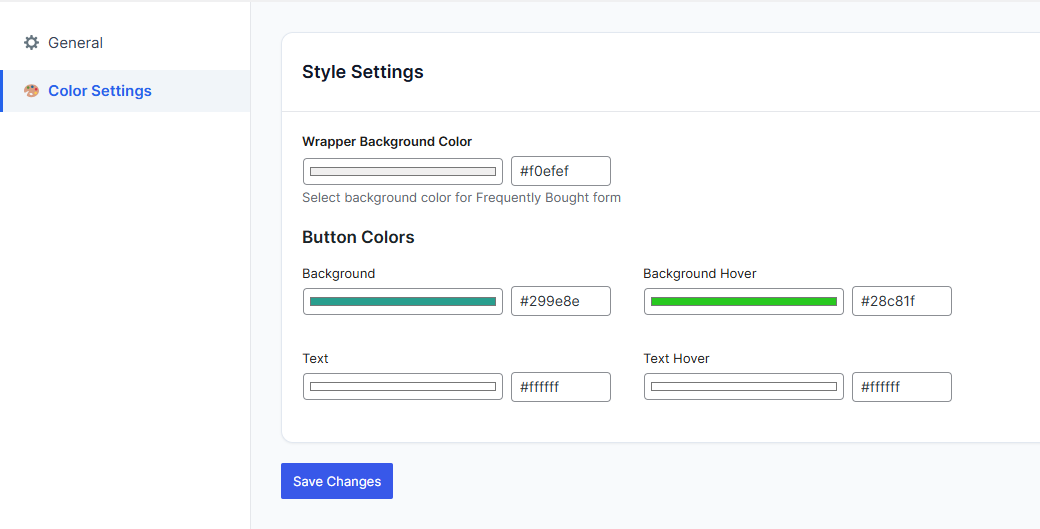
Bought together color settings panel

WooCommerce Bought together customize
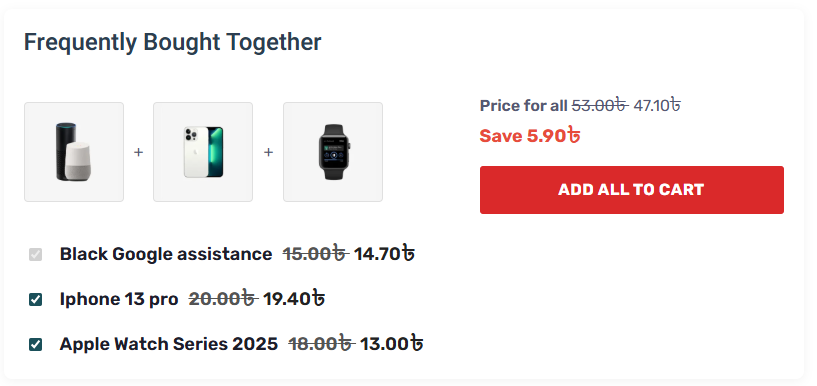
frontend end view
Changelog
1.0.4
- new feature add
1.0.3
- frequently bought together Bundle includes column add
- frequently bought together Products containing bundle added
- product settings bundle list table added
1.0.2
- Settings page issue fix
- Bug Fix
1.0.1
- Plugin setings page
- color custization option added
- new option added
1.0.0
- Initial release.