

Easy Image Optimizer
Easily speed up your website to better connect with your visitors. Properly compress and size/scale images. Includes lazy load and WebP auto-convert.
Plugin info
Maintenance & Compatibility
Maintenance score
Maintained • Last updated 118 days ago • 2 reviews
Is Easy Image Optimizer abandoned?
Likely maintained (last update 118 days ago).
Compatibility
Similar & Alternatives
Explore plugins with similar tags, and compare key metrics like downloads, ratings, updates, support, and WP/PHP compatibility.
Description
Want to get more visitors and customers? Easy Image Optimizer allows you to quickly and easily speed up your website so that you can connect with more people.
One-click activation enables you to optimize your images by efficiently encoding and properly sizing images. It also includes lazy loading to defer offscreen images and automatic WebP conversion for even more speed.
Easy Image Optimizer will optimize your site automatically by replacing all your image URLs with cloud-based URLs to deliver your content as fast as possible.
Beyond image optimization, it will also speed up the delivery of your CSS, JS (JavaScript), and font resources, by minifying them and delivering them through a speedy CDN (Content Delivery Network).
Support
If you need assistance using the plugin, please visit our Support Page.
The Easy Image Optimizer is developed at https://github.com/nosilver4u/easy-image-optimizer
You may report security issues through our Patchstack Vulnerability Disclosure Program. The Patchstack team helps validate, triage and handle any security vulnerabilities. Report a security vulnerability.
Translations
If you would like to help translate this plugin (new or existing translations), you can do so here: https://translate.wordpress.org/projects/wp-plugins/easy-image-optimizer
To receive updates when new strings are available for translation, you can signup here: https://ewww.io/register/
Credits
Written by Shane Bishop of Exactly WWW. Special thanks to my Lord and Savior. Easy IO and HTML parsing classes based upon the Photon module from Jetpack.
Installation
- Install the plugin through the built-in WordPress plugin installer, or upload the “easy-image-optimizer” plugin to your /wp-content/plugins/ directory.
- Activate the plugin through the ‘Plugins’ menu in WordPress.
- Start a free trial subscription for Easy Image Optimizer at https://ewww.io/easy/
- Link your site at https://ewww.io/manage-sites/
- Visit the settings page to complete activation.
- Done!
Frequently Asked Questions
No, all optimization is performed transparently on our network of cloud servers, and your image URLs are automatically updated to point to the optimized images.
Don’t panic, just disable the plugin and contact us. All changes made by the plugin are automatically reverted when you disable the plugin.
Review feed
Screenshots
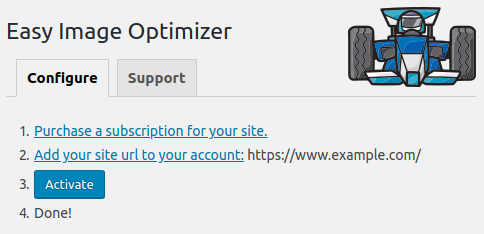
Plugin settings page before activation.
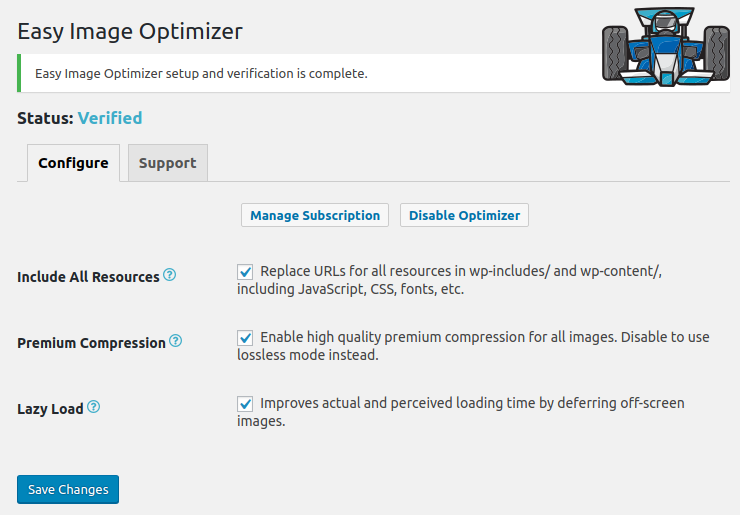
Plugin settings when active.
Changelog
- If you would like to help translate this plugin in your language, get started here: https://translate.wordpress.org/projects/wp-plugins/easy-image-optimizer/
4.3.1
Release Date – December 4, 2025
- fixed: Lazy Load auto-sizing makes images too small when screen size changes
- fixed: failure to decode CSS background images contained in encoded quotes (')
4.3.0
Release Date – November 18, 2025
- added: Lazy Load support for background images in external CSS files
- added: View CDN bandwidth usage on settings page
- changed: Lazy Load checks parent element for skip-lazy class
- changed: Lazy Load auto-sizing honors High DPI setting
- changed: Easy IO fills in 450px wide image when responsive (srcset) images have a gap
- improved: Lazy Load performance when searching for img elements
- improved: Lazy Load placeholder generation is faster and works better with Safari
- fixed: Lazy Load for iframes breaks WP Remote Users Sync plugin
4.2.1
Release Date – August 26, 2025
- fixed: Some preload URLs not updated
4.2.0
Release Date – July 15, 2025
- added: Easy IO support for dynamic cropping (crop=1) on WordPress.com sites
- fixed: PHP warnings related to HTML parsing
- fixed: PHP warnings when link URLs contain special regex characters
4.1.0
Release Date – March 26, 2025
- added: exclude private BuddyBoss media from Easy IO with page:buddyboss exclusion
- added: ability for 3rd party plugins to hook into Lazy Load HTML parser
- changed: improved performance of custom *_option functions on multisite
- fixed: Easy IO rewriting some URLs when full page exclusions are used
4.0.0
Release Date – November 26, 2024
- added: Above the Fold setting for Lazy Load (previously EIO_LAZY_FOLD override)
- changed: gravatar images excluded from Above the Fold/EIO_LAZY_FOLD counts
- fixed: Easy IO adding images to srcset combined with broken WooCommerce gallery thumbnails causes oversized image sizes to be loaded
- fixed: Easy IO srcset filler using incorrect width for calculations
Earlier versions
Please refer to the separate changelog.txt file.