

Easy Inventory And Stock Manager
Easy Inventory And Stock Manager: Your one-stop shop for a stress-free stockroom. Download Now!
Plugin info
Maintenance & Compatibility
Maintenance score
Stale • Last updated 220 days ago
Is Easy Inventory And Stock Manager abandoned?
Likely maintained (last update 220 days ago).
Compatibility
Similar & Alternatives
Explore plugins with similar tags, and compare key metrics like downloads, ratings, updates, support, and WP/PHP compatibility.
Description
Simplify Your Stock! Easy edits, bulk actions, clear tracking. Manage your WooCommerce inventory like a pro.
Streamline Your WooCommerce Inventory in Minutes!
Easy Inventory And Stock Manager puts you in total control. Edit product details, bulk update prices, and track everything from low stock to damaged items – all within your WooCommerce dashboard. Stop wasting time and reduce errors with this powerful, user-friendly plugin. Download now and take the stress out of inventory management!
Features Spotlight: Tame the Inventory Chaos
- Lightning-Fast Edits: Update SKUs, prices, & more directly from the list – no more product page hopping!
- Bulk Actions, Big Wins: Edit prices, sales, & inventory for a whole crew of products at once.
- Rollback with a Click: Say goodbye to post-sale headaches. Revert sale prices back to regular in a snap.
- Inventory at a Glance: Crystal clear visual indicators show you exactly what’s in stock (and what’s not!).
- Story of Your Stock: Track every movement, from reserved items to surprise damages, with detailed inventory logs.
- Import & Export with Ease: Need to migrate data? Our plugin speaks fluent CSV!
Real-Time Examples:
- Scenario: You’re running a summer sale on a specific clothing line.
- Solution: Use Easy Inventory to bulk edit sale prices for the entire line. After the sale ends, revert those prices back to regular with just a click, avoiding manual adjustments for each item.
-
Benefit: Saves you hours of time and eliminates pricing errors.
-
Scenario: You notice a surge in demand for a particular product.
- Solution: Easy Inventory’s visual indicators alert you to low stock levels. Quickly update inventory levels based on real-time sales data to prevent stockouts and customer disappointment.
- Benefit: Ensures product availability and maintains customer satisfaction.
More to come
- Visual indicators for In Stock, Low Stock, and Out of Stock products.
- WPML compatibility
Visit documentation Here For detailed instruction
Free demo available here to explore all the features
Streamline Inventory Management with Real-Time Efficiency
Boost efficiency and customer satisfaction with comprehensive inventory management for your WooCommerce store. Easy Inventory And Stock Manager empowers you with:
- Centralized Control: Manage all inventory aspects – SKUs, pricing, stock levels – from a single, intuitive interface.
- Effortless Bulk Actions: Update prices, sales, and inventory for multiple products simultaneously, saving you valuable time.
- Real-Time Visibility: Gain instant insights into stock status with clear visual indicators, preventing out-of-stock situations and missed sales.
- Detailed Inventory Logs: Track every item movement – reserved stock, returns, incoming shipments, damages – for complete stock transparency.
- Seamless Rollbacks: Easily revert sale prices back to regular pricing after promotions end, ensuring smooth post-campaign transitions.
Installation
It is as simple as installing any other WordPress plugin. There are two general methods:
- Go to Plugins >> Add New
- Search for Follow Up Emails
- Click Install Now >> Activate
General way
- Download the Zip file from the WordPress.org Plugins page.
- Go to Plugins -> Add New -> Upload.
- Browse and upload the downloaded files.
- Activate the WordPress CSV Import plugin.
FTP Users
- Upload the CSV Import plugin Zip file to /wp-content/plugins/ and extract it there.
- Navigate to Plugins -> Installed Plugins
- Choose -> Active
From Admin Page
- Go to Plugins -> Add New
- Search for WP Ultimate CSV Importer
- Click Install Now -> Activate
Frequently Asked Questions
Easy Inventory And Stock Manager is a WooCommerce plugin that acts as your central hub for managing everything inventory-related. Imagine it as a command center for your online store’s stock, allowing you to:
- Effortlessly update product details like SKUs, pricing, and quantities directly from a list view. No more navigating back and forth between product pages!
- Bulk edit multiple products at once, saving you tons of time when making price adjustments or updating stock levels.
- Simplify post-sale transitions with a one-click rollback feature that instantly reverts sale prices back to regular pricing.
- Gain instant insights on your stock status with clear visual indicators for in-stock, low stock, and out-of-stock products.
- Keep track of every inventory movement through detailed logs that record reserved stock, lost or returned items, incoming shipments, and even damaged products.
Review feed
Screenshots
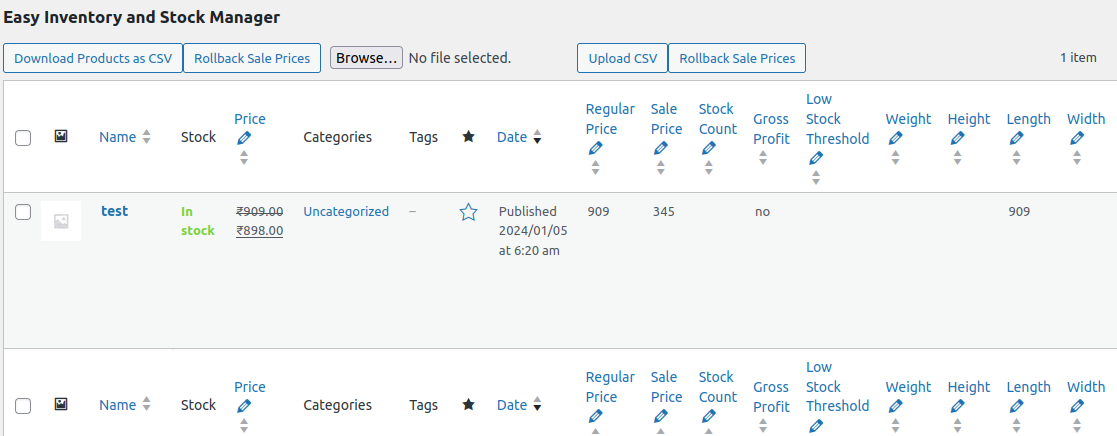
Easy Inventory And Stock Manager Options
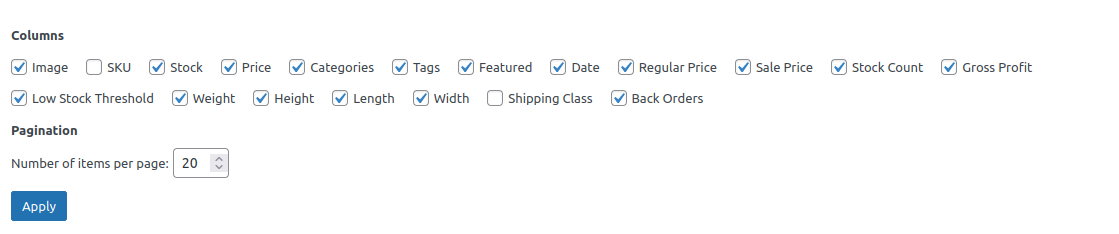
Inventory And Stock Custom Screen Options
Changelog
1.0.0
- Initial release version. Tested and found works well without any issues.