Simple Image Slider
Simple Image Slide permits users to create Image Slide Show.
Plugin info
Maintenance & Compatibility
Maintenance score
Possibly abandoned • Last updated 1149 days ago • 3 reviews
Is Simple Image Slider abandoned?
Possibly abandoned (last update 1149 days ago).
Compatibility
Similar & Alternatives
Explore plugins with similar tags, and compare key metrics like downloads, ratings, updates, support, and WP/PHP compatibility.
Description
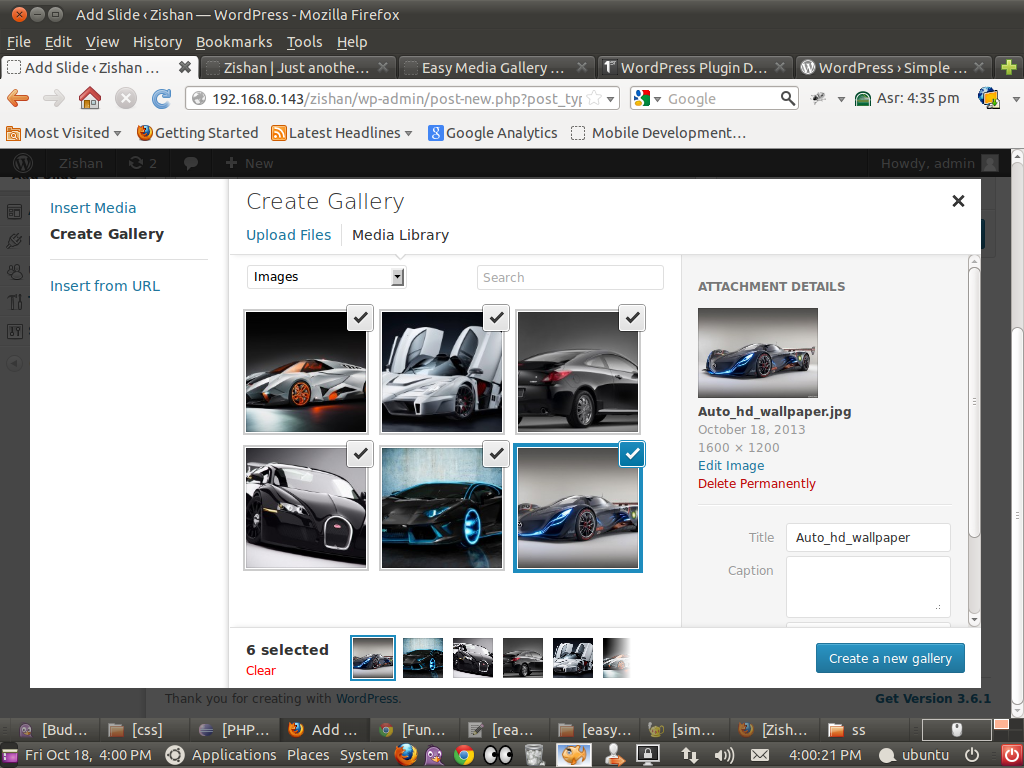
SIS allows to create Simple Slider With that you can create a slide just like a page and insert a media gallery with add media button. By adding image gallery, publish the slide(page) and you will get the shortcode with slide ID for the particular slide at the slider main column. Use this shortcode in your post or page editor then publish it. You have a simple rotating image slider on your page.
For more products : http://www.store.perceptionsystem.com/wordpress-theme-mobile-app-promption-themes-red.html
Installation
- Upload ‘Simple Slider’ to the wordpress admin
- Activate the plugin through the ‘Plugins’ menu in WordPress
- Open Simple Slider and add a slide
- insert the image gallery using ‘add media’ button
Frequently Asked Questions
Que1.How install plugin in my wordpress site ?
Ans1. Now its easy please follow this link and you will found sufficaint solution https://codex.wordpress.org/Managing_Plugins
Que2. How to use Simple Image Slider plugin ?
Ans2. After installing plugin you need to follow below step
1.You can see one left menu with name like Simple Slider.
2.Click on left menu of Simple Slider and after you can see two menu like Simple Slider and Add Slide.
3.Click on Add Slide to add new slider.
4.You can upload images using Add Media button on editor , you can upload image as you want to display in slider.
5.After finish uploading process click on publish/update button.
6.When you add new slide ( its one kind of full slider) you can see short codes list on All Slides page.
7.You can use this Short codes in page/post on which places you want to display slider.
8.Short codes format like [simple_image_slider id=24]
Que3. Is is possible to display multiple slider on single page?
Ans3. yes its possible to display multiple slider on single page.
Que4. How to display multiple slider on single page?
Ans4. You just add multiple short codes by admin and after you can see multiple slider in single page
Que5. Is this slider is working with wordpress 3.5?
Ans5. No sorry its working above version on wordpress 3.5
Que6. Is there any support avaialble?
Ans6. Yes sure, We are ready for any kinds of support please visit our site http:www.perceptionsystem.com and you will get
help online or please generate mail on [email protected]
Que7. If any other products avaialble on your store?
Ans7. Yes sure please visit http://store.perceptionsystem.com/