

PayPal Digital Downloads
Start selling digital products on your site in just a few minutes. No Coding Required. Official PayPal Partner.
Plugin info
Maintenance & Compatibility
Maintenance score
Possibly abandoned • Last updated 3059 days ago • 7 reviews
Is PayPal Digital Downloads abandoned?
Possibly abandoned (last update 3059 days ago).
Compatibility
Similar & Alternatives
Explore plugins with similar tags, and compare key metrics like downloads, ratings, updates, support, and WP/PHP compatibility.
Description
Overview
Note: PayPal Digital Goods is no longer available for new PayPal accounts. This feature remains available for accounts that already have it active. If you have any quetions, please contact PayPal directly.
-
The PayPal Digital Downloads WordPress plugin makes it easy to turn your WordPress site into an eCommmerce website and start selling digital products via PayPal.
-
Simply install the plugin, enter your PayPal business information on the settings page, and use the automatic button inserter to place PayPal Buy Now buttons on your site.
-
PayPal Digital Downloads works with any WordPress theme.
-
This plugin is developed by an Official PayPal Partner.
If you are selling digital goods, this PayPal plugin is a must because it keeps customers on your website by opening a popup window where they can pay.
This reduces the likelihood of customers leaving during checkout. Unlike most PayPal website integerations that keep customers on your site, no security certificate (SSL) is required.
What makes this PayPal plugin different then others on the WordPress Repository is the level of security built into how the digital files are handled.
Other plugins render the items URL on the webpage by using MD5 encryption. However the MD5 URL can be easily broken allowing anyone to get your item for free.
What this PayPal plugin does, is it creates a unique hexidecimal string at install. Then in combination with MD5 encrypts your digital products URL into a string capable of being decoded only by your website. This is medical grade encryption and makes obtaining the download URL nearly impossible.
PayPal Digital Downloads Features
- Works with any WordPress Theme
- Each button has its own product name, price, and download URL.
- Built in support for 18 languages (PayPal currently supports 18 languages)
- Built in support 25 currencies (PayPal currently supports 25 currencies)
- PayPal testing through SandBox
- Choose from 4 different PayPal button types.
WPPlugin is an offical PayPal Partner. Various trademarks held by their respective owners.
Installation
Automatic Installation
- Sign in to your WordPress site as an administrator.
- In the main menu go to Plugins -> Add New.
- Search for PayPal Digital Downloads and click install.
- Configure values in the settings page.
- In a page or post editor you will see a new button called “Digital Downloads” located right above the text area beside the Add Media button. By using this you can create a shortcode for a Buy Now button.
Frequently Asked Questions
Installation Instructions
Automatic Installation
- Sign in to your WordPress site as an administrator.
- In the main menu go to Plugins -> Add New.
- Search for PayPal Digital Downloads and click install.
- Configure values in the settings page.
- In a page or post editor you will see a new button called “Digital Downloads” located right above the text area beside the Add Media button. By using this you can create a shortcode for a Buy Now button.
How do I use this plugin
In a page or post editor you will see a new button called “PayPal Digital Downloads” located right above the text area beside the Add Media button.
By using this you can automatically create a shortcode for a Buy Now button.
Can I put more then one shortcode on the same post / page?
Yes, there is no limit to the amount you can put on one post / page, or your entire site.
Review feed
Screenshots

Sample item for sale with buy now button
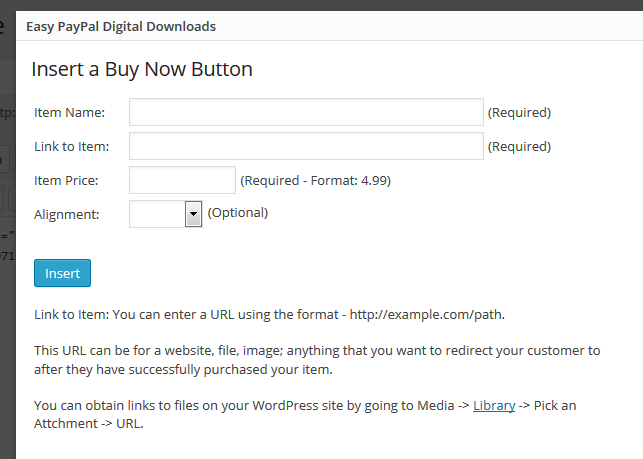
Automatic shortcode inserter

Settings page
Changelog
1.4
- 8/20/16
- Bug fix – More then one button on a page / post was not properly opening the popup window.
1.3
- 4/6/16
- Bug fix – Fixed header issue. (Special thanks to Nick M)
- Added feature – Allow guest checkout.
1.2
- Bug fix release – attempt to fix headers already sent error caused on some servers
1.1
- Bug fix release
1.0
- Initial release