

Plugin info
Maintenance & Compatibility
Maintenance score
Stale • Last updated 199 days ago
Is Easy Testimonials Carousel abandoned?
Likely maintained (last update 199 days ago).
Compatibility
Similar & Alternatives
Explore plugins with similar tags, and compare key metrics like downloads, ratings, updates, support, and WP/PHP compatibility.
Description
Transform your website’s credibility with Easy Testimonials Carousel – the most user-friendly WordPress testimonial plugin that converts visitors into customers through powerful social proof.
🎯 Why Choose Easy Testimonials Carousel?
✅ Boost Conversions by 34% – Social proof increases trust and sales
✅ Zero Coding Required – Drag-and-drop interface, works in minutes
✅ Mobile-First Design – Perfect on all devices and screen sizes
✅ SEO Optimized – Built-in schema markup for better search rankings
✅ Lightning Fast – Lazy loading and optimized performance
✅ Multiple Designs – 3 stunning carousel styles + grid layouts
✅ Frontend Submission – Let customers submit testimonials directly
✅ Import/Export – Easy backup and migration between sites
🎯 Perfect For:
- E-commerce stores (increase product trust)
- Service businesses (showcase client success)
- SaaS companies (build user confidence)
- Agencies (display client testimonials)
- Restaurants (customer reviews)
- Healthcare (patient testimonials)
Features
🎨 Multiple Layouts:
- Responsive carousel slider with 3 professional designs
- Grid layout option for organized display
- Masonry style display for dynamic layouts
- Custom shortcode for each design
- Multiple testimonial categories
🎨 Advanced Customization:
- 3 professional carousel designs to choose from
- Custom colors and fonts for brand matching
- Image styling options and effects
- Text alignment controls
- Star rating system (1-5 stars)
- Custom CSS support for advanced styling
📱 Mobile Optimization:
- Touch/swipe support for mobile devices
- Responsive breakpoints for all screen sizes
- Mobile-first design approach
- Fast loading on all devices
- Optimized for tablets and smartphones
🔧 Easy Management:
- Drag-and-drop interface for easy setup
- Bulk import/export functionality
- Category organization system
- Frontend submission form for customers
- Custom CSS support for developers
- Multiple shortcode management
⚡ Performance Features:
- Lazy loading for faster page speeds
- Optimized database queries
- Cached shortcode generation
- Minimal resource usage
- SEO-friendly structure
🚀 Advanced Features:
- Slider autoplay with customizable speed
- Slider loop and infinite scroll
- Pause on hover functionality
- Navigation arrows and dots
- Swipe/touch support
- Lazy loading for images
- Top-rated testimonials showcase
Use of 3rd party services
This plugin uses the following third-party services and libraries:
- Google Sheets API
- Description: This plugin integrates with the Google Sheets API to store form submissions directly into a Google Sheet.
- Purpose: Used to store the plugin deactivation reasons
- Link: Google Sheets API Documentation
- Privacy Notice: By using this feature, you may be subject to Google’s Terms of Service and Privacy Policy.
Requirements
- WordPress 6.0 or higher
- PHP 8.0 or higher
- Modern web browser (Chrome, Firefox, Safari, Edge)
- Basic WordPress knowledge (no coding required)
How to Use Easy Testimonials Carousel
💡 Get Started in 3 Easy Steps:
Step 1: Add Testimonials
- Go to Easy Testimonials Carousel Add New Testimonial
- Fill in testimonial details:
- Title (testimonial headline)
- Content (testimonial text)
- Excerpt (short summary)
- Featured image (customer photo)
- Designation (job title/company)
- Star rating (1-5 stars)
- Category (optional)
- Click Publish to save
Step 2: Create Shortcodes
- Go to All Shortcodes Add New
- Give your shortcode a title
- Configure settings in these tabs:
- Post Settings – Choose testimonials and display options
- Color Settings – Customize colors and styling
- Category – Filter by testimonial categories
- Slider Designs – Choose from 3 professional designs
- Slider Settings – Configure autoplay, navigation, etc.
- Click Publish to save
Step 3: Display Testimonials
- Copy the generated shortcode
- Paste it into any page, post, or widget
- Your testimonials will display automatically
- Create multiple shortcodes with different settings
🎨 Design Options:
- Design 1: Modern carousel with navigation arrows
- Design 2: Clean slider with dots indicator
- Design 3: Elegant testimonial cards
- Grid Layout: Masonry-style testimonial grid
📱 Frontend Submission:
- Enable frontend form for customer submissions
- Customers can submit testimonials directly
- Automatic moderation and approval system
- Email notifications for new submissions
Uncompressed Source Files
The uncompressed source files for this plugin are included within the plugin package. You can find them in the ‘assets’ directory of the plugin repository.
If you wish to modify or study the source code, follow these steps:
- Clone or download the plugin repository from GitHub.
- Navigate to the ‘assets’ directory to access the uncompressed JavaScript and CSS files.
- Make any necessary changes to the source files.
- Use build tools like npm and webpack to generate the compressed files from the uncompressed source files, if needed.
- Test your changes and contribute back to the plugin repository by opening a pull request.
Feel free to explore, modify, and contribute to the code. We believe in the power of open-source collaboration!
Installation
Installation via WordPress plugin installer
- Extract the plugin package on your machine that you downloaded from wordpress.org
- Hover over the plugins menu item on your left sidebar in your WordPress admin area and select “Add New”
- In the new page click on the “Upload” menu item on top of the page
- Choose the easy-testimonials-carousel.zip file that you extracted from the downloaded package and click “Install Now”
- The plugin is now installed, click on the “Activate Plugin” button
- Now, you can go to Easy Testimonials Carousel and configure the plugin
Installation via FTP
- Extract the plugin package on your machine that you downloaded from wordpresss.org
- Find the easy-testimonials-carousel.zip file in the extracted content and extract it also
- Open your favourite FTP application and connect and navigate to your “/wp-content/plugins/”
- Copy over the folder extracted from easy-testimonials-carousel.zip file and paste it inside plugins directory
- Navigate to your plugins page on your WordPress admin area and click the “Activate” button
- Now, you can go to Easy Testimonials Carousel and configure the plugin
Frequently Asked Questions
Yes! Easy Testimonials Carousel is designed to work with any WordPress theme. It uses standard WordPress functions and CSS that are compatible with all themes.
No coding knowledge required! The plugin features a user-friendly interface with drag-and-drop functionality. You can create and customize testimonials using the WordPress admin panel.
Absolutely! You can customize colors, fonts, layouts, and styling through the plugin settings. Advanced users can also add custom CSS for more specific styling.
Yes! The plugin is fully responsive and mobile-optimized. It works perfectly on all devices including smartphones, tablets, and desktops.
Yes! The plugin includes a frontend submission form that allows customers to submit testimonials directly from your website. You can moderate and approve submissions.
There’s no limit! You can add unlimited testimonials and organize them into categories for better management.
No! The plugin is optimized for performance with lazy loading, efficient database queries, and minimal resource usage to ensure fast page loading.
Yes! The plugin includes import/export functionality, making it easy to backup your testimonials or migrate them to another website.
Yes! The plugin includes schema markup and SEO optimization features to help improve your search engine rankings.
The plugin requires WordPress 6.0 or higher and PHP 8.0 or higher for optimal performance and security.
Review feed
Screenshots

Plugin Activation - Easy one-click installation and activation

Main Dashboard - Clean and intuitive admin interface

Add New Testimonial - Simple form to add customer testimonials

Testimonial Details - Add title, content, image, designation, and ratings

Create Shortcode - Generate custom shortcodes for different displays

Shortcode Settings - Configure colors, fonts, and display options
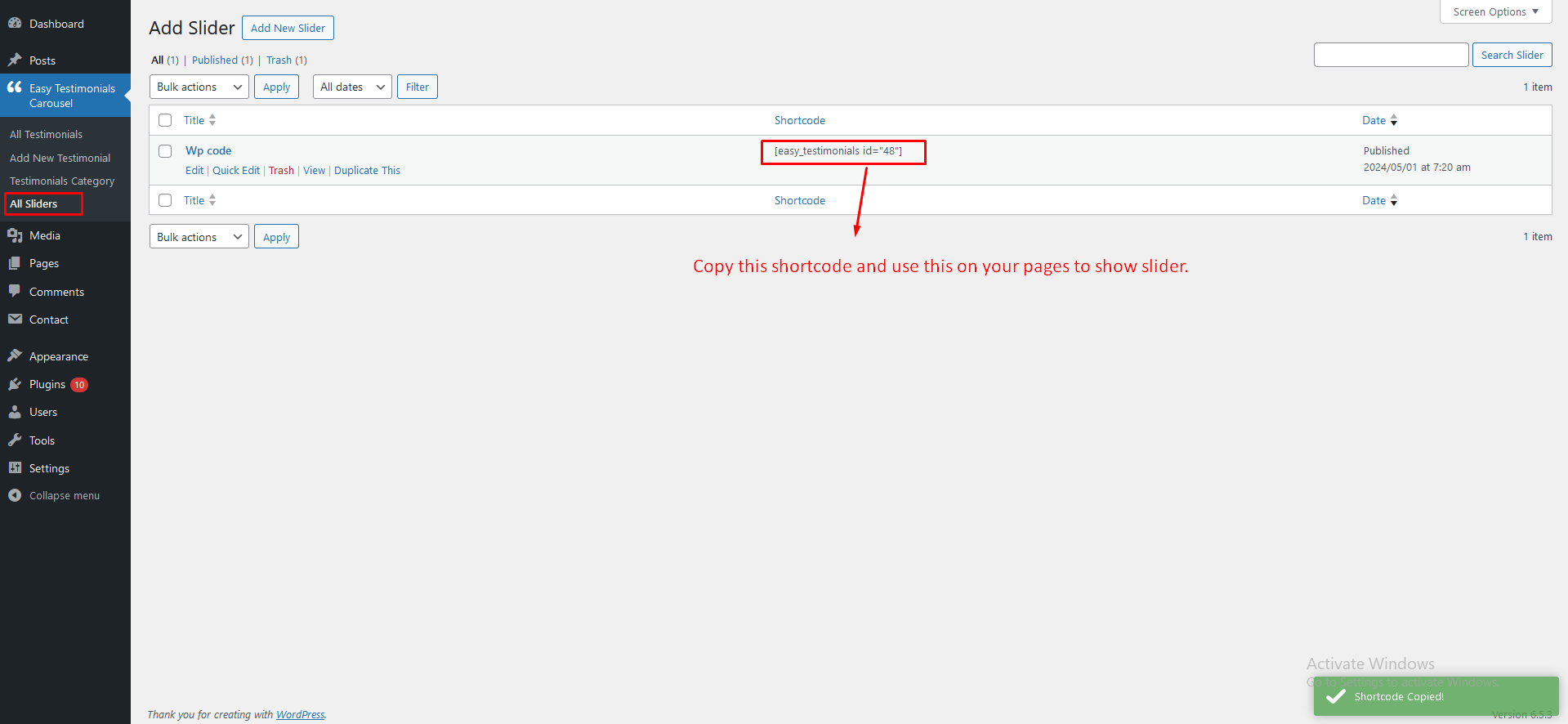
Copy Shortcode - One-click shortcode copying for easy implementation
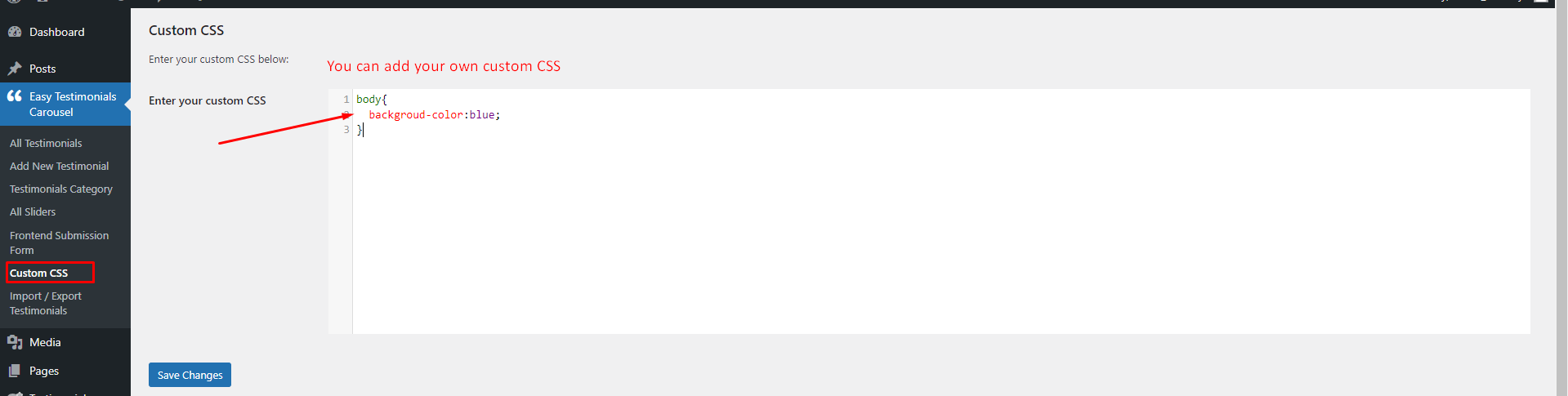
Custom CSS Editor - Advanced styling options for developers

Frontend Submission Form - Customer testimonial submission interface
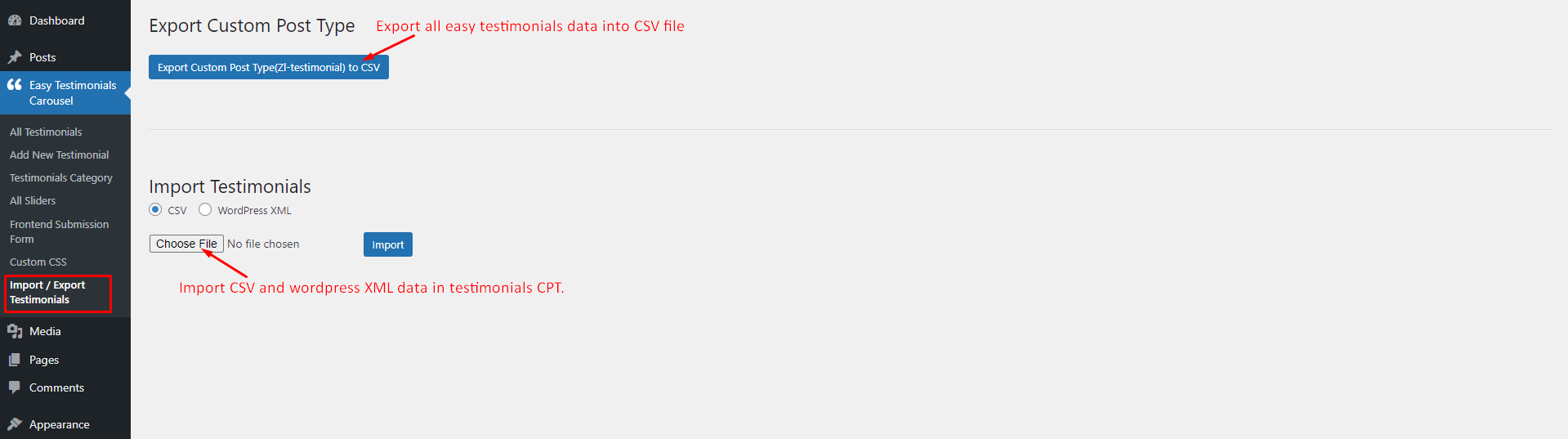
Import/Export - Backup and migrate testimonials easily
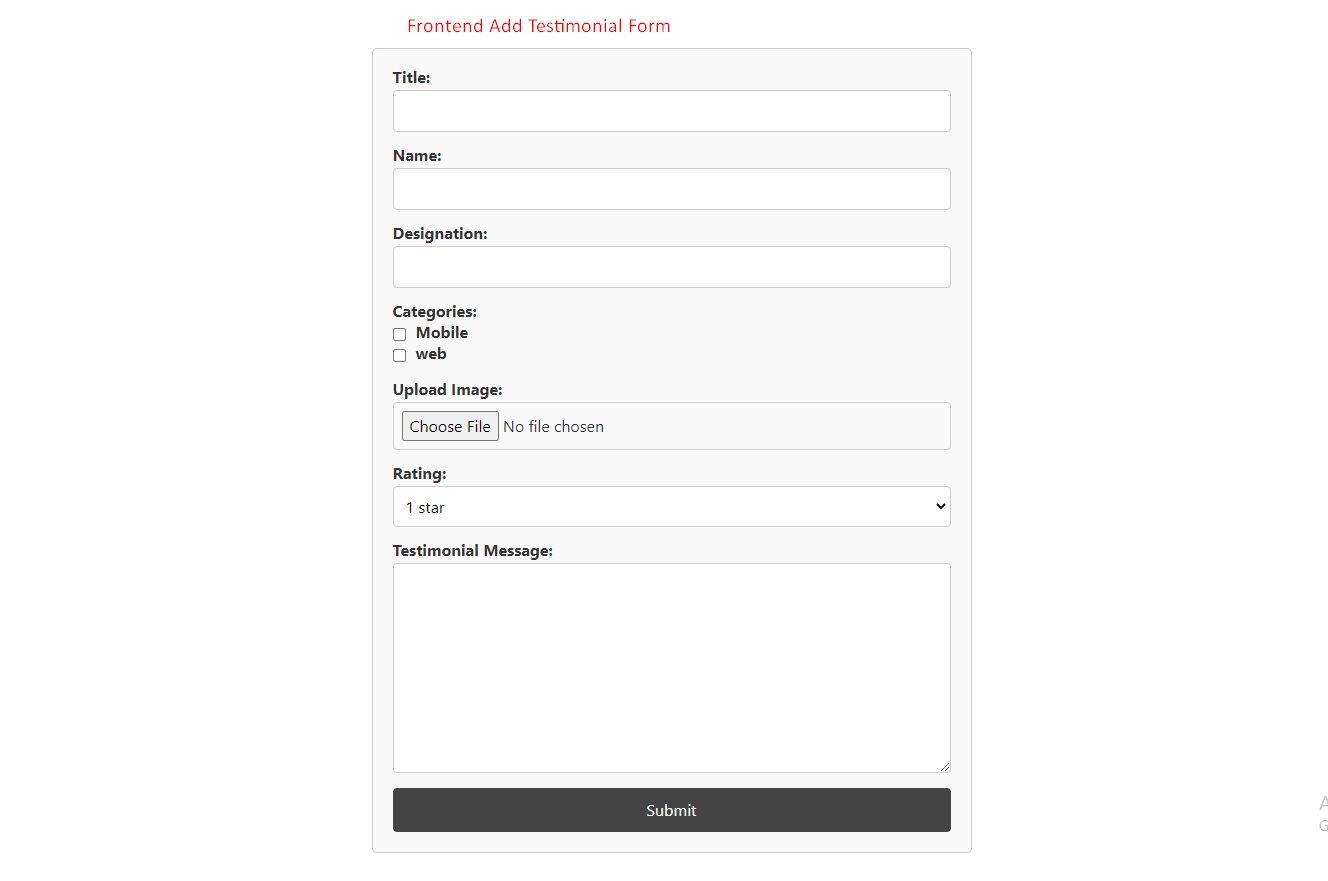
Frontend Form Design - Beautiful customer submission form

Design 1 - Modern Carousel - Professional carousel with navigation arrows

Design 2 - Clean Slider - Elegant slider with dots indicator

Design 3 - Testimonial Cards - Stylish card-based layout

Grid Layout - Organized masonry-style testimonial grid
Changelog
1.7
- Fixed WordPress 6.8+ compatibility issues
- Fixed PHP 8.0+ compatibility issues
- Removed session_start() usage and replaced with WordPress transients
- Added proper capability checks for security
- Fixed array access issues for PHP 8+ compatibility
- Updated plugin headers for latest WordPress/PHP versions
- Improved code security and sanitization
1.6
- Added Feedback Form
1.5
- Removed vertical scrolling
- Other classes name updates
1.4
- Added new feature like custom CSS option, Import & Export testimonials, Frontend form submission option and Top rated testimonial etc.
1.3
- Added new feature like custom CSS option, Import & Export testimonials, Frontend form submission option and Top rated testimonial etc.
1.2
- Added new feature like Content alignment, Content hide settings, Vertical & Horizontal slide move option etc.
- Other text and design updates
1.1
- Added new feature like slider Loop and slider stop on Hover
- Other text and design updates
1.0
- Initial Release