

Easy Text Replace
Customize WooCommerce, forms & WordPress text instantly. Replace strings without coding. Update-safe, cached, SEO-friendly text replacement.
Plugin info
Maintenance & Compatibility
Maintenance score
Maintained • Last updated 127 days ago
Is Easy Text Replace abandoned?
Likely maintained (last update 127 days ago).
Compatibility
Similar & Alternatives
Explore plugins with similar tags, and compare key metrics like downloads, ratings, updates, support, and WP/PHP compatibility.
Description
Easy Text Replace is a lightweight, performance-optimized WordPress plugin that allows you to replace any text string on your website without modifying theme or plugin files. Perfect for customizing WooCommerce buttons, changing WordPress labels, or personalizing any text across your site.
Why Choose Easy Text Replace?
- No Code Editing Required – Change text without touching theme or plugin files
- Update-Safe – Your customizations survive theme and plugin updates
- Performance Optimized – Single database query per page load with intelligent caching
- Text Domain Filtering – Target specific plugins, themes, or apply changes globally
- Priority Control – Manage the order of multiple replacements
- Bulk Operations – Enable, disable, or delete multiple replacements at once
- Import/Export – Transfer configurations between sites easily
- Cache Compatible – Works with WP Rocket, W3 Total Cache, WP Super Cache, and more
Perfect For
- Changing WooCommerce “Add to Cart” to “Buy Now”
- Customizing Contact Form 7 button labels
- Replacing WordPress admin bar text
- Modifying theme-specific strings
- Personalizing plugin messages
- Translating or localizing specific phrases
- A/B testing different button labels
Key Features
Simple String Replacement
Replace any text from themes, plugins, or WordPress core with just a few clicks. No coding knowledge required.
Text Domain Filtering
Target specific plugins or themes by their text domain, or apply replacements globally across your entire site. This prevents unintended replacements in other plugins.
Case Sensitivity Control
Choose whether replacements should match exact case or be case-insensitive for maximum flexibility.
Priority Ordering
Control the order in which replacements are applied using priority numbers (1-999). Lower numbers apply first.
Enable/Disable Toggle
Quickly activate or deactivate replacements without deleting them. Perfect for testing and seasonal changes.
Bulk Operations
Select multiple replacements and enable, disable, or delete them all at once to save time.
Import/Export
Export your replacement configurations to JSON files for backup or transfer to other sites. Import with automatic duplicate detection.
Performance Optimized
- Single database query per page load
- Intelligent 24-hour caching system
- Lazy loading of admin assets
- No frontend JavaScript overhead
- Indexed database for fast queries
- Maximum 100 replacements to maintain performance
WordPress Native UI
Clean, intuitive interface using WordPress design patterns. Feels like a natural part of WordPress.
Search & Sort
Easily find and organize your replacements with built-in search and sorting capabilities.
Use Cases
E-Commerce Customization
- Change “Add to Cart” to “Add to Bag” or “Buy Now”
- Modify “Proceed to Checkout” to “Complete Purchase”
- Customize product page labels
- Personalize shipping and payment text
Form Customization
- Change Contact Form 7 submit button text
- Modify form field labels
- Customize validation messages
- Personalize success messages
WordPress Core Customization
- Replace “Howdy” in admin bar
- Change “Dashboard” to “Control Panel”
- Modify menu labels
- Customize admin notices
Theme Customization
- Change “Read More” links
- Modify navigation labels
- Customize footer text
- Personalize call-to-action buttons
How It Works
Easy Text Replace hooks into WordPress’s translation system (gettext) to intercept and replace text strings before they’re displayed. This means:
- No file modifications – Your theme and plugin files remain untouched
- Update-safe – Replacements persist through updates
- Reversible – Simply disable or delete replacements to restore original text
- Efficient – Replacements are cached for optimal performance
Developer Friendly
Includes hooks and filters for developers:
etrp_replacement_text– Filter text before replacementetrp_replacement_result– Filter text after replacementetrp_active_replacements– Modify active replacements arrayetrp_max_replacements– Adjust maximum replacement limitetrp_before_replacement_apply– Action before replacementetrp_after_replacement_apply– Action after replacement
Support
Need help? Visit our support forum for assistance.
Privacy Policy
Easy Text Replace does not collect, store, or transmit any personal data. All replacement configurations are stored locally in your WordPress database.
Credits
Developed with ❤️ for the WordPress community.
Support
For bug reports, feature requests, and support, please visit:
Support Forum
Translations
Easy Text Replace is translation-ready and includes:
English (default)
Want to translate Easy Text Replace into your language? Visit WordPress Translate.
Installation
Automatic Installation
- Log in to your WordPress admin panel
- Navigate to Plugins > Add New
- Search for “Easy Text Replace”
- Click Install Now and then Activate
- Go to Text Replace in your admin menu to start adding replacements
Manual Installation
- Download the plugin ZIP file
- Log in to your WordPress admin panel
- Navigate to Plugins > Add New > Upload Plugin
- Choose the ZIP file and click Install Now
- Click Activate Plugin
- Go to Text Replace in your admin menu to start adding replacements
After Installation
- Navigate to Text Replace > Add New in your WordPress admin
- Enter the Source String (text you want to replace)
- Enter the Replacement String (new text)
- Optionally specify a Text Domain to target a specific plugin or theme
- Set Priority if you have multiple related replacements
- Choose Case Sensitive matching if needed
- Set status to Active
- Click Save Replacement
- Clear your site cache if using a caching plugin
- Visit your site to see the changes
Frequently Asked Questions
Yes! Easy Text Replace works with any WordPress theme by hooking into WordPress’s translation system.
Absolutely! It’s perfect for customizing WooCommerce text like “Add to Cart”, “Proceed to Checkout”, and more. Just use “woocommerce” as the text domain.
Minimal impact. The plugin uses intelligent caching and executes only one database query per page load. Active replacements are cached for 24 hours.
Your replacements remain intact! Since you’re not modifying source files, updates won’t affect your customizations.
The plugin is designed for text replacement. While it can replace simple HTML, it’s recommended to use it for plain text strings.
Check the plugin’s main file header for the “Text Domain” field, or look in the plugin’s translation files (.po/.pot files). Common examples:
* WooCommerce: woocommerce
* Contact Form 7: contact-form-7
* Yoast SEO: wordpress-seo
* Elementor: elementor
The default limit is 100 replacements (both active and inactive) to maintain optimal performance. This can be adjusted using the etrp_max_replacements filter if needed.
Not in the current version. The plugin uses simple string matching for reliability and performance.
Check these common issues:
1. Verify the replacement is Active (toggle switch is on)
2. Check if you specified a Text Domain – try leaving it empty for global replacement
3. Clear your site’s cache (plugin cache and any caching plugins)
4. Verify the source string matches exactly (check case sensitivity setting)
5. Make sure the text you’re trying to replace is actually generated by WordPress, not hardcoded in templates
- Go to Text Replace > Import/Export
- Click the Clear Cache button
- Also clear your caching plugin’s cache if you use one (WP Rocket, W3 Total Cache, etc.)
Yes! Go to Text Replace > Import/Export to export all replacements to a JSON file or import from a previously exported file.
Yes, Easy Text Replace works alongside multilingual plugins like WPML and Polylang. The replacements are applied after translation.
Use the Text Domain field to target specific plugins or themes. For example, if you only want to replace text in WooCommerce, enter “woocommerce” as the text domain.
Yes! Click the status toggle in the replacements list to switch between Active and Inactive without deleting the replacement.
Use the Priority field to control the order. Lower numbers (e.g., 1, 5) apply before higher numbers (e.g., 10, 20).
Yes! Easy Text Replace works with Elementor, Beaver Builder, Divi, and other page builders for text generated by WordPress.
Yes, as long as the text is generated through WordPress’s translation system.
Review feed
Screenshots
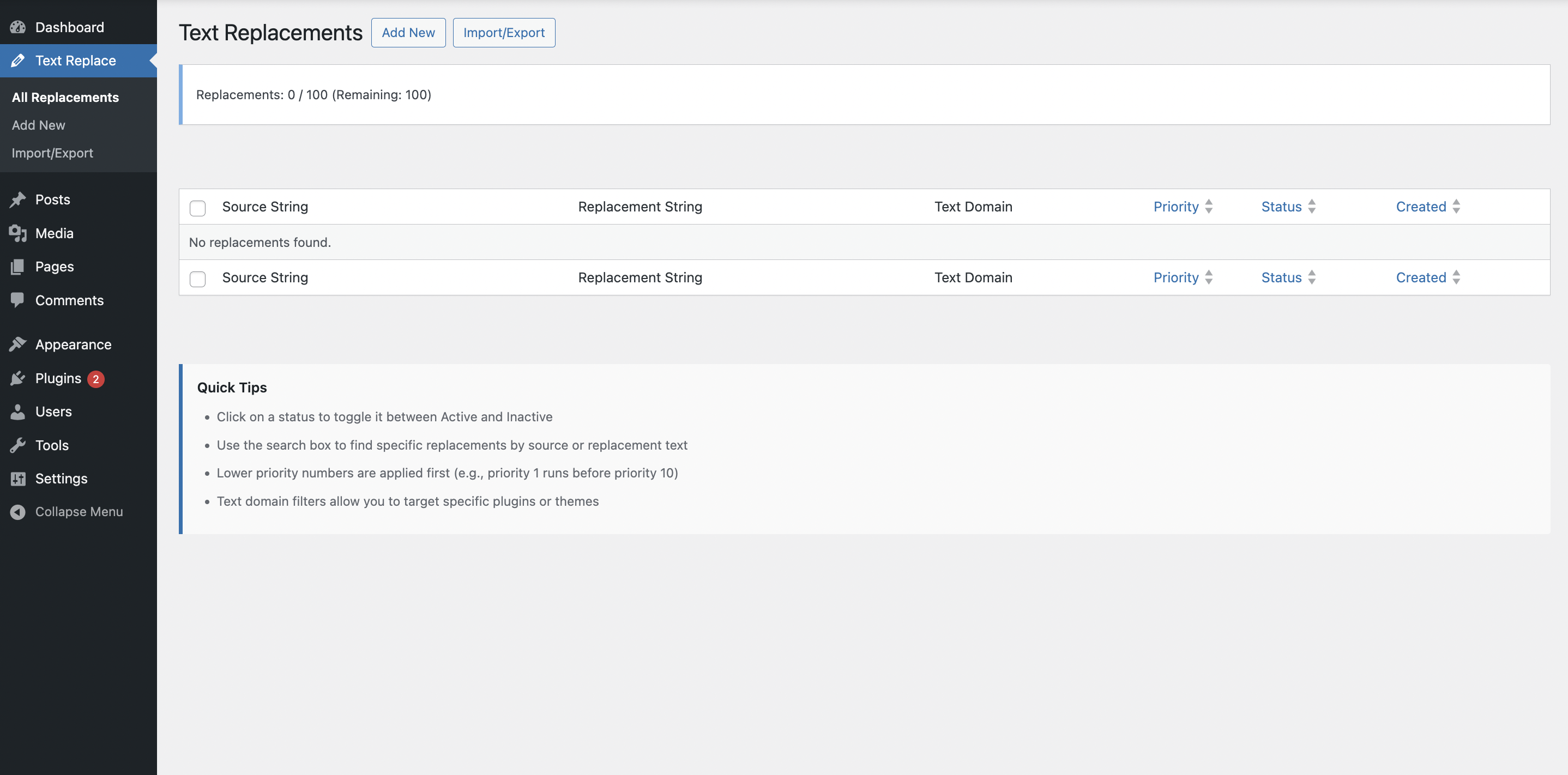
All Text Replacements - Manage all your text replacements in one place with search, sort, and bulk actions
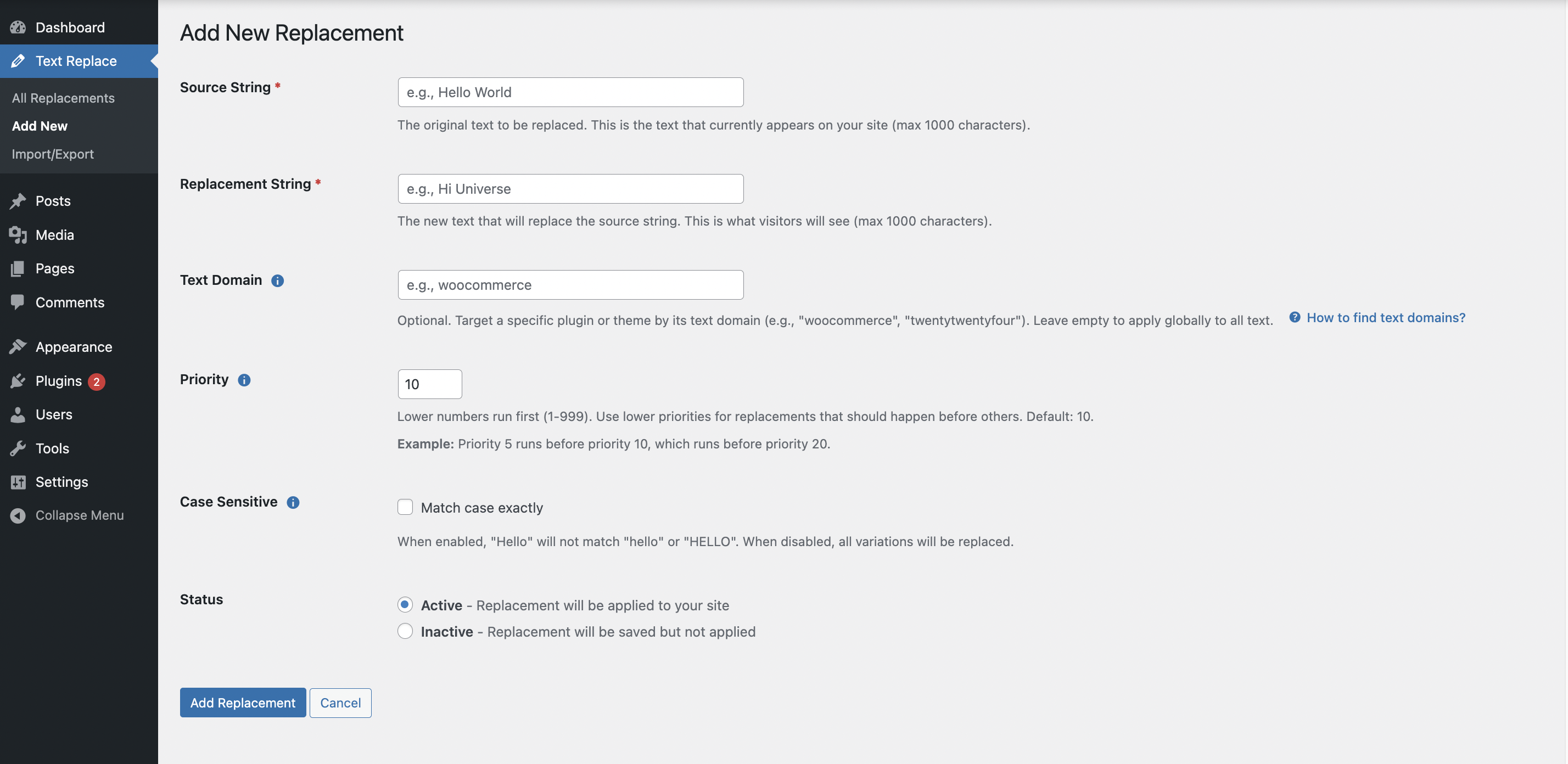
Add New Replacement - Simple form to create new text replacements with all options
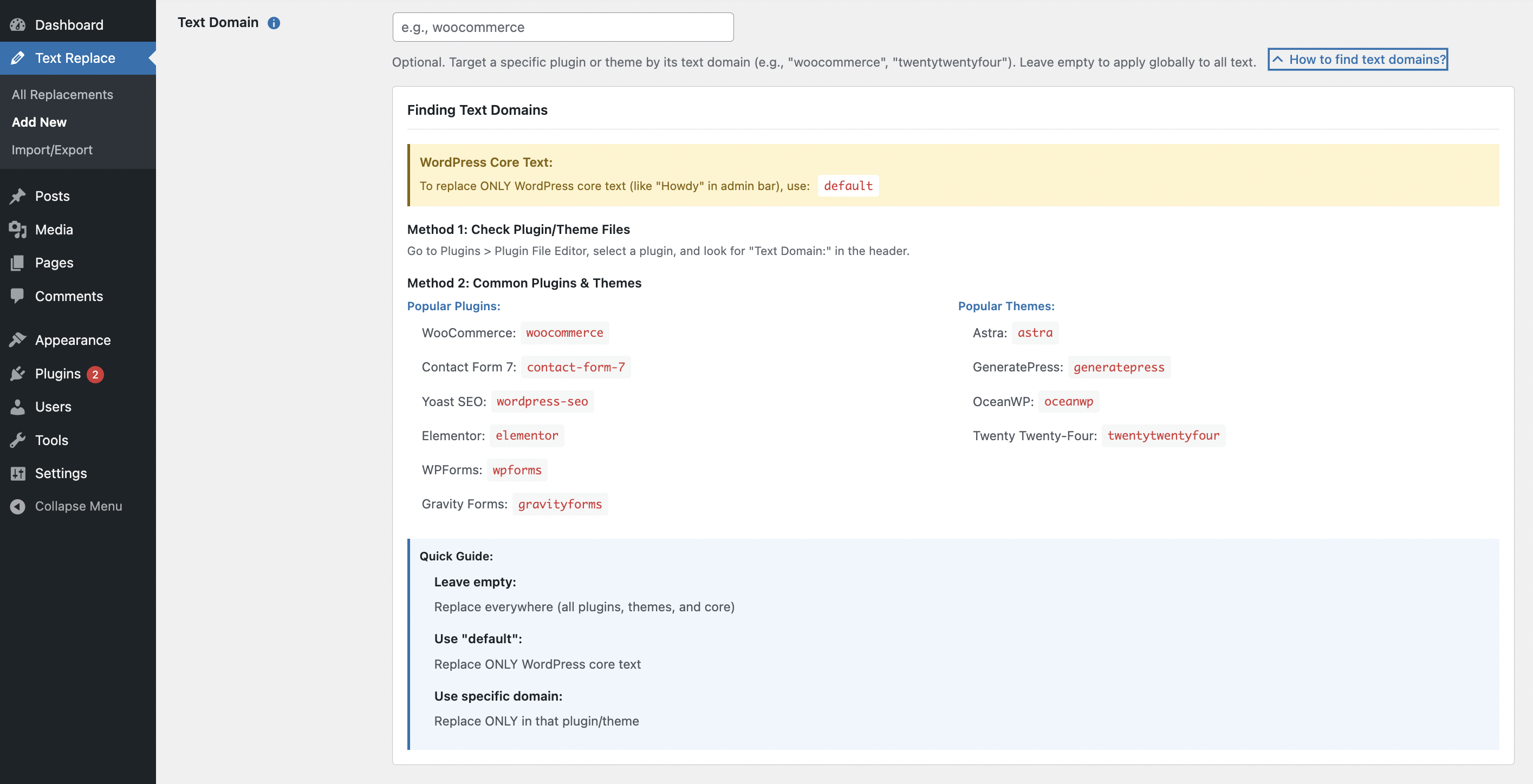
Text Domain Tooltip - How to find and use text domains to target specific plugins or themes
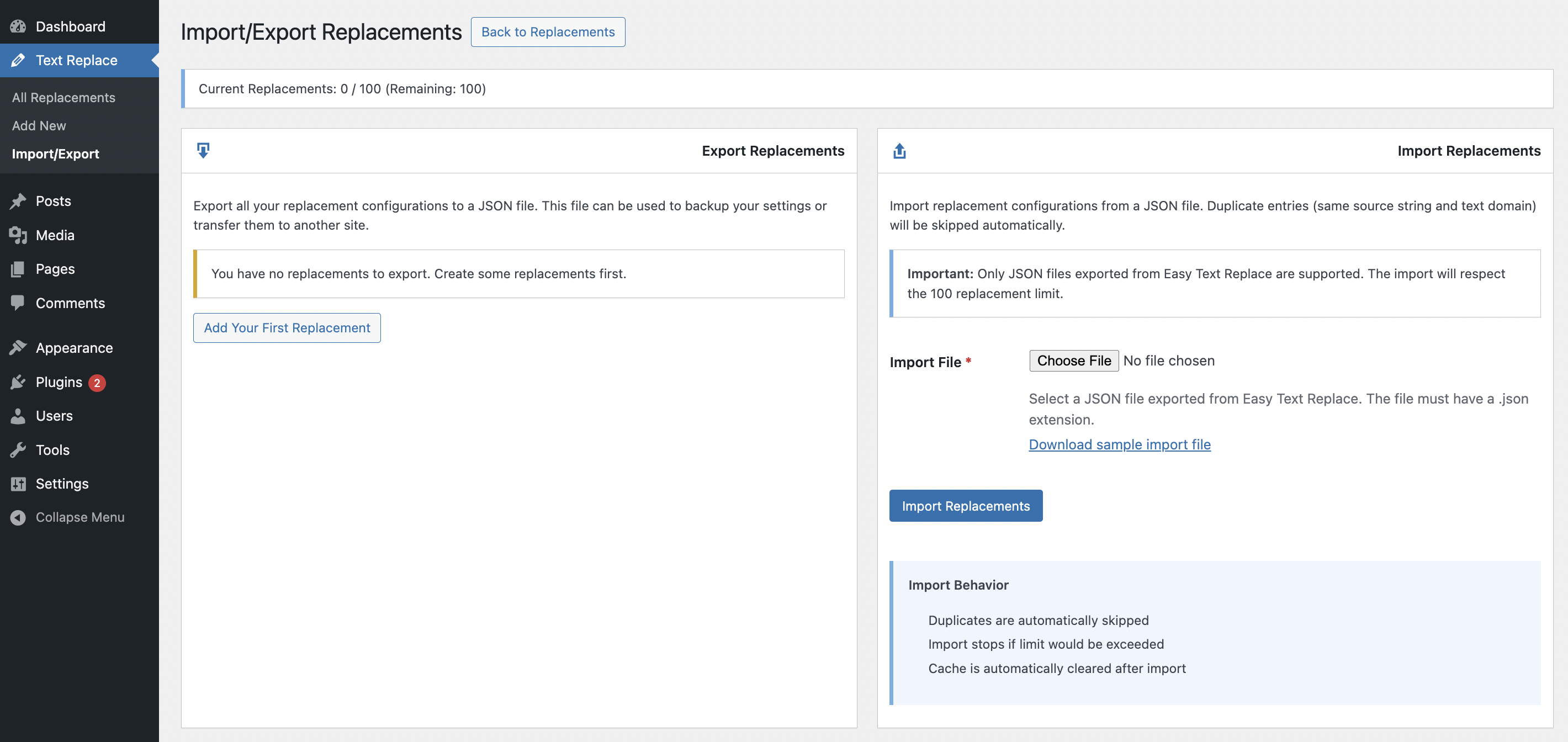
Import/Export - Backup and transfer your replacement configurations between sites
Changelog
1.0.0 – 2025-10-25
- Initial release
- String replacement functionality with text domain filtering
- Priority ordering system for multiple replacements
- Case-sensitive and case-insensitive matching
- Enable/disable toggle for individual replacements
- Bulk operations (enable, disable, delete)
- Import/export functionality with JSON format
- Performance optimization with intelligent caching
- WordPress coding standards compliance
- Security hardening with nonce verification and capability checks
- Maximum 100 replacements limit for optimal performance
- Compatible with WordPress 5.8 to 6.8
- Compatible with PHP 7.4 to 8.3