

Easy Text-to-Speech
Easy Text-to-Speech is a powerful, user-friendly WordPress plugin designed to transform your textual content into high-quality synthesized speech.
Plugin info
Maintenance & Compatibility
Maintenance score
Maintained • Last updated 162 days ago • 3 reviews
Is Easy Text-to-Speech abandoned?
Likely maintained (last update 162 days ago).
Compatibility
Languages
Similar & Alternatives
Explore plugins with similar tags, and compare key metrics like downloads, ratings, updates, support, and WP/PHP compatibility.
Description
Easy Text-to-Speech effortlessly transforms your website’s written content into spoken audio, making your site more accessible, engaging, and inclusive. This WordPress plugin integrates cutting-edge text-to-speech technology from top-tier services such as Amazon Polly, OpenAI, and ElevenLabs.
Whether you’re looking to reach a broader audience, including those with visual impairments, or simply enhance the user experience with audio, this plugin provides an easy solution.
Key Features
- Diverse Technology Options: Choose between Amazon Polly, OpenAI, and ElevenLabs for access to industry-leading text-to-speech technology, allowing you to select the best voice for your content.
- Effortless Integration: Works seamlessly with both WordPress’s Classic and Block Editors, making it simple to add audio to your posts, pages, and articles.
- Broad Accessibility: Make your content accessible to those with visual impairments or those who prefer auditory learning experiences, expanding your audience.
- Intuitive User Interface: A clean, user-friendly interface that allows for a quick and straightforward setup, no technical expertise required.
- Customizable Audio Experience: Choose from multiple voice options and adjust speech settings to match your website’s tone and style.
With Easy Text-to-Speech, you can make your content more accessible and engaging, offering a spoken version of your text and providing a richer experience for all visitors.
PRO Features 🔊
Unlock the full potential of Easy Text-to-Speech Pro with exclusive premium features:
- OpenAI Integration: Harness OpenAI’s state-of-the-art text-to-speech technology for crystal-clear, highly natural audio outputs.
- ElevenLabs Integration: Enjoy ElevenLabs’ exceptional, lifelike voice synthesis for a truly natural-sounding experience.
- Premium Support: Receive dedicated, responsive support to help with any queries or issues quickly and efficiently.
- Ad-Free Experience: Access an ad-free interface within the plugin’s admin, providing a more focused and streamlined user experience.
- Exclusive Voices & Features: Get access to additional premium voices, enhanced customization options, and other advanced features designed to take your content to the next level.
Discover more and upgrade to Easy Text-to-Speech Pro
Privacy Policy and Third-Party Service Disclosure
Easy Text-to-Speech uses third-party services such as Amazon Polly, OpenAI, and ElevenLabs for text-to-speech conversion. For more details on how these services handle your data, please refer to their respective privacy policies:
Contributing & Bug Report
We welcome bug reports, feature requests, and pull requests! Feel free to contribute on GitHub.
Documentation
Comprehensive documentation can be found at https://handyplugins.co/docs-category/easy-text-to-speech/.
Installation
- Upload the entire
/easy-text-to-speechdirectory to the/wp-content/plugins/directory. - Activate the plugin via the ‘Plugins’ menu in WordPress.
- Configure the settings and start converting text to speech on your site!
Frequently Asked Questions
Yes, Easy Text-to-Speech is fully compatible with both Classic and Block editors.
Absolutely! You can use this plugin with any custom post types on your site.
Follow the instructions on our installation guide to get your Amazon Polly API key.
Review feed
It truly deserves the "Easy" in its name.
Screenshots
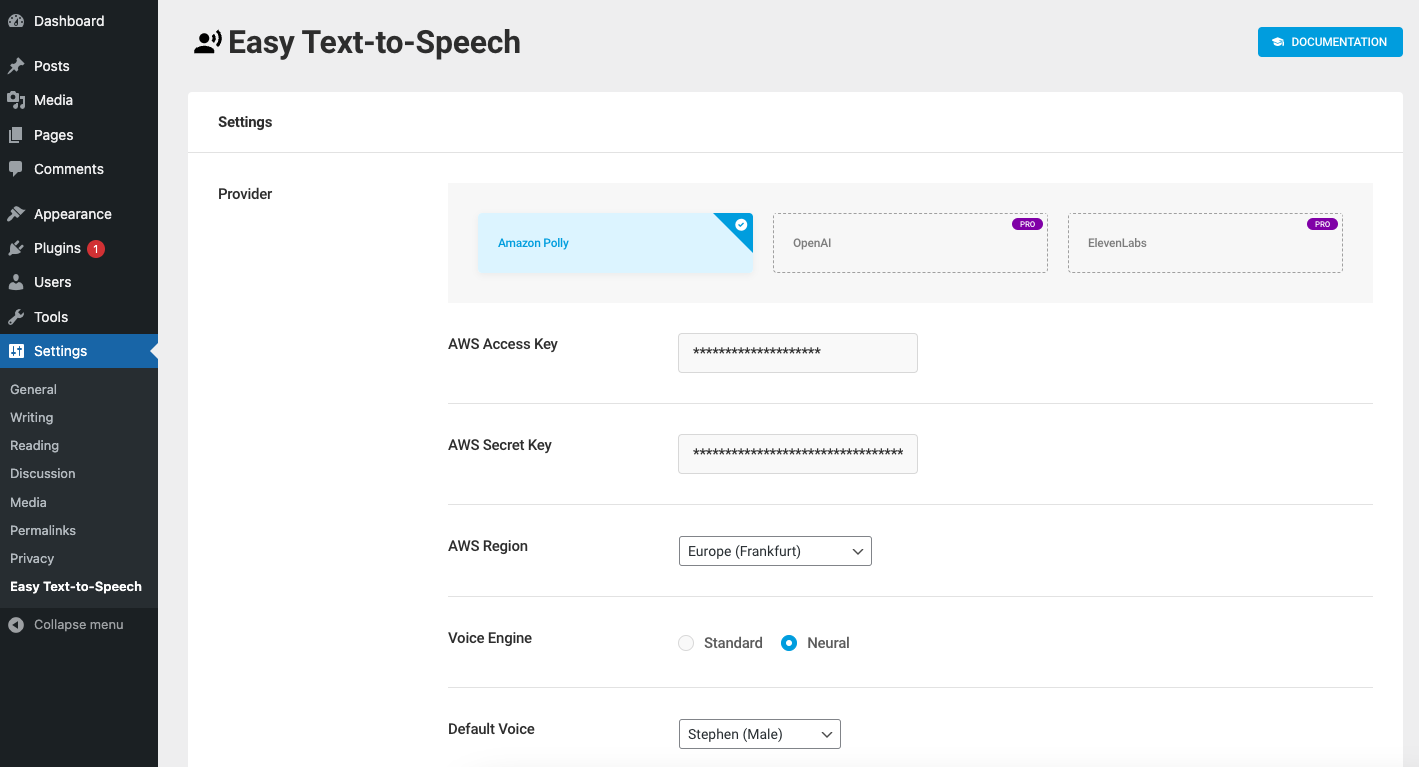
Settings Page – Overview of the plugin’s configuration options.

Block Editor Integration – Demonstrates integration with the block editor for easy audio conversion.
Changelog
1.1.2 (October 22, 2025)
- Tested with WordPress 6.9
- Updated plugin dependencies
1.1.1 (July 21, 2025)
- Do not show TTS button on Elementor.
- Dependency updates.
1.1 (April 12, 2025)
- Add post title when no particular text is selected.
- Dependency updates.
- Tested WP 6.8
1.0.3 (September 23, 2024)
- Use wp-block-editor instead of wp-edit-post for block editor.
- Dependency updates.
1.0.2 (September 20, 2024)
- Add multiple TinyMCE editor support.
- Fixed – ACF compatibility issue.
1.0.1 (September 17, 2024)
- Fixed – Don’t add TTS button for frontend TinyMCE editor.
- Dependency updates.
1.0 (May 17, 2024)
- First release