

Eazy Flickity Slider
Eazy Flickity Slider is an easy to use responsive slider that uses Flickity.js by Metafizzy to animate the slider.
Plugin info
Maintenance & Compatibility
Maintenance score
Possibly abandoned • Last updated 3013 days ago • 1 reviews
Is Eazy Flickity Slider abandoned?
Possibly abandoned (last update 3013 days ago).
Compatibility
Similar & Alternatives
Explore plugins with similar tags, and compare key metrics like downloads, ratings, updates, support, and WP/PHP compatibility.
Description
Eazy Flickity Slider lets you create responsive sliders, without being overly complex.
Adding slides is as easy as adding a post. Creating a slider works like adding a post to a category. You can then use a shortcode to get the slider to display on your site. There is a shortcode generator that shows up next to the add media button on the edit post & edit page sections of the admin.
The plugin uses flickity.js by Metafizzy to animate the slider.
Installation
- Add plugin
- Activate plugin
- Navigate to Eazy Flickity Slider section of admin
- Add a new slide, just like adding a post. Use the featured image to add the slide image.
- You can group your slides into sliders, like categories on posts.
- Add your slider using the Flickity Slider button above the editor or use [eazy-flickity-slider eazy_flickity_slider=”YOUR-SLIDER-NAME”]
Frequently Asked Questions
Installation Instructions
- Add plugin
- Activate plugin
- Navigate to Eazy Flickity Slider section of admin
- Add a new slide, just like adding a post. Use the featured image to add the slide image.
- You can group your slides into sliders, like categories on posts.
- Add your slider using the Flickity Slider button above the editor or use [eazy-flickity-slider eazy_flickity_slider=”YOUR-SLIDER-NAME”]
How do add a slider?
Click on the ‘Add New Slide’ item under the Eazy Flickity Slider section in your admin. You can add the slider image like you would a post; Give it a title, then navigate to the Eazy Flickity Slider box on the right and either add it to an existing slider or click on add new slider and add one. Add the image using the Add Eazy Flickity Slide Image box below the Eazy Flickity Sliders box.
How do I set the size of the slider?
If you are using the Flickity Slider button, it will ask you for a width and height. It is important to set the unit of measure you are using. (i.e. px, em, %, vw etc.)
If you are adding your own shortcode you should pass height & width arguments. [eazy-flickity-slider height=”100px” width=”100px”]
How do I set the movement of the slider?
Unfortunately, there are not currently any controls for the slider built into the plugin. You would need to edit eazy-flickity-slider/resources/js/flickity.shortcode.js. You can change these settings using the settings defined by Metafizzy for the flickity.js libray.
Review feed
Screenshots

Eazy Flickity Slider main screen.

Add a slide. Include title & add slider using Eazy Flickity Sliders box
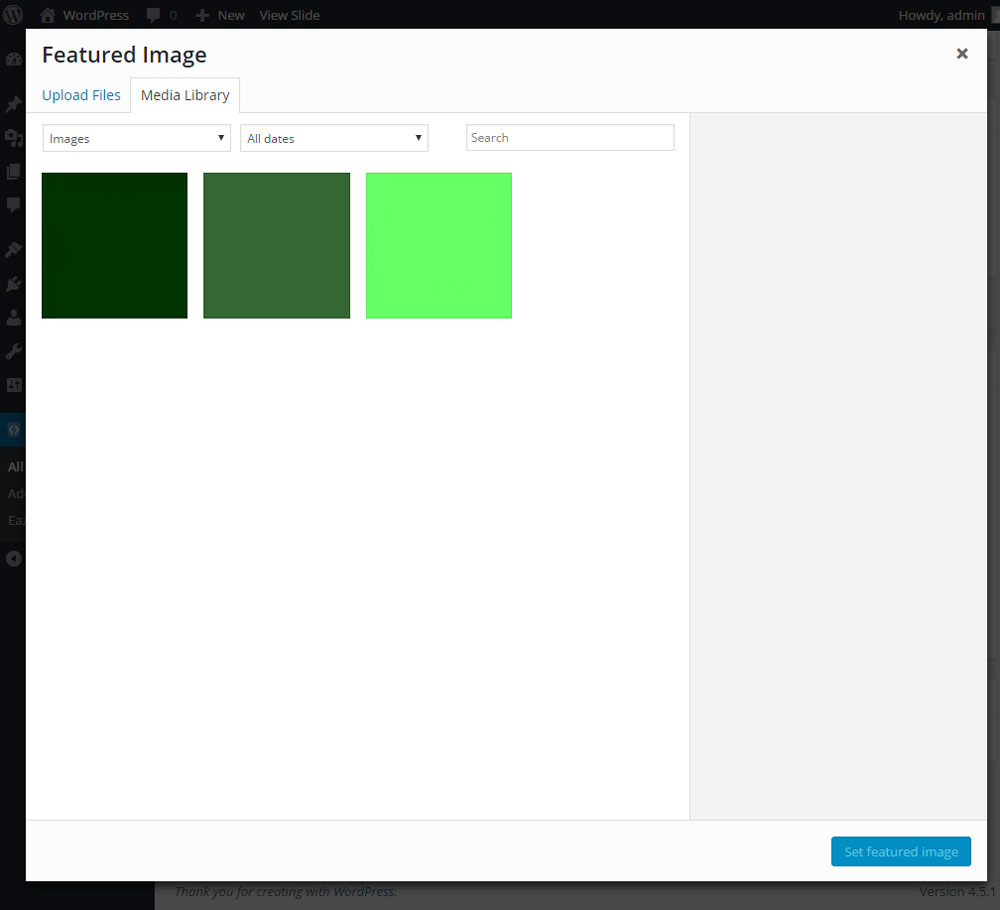
Click add featured image to include slide image using media library.

Shows a slide completed. (includes title, slider category & image)

Add a slider using the Flickity Slider button next to the Media Library button.

Select your slider from the drop down menu and add the size.

Shows shortcode added to editor.

Slider appears via WordPress magic.
Changelog
1.2.1
*Update flickity.shortcode.dimensions.js to make height and width conditional
1.2.0
*Update shortcode function to declare width and height of shortcode
*Remove is front page conditional from shortcode
*Remove outdated variable names
1.1.2
*Update CSS for gallery-cell.
1.1.1
*Update eazy_flickity_slider_shortcode.php to use a variable to store the array from wp_get_attachment_image_src on line ~64.
1.1
*Add flickity.shortcode.dimensions.js to insert the inline style for shortcodes height and width
1.0.2
*Add conditional statement to shortcode to prevent height and width form showing when not set
*Remove escaped quotes from readme
*Add Lazy Load to homepage JS
*Remove repetitive CSS
1.0.1
- Initial version of plugin.