

EDD Software License Manager
Seamless integration between Easy Digital Downloads and Software License Manager.
Plugin info
Maintenance & Compatibility
Maintenance score
Possibly abandoned • Last updated 3756 days ago • Support resolved 0% • 2 reviews
Is EDD Software License Manager abandoned?
Possibly abandoned (last update 3756 days ago).
Compatibility
Similar & Alternatives
Explore plugins with similar tags, and compare key metrics like downloads, ratings, updates, support, and WP/PHP compatibility.
Description
Seamless integration between Easy Digital Downloads and Software License Manager.
Features
- Automatically creates license keys for each sale with Easy Digital Downloads
- Licensing is optional and can be activated/deactivated individually
- Normal and variable pricing supported
- Send generated license keys to your customers within your existing email notifications
- Visit the plugin page
- Regular updates and improvements: Go though the changelog
Please note
The license validation part for your distributed plugins and themes is not part of this plugin. Therefore please take a look into the Software License Manager documentation.
Support
- Browse issue tracker on GitHub
- Follow me on Twitter to stay in contact and informed
Credits
Configuration
The plugin is really simple and well structured so you don’t have to prepare a lot in order to get it working.
- After the successful installation you will find a prepared options page here: “Downloads” > “Settings” > “Extensions”
- Enter your Software License Manager API credentials
- Go to your Downloads and activate licensing where it’s required
Installation
The installation and configuration of the plugin is as simple as it can be.
Using The WordPress Dashboard
- Navigate to the ‘Add New’ in the plugins dashboard
- Search for ‘edd software license manager’
- Click ‘Install Now’
- Activate the plugin on the Plugin dashboard
Uploading in WordPress Dashboard
- Navigate to the ‘Add New’ in the plugins dashboard
- Navigate to the ‘Upload’ area
- Select
edd-software-license-manager.zipfrom your computer - Click ‘Install Now’
- Activate the plugin in the Plugin dashboard
Using FTP
- Download
edd-software-license-manager.zip - Extract the
edd-software-license-managerdirectory to your computer - Upload the
edd-software-license-managerdirectory to the/wp-content/plugins/directory - Activate the plugin in the Plugin dashboard
Frequently Asked Questions
Is it necessary to install both plugins on the same WordPress installation?
No! That’s one of the biggest benefits of this integration. Easy Digital Downloads and the Software License Manager can be installed on different sites.
Can I use this plugin to validate the generated license keys?
No! The license validation part for your distributed plugins and themes is not part of this plugin. Therefore please take a look into the Software License Manager documentation.
Review feed
Screenshots

Configuration screen

Activating licensing for a download

Output the generated license keys within your emails
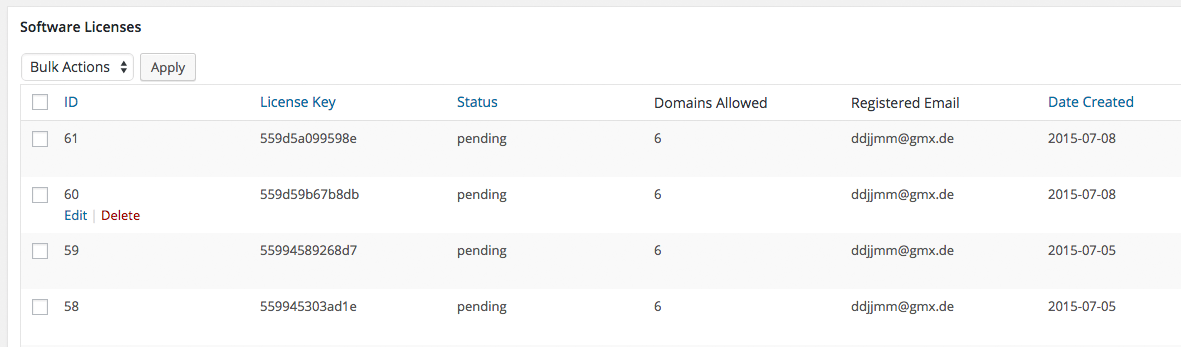
See your generated license keys within the license manager plugin
Changelog
Version 1.0.1 (7th November 2015)
- Fix: Email license key listing showed only the last item
Version 1.0.0 (17th July 2015)
- Initial release