

EdgeTariff Tools
EdgeCTP combines a CRM, Stock Control, Invoicing, Purchase Orders, Shipping and Landed Cost Calculator into one app.
Plugin info
Maintenance & Compatibility
Maintenance score
Maintained • Last updated 103 days ago • 1 reviews
Is EdgeTariff Tools abandoned?
Likely maintained (last update 103 days ago).
Compatibility
Similar & Alternatives
Explore plugins with similar tags, and compare key metrics like downloads, ratings, updates, support, and WP/PHP compatibility.
Description
Edge’s Combined Trading Platform (CTP) is a business support tool that is designed for businesses that trade nationally or internationally in physical goods. EdgeCTP provides a fully integrated CRM; Stock Control; Invoicing; Shipping Documents; Sales and Purchase Workflows; Connections (to various systems) and a total landed cost calculator, all in a single cloud application.
Why EdgeTariff?
EdgeTariff, a part of EdgeCTP, provides eCommerce businesses with a landed cost calculator, which enables overseas buyers to know the cost of the goods, shipping and duties & taxes BEFORE they make an informed purchasing decision. The benefits of installing EdgeTariff in your WooCommerce store is that international orders are processed on a DDP (Delivery & Duty Paid) basis, which makes international trade as simple as domestic trading.
Features
EdgeTariff provides three online services that can be integrated in an Ecommerce platform:
* Product Pre-Classification (PPC), which categories your product(s) into Harmonized System codes (HS6 and above), so that international customs authorities can recognise your product(s) to apply the correct duties & taxes.
* Expected Duties & Taxes (EDT), which shows to the overseas buyers, on the checkout, the cost of the goods; shipping costs and expected duties & taxes, i.e., the total landed cost. The buyers can then make an informed choice to buy.
* Restricted Party Screening (RPS), which allows you (as the seller) to screen your customer for any international trade compliance issues BEFORE you send the goods.
Installation and Use
- Download the plugin zip file from the WordPress Plugin Repository.
- Log in to your WordPress admin dashboard.
- Navigate to Plugins > Add New.
- Click on Upload Plugin and select the downloaded zip file.
- Click Install Now.
- After installation, click on Activate to enable the plugin on your site.
- Here’s a link to Download the installation guide.
It’s not working
- Step 1. Check if your Plugin is activated.
- Step 2. Deactivate all plugins except WooCommerce and reactivate EdgeTariff Tools.
External Services
This plugin interacts with several external services to enhance its functionality. Below is a detailed explanation of these services, including what data is sent, when it is sent, and links to the service’s terms of service and privacy policy.
1. Plugin Status Check
– Service: Verifies if the plugin is activated or deactivated.
– Data Sent: Only the site URL.
– Trigger: Upon plugin installation or activation/deactivation.
– Purpose: To ensure the plugin is properly registered and activated.
– Service Provider: EdgeCTP
– Service Link
– Terms of Service
– Privacy Policy
2. Update Restricted Party Screening (RPS)
– Service: Checks whether a specific party is restricted.
– Data Sent: Checkout data, including order items and customer address.
– Trigger: During the checkout process.
– Purpose: To comply with legal restrictions on shipping to certain parties.
– Service Provider: EdgeCTP
– Service Link
– Terms of Service
– Privacy Policy
3. Shipstation Order Update
– Service: Sends user order items to the ShipStation platform for shipment processing.
– Data Sent: Order item details.
– Trigger: When an order is placed or updated.
– Purpose: To facilitate order fulfillment through ShipStation.
– Service Provider: EdgeCTP
– Service Link
– Terms of Service
– Privacy Policy
4. WooEstimatedDutyAndTaxes
– Service: Provides estimated duties and taxes for orders.
– Data Sent: Checkout data, including order details and customer address.
– Trigger: On the checkout page or when an admin creates a manual order.
– Purpose: To calculate and display estimated duties and taxes for international orders.
– Service Provider: EdgeCTP
– Service Link
– Terms of Service
– Privacy Policy
5. RPS (Restriction Endpoint)
– Service: Checks if a customer is restricted from receiving shipments.
– Data Sent: Customer-specific information related to restrictions.
– Trigger: When processing restricted orders.
– Purpose: To ensure compliance with shipping restrictions.
– Service Provider: EdgeCTP
– Service Link
– Terms of Service
– Privacy Policy
6. IP-Based Country Code Retrieval
– Service: Fetches the user’s country code using their IP address.
– Data Sent: The user’s IP address.
– Trigger: On the checkout page.
– Purpose: To determine the user’s country for tax and duty calculations.
– Service Provider: IP-API
– [Service Link](http://ip-api.com/php/’ . urlencode( $ip_address ) . ‘?fields=countryCode)
– Terms of Service
– Privacy Policy
7. Connection Links for Estimated Duty and Taxes
– Service: Facilitates the plugin’s integration with external services for duty and tax estimation.
– Data Sent: Order details and customer information.
– Trigger: During the checkout process.
– Purpose: To connect with external services for accurate duty and tax calculations.
– Service Provider: EdgeCTP
– Service Links:
– BASE URL
– SWAN BASE URL
– Terms of Service
– Privacy Policy
8. TCPDF External Library for Bulk Printing
– Service: Provides PDF generation and merging capabilities used for bulk printing of invoices and labels.
– Data Sent: Document content (invoice and label data) generated within the plugin; no external data transmission occurs.
– Trigger: When users perform bulk print actions for invoices or labels.
– Purpose: To generate and merge multiple PDFs into a single printable file.
– Service Provider: TCPDF (Open Source PHP PDF Library)
– Service Links:
– Service Link
– Github Repository
– Terms of Service
– Privacy Policy
Installation
Frequently Asked Questions
You can install the plugin from the WordPress Plugin Repository or manually upload it via FTP.
Yes, it has been tested with WooCommerce 9.7 and WordPress 6.7.
Yes, you must create an account with EdgeCTP to obtain an API key.
No, the plugin does not store any personal data locally. It only interacts with external APIs for necessary calculations.
Review feed
Screenshots
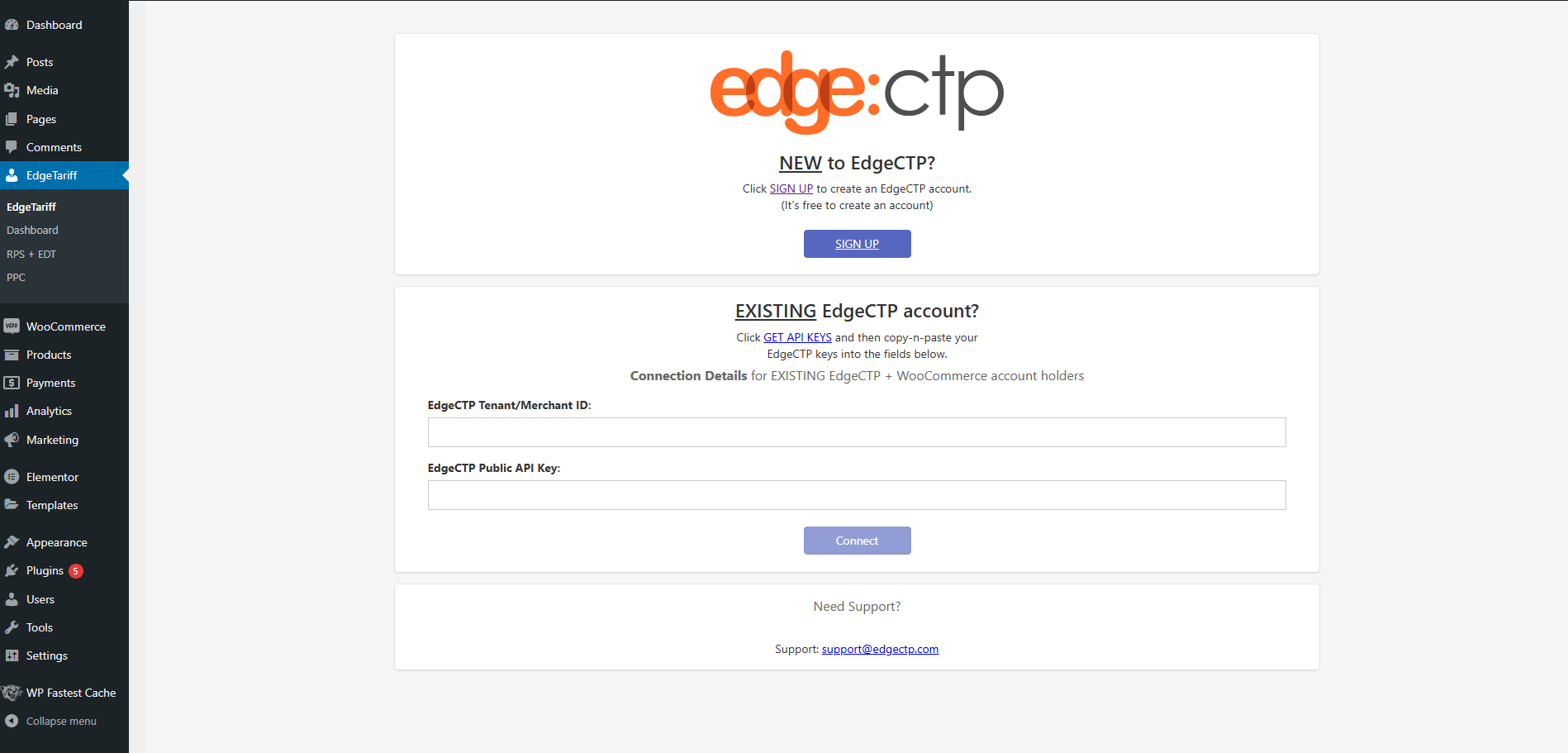
Connect EdgeCTP by signing up

EdgeCTP connected successfully

EdgeTariff Dashboard

Restricted Party Screening (RPS) + Estimated Duties & Taxes (EDT) Table

Product Pre-Classification (PPC) Table
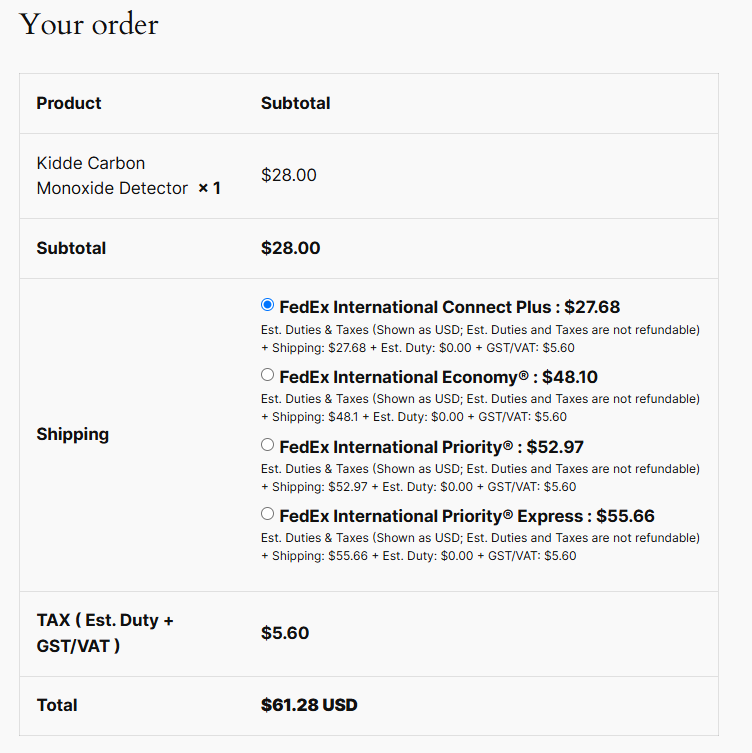
Estimated Duties & Taxes (EDT) on checkout Page

Request Restricted Party Screening (RPS) on the order page for a specific customer

Get Product Pre-Classification for specific product

Add the country of origin to perform ppc. After PPC HS6 will populate automatically

You can make bundles by using our EdgeTariff Bundle feature

The FedEx shipment label can now be generated automatically upon successful order placement.

You can use the buttons to either download the shipment label or track the shipment status.

You can cancel the shipment by clicking the 'Void Shipment' button.
Changelog
1.0.8
- Added validation on EDT calls for Virtual and Downloadable products.
- Added validation on shipment creation calls for Virtual and Downloadable products.
- Set DPI for PNG file types.
- Introduced bulk printing feature for labels and commercial invoices.
- Integrated third-party library TCPDF to enable bulk printing for both invoices and labels.
1.0.7
- Introduced functionality to generate labels in multiple print types and sizes.
- Performance optimizations and minor bug fixes.
1.0.6
- Added automatic commercial invoice generation on order placement.
- Performance optimizations and minor bug fixes.
1.0.5
- Add Fedex shipping label functionality.
- Auto creation shipment on place order.
- Download Labels from the order view page.
- Track shipment from the order view page.
1.0.4
- Make compatibility with virtual and downloadable products.
- Make the plugin more user friendly.
1.0.3
- Remove the ‘Continue to shipping’ button. Now all the rates will appear in shipping section after filling the address fields.
1.0.2
- Make the security fixes and update the meta properties.
1.0.1
- Make our plugin compatible to work with other shipping methods.
- Now you can handle domestic and international rate adjustments.
1.0.0
- Initial release.