

Email and Domain Blocker for WooCommerce
Block emails or domains from WooCommerce signups. Supports wildcards, logging, CSV export, and test email checker.
Plugin info
Maintenance & Compatibility
Maintenance score
Stale • Last updated 212 days ago • 3 reviews
Is Email and Domain Blocker for WooCommerce abandoned?
Likely maintained (last update 212 days ago).
Compatibility
Similar & Alternatives
Explore plugins with similar tags, and compare key metrics like downloads, ratings, updates, support, and WP/PHP compatibility.
Description
Tired of fake signups and spam accounts in your WooCommerce store?
Email and Domain Blocker for WooCommerce lets you block unwanted emails or domains from registering — keeping your store clean and your customers real.
Key Features:
* Block specific email addresses (e.g. [email protected])
* Block entire domains (e.g. @spam.com)
* Wildcard support (e.g. *@gmail.com, *@*.ru)
* Test Email Checker (instantly check if an email is allowed or blocked)
* Optional logging of blocked attempts
* Logs tab to view, clear, and download blocked attempts as CSV
* Simple admin UI with usage examples
Use cases:
* Stop spam signups with disposable or free mail services
* Block competitors or fraud-prone domains
* Restrict registrations to company emails only
Installation
- Upload the plugin folder to the
/wp-content/plugins/directory or install via WordPress Plugins screen. - Activate the plugin through the “Plugins” menu in WordPress.
- Go to Settings > Email & Domain Blocker to configure.
- Enter blocked emails/domains (comma separated).
- Optionally enable logging.
- Test with the built-in Test Email Checker.
Frequently Asked Questions
No, it only blocks new registrations. Existing accounts remain unaffected.
Yes! Examples:
* *@gmail.com blocks all Gmail addresses
* *@*.ru blocks all .ru domains
* test*@domain.com blocks any address starting with “test”
Enable logging in settings. Blocked attempts will appear in the Logs tab, where you can view, clear, or download them as CSV.
Yes, it hooks into WooCommerce’s registration process, so it works with plugins that use WooCommerce accounts.
Review feed
Screenshots
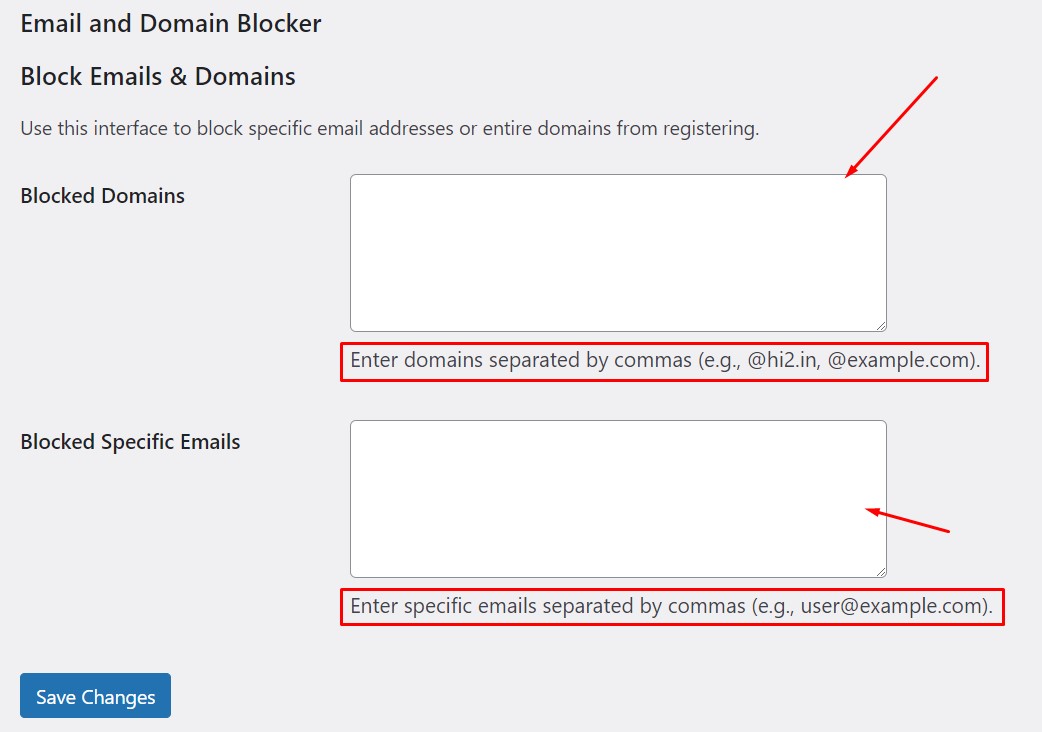
Test Email Checker.
Changelog
1.1
- Added wildcard support for blocking emails/domains.
- Added Test Email Checker (AJAX).
- Added optional logging system.
- Added Logs tab with view, clear, and CSV export.
- Improved admin UI with help text and examples.
1.0
- Initial release — block specific emails and domains in WooCommerce registration.