

List Builder
List Builder is the easiest way to double your email subscribers. A lightbox that integrates with MailChimp, Campaign Monitor, Constant Contact.
Plugin info
Maintenance & Compatibility
Maintenance score
Possibly abandoned • Last updated 1916 days ago • 6 reviews
Is List Builder abandoned?
Possibly abandoned (last update 1916 days ago).
Compatibility
Similar & Alternatives
Explore plugins with similar tags, and compare key metrics like downloads, ratings, updates, support, and WP/PHP compatibility.
Description
List Builder by Social Intents lets you quickly add an email list sign up form to any page to allow visitors to join your email list. Instead of a sidebar widget, our mailing list builder brings extra attention by popping up an elegant lightbox. It can be configured to display after a period of time on your website, or as visitors are exiting your site using exit intents. Add your CSS, your language, your background images, and your style to the form. It’s one of the fastest and most effective ways to build your email lists.
Sign up today for a 14-day Free Trial!
Features
- Simple integration with WordPress Themes
- Mobile optimized
- Email integration with MailChimp, Constant Contact, and Campaign Monitor
- Export emails as CSV
- No additional software
- Asynchronous loading, won’t slow your site
- Multi-Language support
- Customize text and colors
- Unlimited email subscribers
- Remove “Powered By” Footer
- Custom logos and branding
- Awesome support
Combine this plugin with our Live Chat, Social Offers, and Feedback plugins to power sales and improve conversions!
Questions about our live chat plugin? Contact us at www.socialintents.com.
Social Intents offers a 14-Day Free Trial.
Getting Started with Email List Builder
Step 1: Login to WordPress Admin and search for the plugin ‘Email List Builder by Social Intents’ and install it.
Step 2: Register for a Free Trial Account right from the plugin or at our website.
Questions or suggests? Contact us at www.socialintents.com. We’d love to hear from you.
Why choose Email List Builder
-
Simple to setup
-
Target specific pages or website visitors
-
Email list integration with MailChimp and Constant Contact
-
Export email subscribes to a .csv file
-
Quickly build your email list subscribers
-
Customize the widget look and feel with custom CSS, logos, and messages
Other Social Intents Widgets
We also have Live Chat, Conversion Popup, and Social Offers widgets available that can be used to grow your social audience and power your sales.
To learn more about Social Intents visit us at socialintents.com.
Installation
-
If you don’t have a Social Intents account, you can sign up right from the widget.
-
In the admin section of your WordPress site, click ‘plugins’ and then ‘add new’
-
Search for ‘Email List Builder by Social Intents’
-
Click ‘Install Now’
-
After Installation, enter your widget key or Register for a new Account.
Frequently Asked Questions
Do I need a Social Intents account for my email list builder widget
Yes, you do. You can sign up for a free trial at socialintents.com..
Do I have to install software on my server to get this working?
No, Email List Builder is a service. Simply sign up for the service, grab your widget key, and save it in your plugin.
Review feed
Screenshots
Example Email List Builder Popup

Another Example Email List Builder Popup

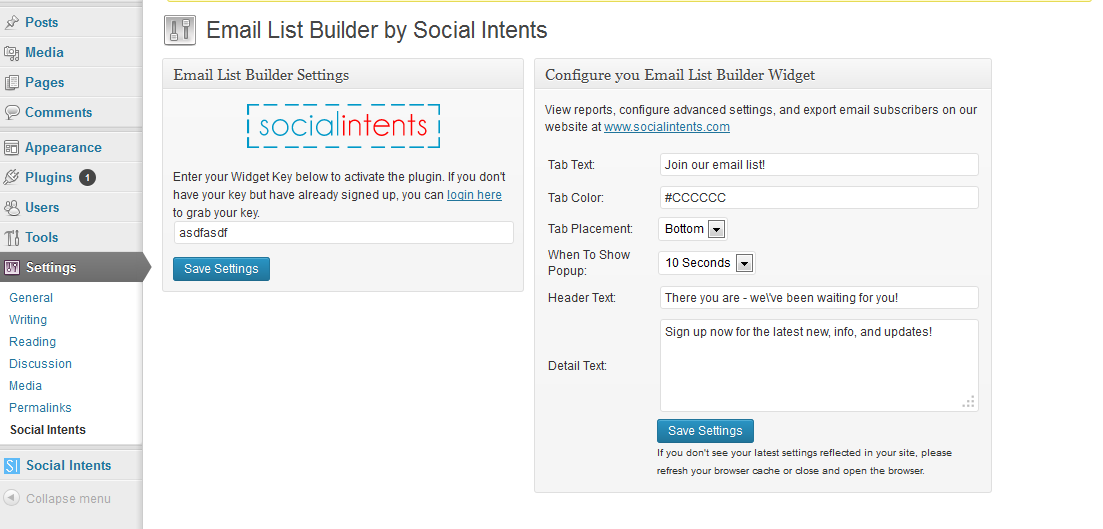
Email List Builder Settings

Social Intents Dashboard

Social Intents Overview
Changelog
1.1.21
- 4.6 support
1.1.10
- Server side settings changes
1.1.6
- WP 4.3.1 support
1.1.4
- Advanced settings
1.1.2
- Support for 4.2
1.1.1
- Bug fix on configuration screen
1.1.0
- Minor feature enhancements