

Embed Spreadsheet Viewer
Embed spreadsheet tables from public Excel URLs into your WordPress site with sorting, filtering, pagination, and custom formatting.
Plugin info
Maintenance & Compatibility
Maintenance score
Stale • Last updated 325 days ago
Is Embed Spreadsheet Viewer abandoned?
Likely maintained (last update 325 days ago).
Compatibility
Similar & Alternatives
Explore plugins with similar tags, and compare key metrics like downloads, ratings, updates, support, and WP/PHP compatibility.
Description
Embed Spreadsheet Viewer lets you easily embed data from shared Excel .xlsx files into your WordPress posts and pages.
✨ Key features:
– Connect to any public Excel .xlsx URL (Dropbox, Google Drive direct link, etc.).
– Choose worksheet, rows, and columns to display.
– Apply custom headers and formatting (numbers, dates, currency).
– Enable sorting, filtering, and pagination.
– Admin tools to preview and refresh cached data.
– Optional public refresh button for end users.
Perfect for sharing live data tables like work orders, price lists, schedules, and reports.
License
This plugin is licensed under GPLv2 or later.
Installation
- Upload the plugin ZIP file via Plugins Add New.
- Activate the plugin.
- Go to Spreadsheets in the WordPress admin menu.
- Add a new Spreadsheet entry:
- Set a unique Table ID.
- Provide the public Excel file URL.
- Specify the worksheet name.
- Insert the shortcode into your content:
Frequently Asked Questions
Any public Excel .xlsx file, including Dropbox and Google Drive (with a direct download link).
No, it only works with .xlsx files.
Yes — if you enable the Show Refresh Button option in the spreadsheet settings.
Flattened files strip formulas and keep only visible values, similar to “Paste Special Values” in Excel.
Review feed
Screenshots
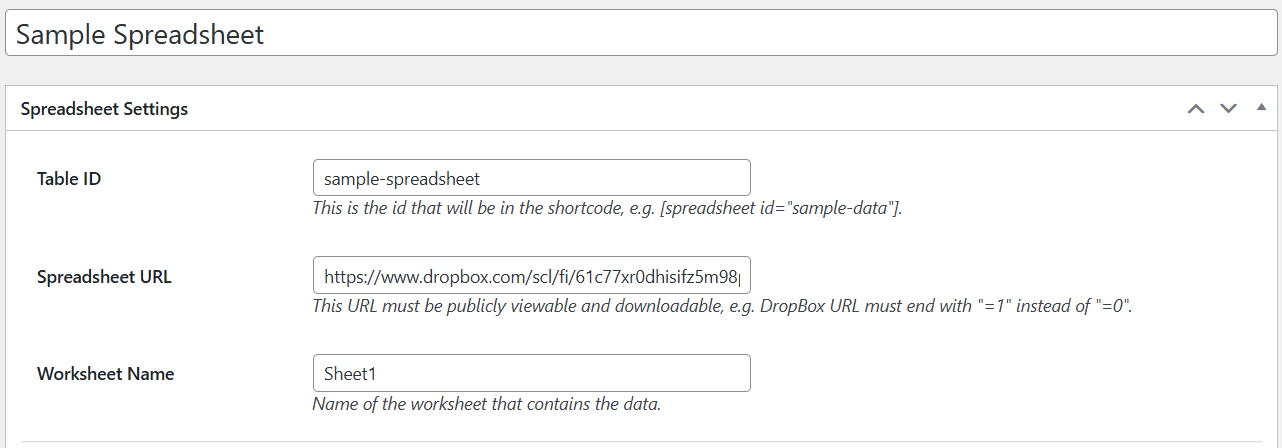
Admin spreadsheet creation screen.
Changelog
1.0
- Initial release
GitHub Repository: https://github.com/mattellenburg/embed-spreadsheet-viewer