

Emergency Alerts
Create emergency alerts for your website. Inspired by the COVID-19 (Coronavirus) pandemic, but usable for all sorts of messaging that you need to get …
Plugin info
Maintenance & Compatibility
Maintenance score
Possibly abandoned • Last updated 2132 days ago
Is Emergency Alerts abandoned?
Possibly abandoned (last update 2132 days ago).
Compatibility
Similar & Alternatives
Explore plugins with similar tags, and compare key metrics like downloads, ratings, updates, support, and WP/PHP compatibility.
Description
Create emergency alerts for your website. Inspired by the COVID-19 (Coronavirus) pandemic, but usable for all sorts of messaging that you need to get to your site’s users.
Includes options for text/background color, lightbox, fixed and absolute positioning. Includes some Javascript support for resizing.
You can force the alert to ALWAYS show or you can
Installation
- Upload the plugin files to the
/wp-content/plugins/wpm-emergency-alertsdirectory, or install the plugin through the WordPress plugins screen directly. - Activate the plugin through the ‘Plugins’ screen in WordPress
- Use the Settings -> Emergnecy Alerts screen to configure the plugin
- If you have issues with the default output not looking right with your site, you may need to add custom CSS via the Appearance > Customize option in WordPress (see FAQs).
Frequently Asked Questions
Currently, this is only available with a filter wpm_ea_status (set to "on" for on and "off" for off).
Yes simply toggle the Enable Javascript Position Adjustments to OFF.
You may need to add custom CSS. Usually the Lightbox, Top – Fixed, and Bottom – Fixed options work well regardless of site design, but are more obtrusive.
Top/Bottom Alert Positions will be more tricky with more complex header/footer areas. If you run out of support options, you may always work with our support team by signing up for further support at https://wpmaintainer.com
Yes, our default output is responsive but every site is different. You may require some custom CSS to make things look 100% perfect!
Review feed
Screenshots
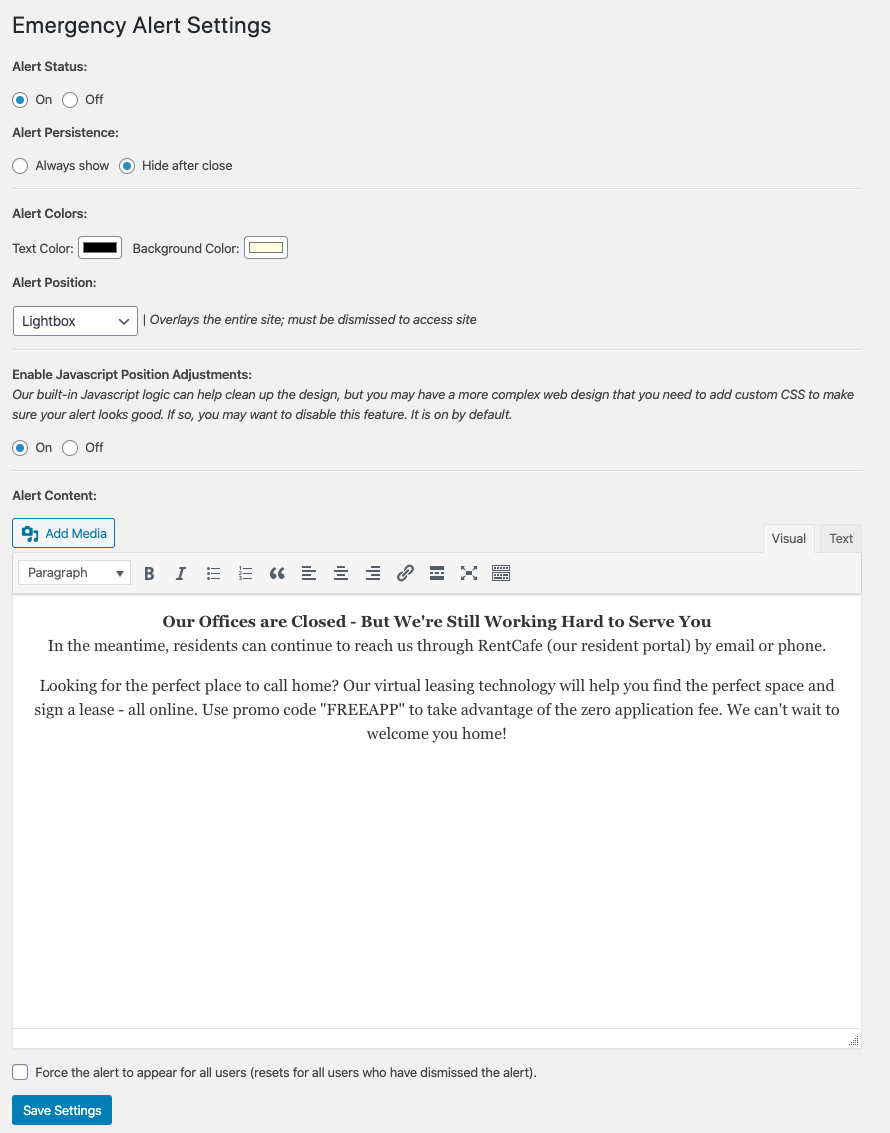
Sample settings screen with messaging. Toggle all plugin settings.
Changelog
1.4.0
- Corrects a bug where dismissing the alert wipes out default values from
body_class()
1.3.0
- Corrects a bug with the
wpm_ea_statusfilter.
1.2.0
- Adds custom expiration time for suppressable alerts.
1.1.1
- Cleans up some code organization and comments.
1.1.0
- Updates for repository imagery and a filename typo. Adds setting link shortcut.
1.0
- First version of the plugin – released.