
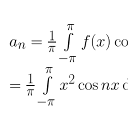
Plugin info
Maintenance & Compatibility
Maintenance score
Possibly abandoned • Last updated 3593 days ago • 2 reviews
Is Enable Latex abandoned?
Possibly abandoned (last update 3593 days ago).
Compatibility
Similar & Alternatives
Explore plugins with similar tags, and compare key metrics like downloads, ratings, updates, support, and WP/PHP compatibility.
Description
Insert LaTeX formulas in your posts.
Just type [latex size=0 color=000000 background=ffffff]\\displaystyle f_{rec} = \\frac{c+v_{mobile}}{c} f_{em}[/latex] in your post to show the LaTeX formula.
You can configure:
- the color of the font,
- the color of the background,
- the style of the image displayed.
Plugin developped from the orginal plugin WP-LaTeX.
This plugin is under GPL licence.
Multisite – WordPress MU
This plugin is compatible with multisite installation.
Localization
- Arabic (Egypt) translation provided by AmrIbrahim
- German (Germany) translation provided by amens
- English (United States), default language
- Farsi (Iran) translation provided by youseftabeolhojjeh
- French (France) translation provided by SedLex
Features of the framework
This plugin uses the SL framework. This framework eases the creation of new plugins by providing tools and frames (see dev-toolbox plugin for more info).
You may easily translate the text of the plugin and submit it to the developer, send a feedback, or choose the location of the plugin in the admin panel.
Have fun !
Installation
- Upload this folder enable-latex to your plugin directory (for instance ‘/wp-content/plugins/’)
- Activate the plugin through the ‘Plugins’ menu in WordPress
- Navigate to the ‘SL plugins’ box
- All plugins developed with the SL core will be listed in this box
- Enjoy !
Frequently Asked Questions
- Where can I read more?
Visit http://www.sedlex.fr/cote_geek/
InfoVersion:56ce25956fc5cea4079ade51266492a3cf1c649b
Review feed
Screenshots
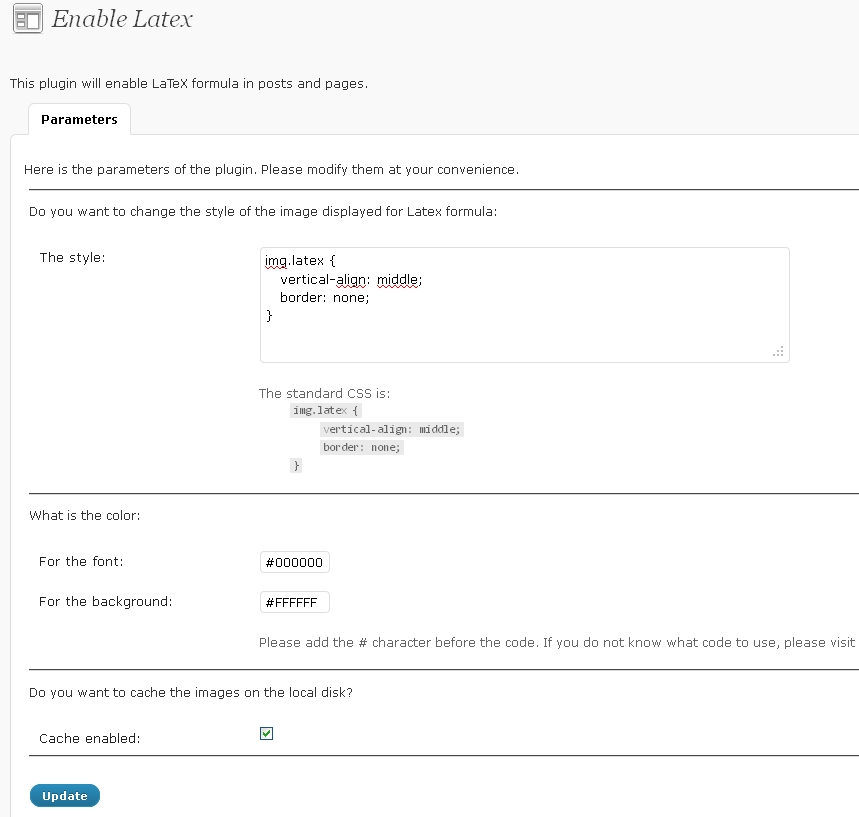
The configuration page of the plugin
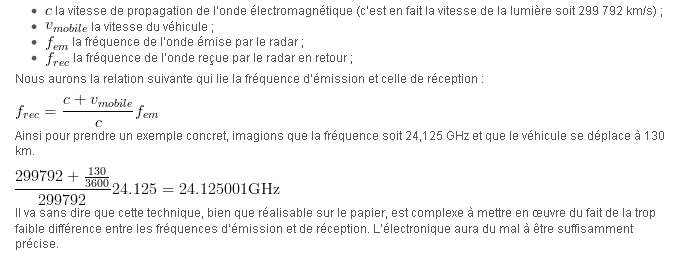
An example of LaTex formula in a post
Changelog
1.2.16
- NEW : Various improvement of the core
1.2.15
- NEW : delete temp files upon desinstall
1.2.14
- NEW : add icons
1.2.13
- Various improvements
1.2.12
- NEW: How to
1.2.11
- NEW: Various enhancement of the framework
1.2.10
- NEW: Improve the look of the plugin
1.2.9
- Update the core
1.2.8
- Update the core
1.2.7
- New translation and modification of the URL of wordpress
1.2.6
- Few bug fixes
1.2.5
- Update the core
1.2.4
- Add a button to add latex in a easy way
1.2.3
- Delete option and sql on uninstall
1.2.2
- Multisite support
1.2.1
- Update the framework
1.2.0
- Improve the English text thanks to Rene
1.1.0 -> 1.1.3
- Improve the English text thanks to Rene
- Update to remove potential bug
- Update of the core and adding few translations
- SVN support for committing changes
1.0.2 -> 1.0.6
- The core plugin has been updated
- ZipArchive class has been suppressed and pclzip is used instead
- Ensure that folders and files permissions are correct for an adequate behavior
- Translations available
- French translation provided
- Feedback possible
- Upgrade of the framework (3.0)
- Ensure compatibily with the worpress format for plugins
1.0.1
- First release in the wild web