

Essential Addons for Contact Form 7
Extend Contact Form 7 with 50+ fields, conditional logic, drag-drop uploads, styling, and integrations.
Plugin info
Maintenance & Compatibility
Maintenance score
Maintained • Last updated 122 days ago • Support resolved 0% • 1 reviews
Is Essential Addons for Contact Form 7 abandoned?
Likely maintained (last update 122 days ago).
Compatibility
Languages
Similar & Alternatives
Explore plugins with similar tags, and compare key metrics like downloads, ratings, updates, support, and WP/PHP compatibility.
Description
Essential Addons for Contact Form 7 enhances Contact Form 7 with 50+ advanced fields and features, transforming it into a powerful, feature-rich form builder.
Create professional, interactive, and highly functional forms effortlessly. From multi-step forms and conditional logic to file uploads, multi-column layouts, and CRM integrations, this plugin gives you everything you need — no coding required.
It includes 30+ fields and 21+ advanced features designed to make form building faster, easier, and more customizable.
Video Overview
👀 Try Live Demo | 🚀 Get PRO
🌟 Key Fields & Features
- Form & Tag Generator
- Form Templates
- Conditional Logic
- Multi-Column Layouts
- Multi-Step Forms
- Repeater Field
- PDF Generator
- Frontend Post Submission
- Booking / Appointment Form
- Database Entries
- Form Preview
- Form Styler
- Drag & Drop File Upload
- Drag & Drop Image Upload
- Drag & Drop Google Drive Upload
- Popup Form
- User Registration
- Conversational Form
- WooCommerce Product Dropdown
- WooCommerce Checkout
- Save Form Progress
- Spam Blocker (New ⚡)
- Pre-Populate Field
- Redirection
- WhatsApp Integration
🆓 Free Version Fields, Features & Integrations
Form & Tag Generator
Create and manage Contact Form 7 forms easily with a user-friendly tag generator.
Form Templates
Use pre-designed form templates for faster, professional form creation.
Conditional Logic
Show or hide form fields dynamically based on user selections.
Multi-Column Layouts
Organize your form fields into multiple columns for cleaner layouts.
Database Entries
Save all form submissions inside your WordPress admin and manage them easily.
Form Preview
Preview forms in real time before publishing.
Form Styler
Customize your form design — colors, fonts, spacing — without writing CSS.
Drag & Drop File Upload Field
Let users upload files (PDF, DOC, ZIP, etc.) via drag-and-drop.
Drag & Drop Image Upload Field
Enable drag-and-drop image submissions with support for multiple formats.
Pre-Populate Fields
Auto-fill fields dynamically to improve user experience and conversion rates.
Redirection
Redirect users to any page or external link after submission.
Country List Field
Add a country dropdown field for fast user selection.
Dynamic Text Field
Display hidden or dynamic data from your site inside forms.
Range Slider Field
Let users select numeric values interactively with a slider.
Star Rating Field
Collect feedback and ratings directly through your forms.
Address Field
Add structured address inputs for better data collection.
Date Time Field
Combine date and time inputs for scheduling and bookings.
Honeypot Field
Automatically detect and block spam bots.
Phone Field
Add formatted phone number fields with validation.
Section Break
Visually organize long forms into sections.
Submission ID
Each submission gets a unique ID for easy tracking.
Mailchimp Integration
Automatically sync submissions with your Mailchimp lists.
Telegram Integration
Forward form submissions to your Telegram account.
Webhook Integration
Send submission data to any custom endpoint via Webhooks.
Zapier Integration
Connect forms to thousands of apps using Zapier.
Pabbly Integration
Integrate with 2000+ apps for automation.
Google reCAPTCHA
Add reCAPTCHA protection to stop spam bots.
hCaptcha
Use hCaptcha to protect forms from automated abuse.
Cloudflare Turnstile
Integrate Cloudflare Turnstile for lightweight spam prevention.
🚀 Pro Version Fields, Features & Integrations
Form Templates (Advanced)
Choose from beautifully designed form templates to jump-start form creation.
Multi-Step Forms
Split long forms into multiple steps for better user experience.
Custom Multi-Column Layouts
Build responsive multi-column designs with full customization.
Drag & Drop Google Drive Upload Field
Let users upload files directly to your connected Google Drive account.
Repeater Field
Allow users to duplicate fields dynamically — great for multiple entries.
Image Choice Field
Add image-based multiple-choice options for more visual form interactions.
PDF Generator
Automatically generate PDFs from form submissions.
Frontend Post Submission
Turn submissions into posts with custom fields in your WordPress site.
Popup Form
Display forms in beautiful popups triggered by button clicks or links.
User Registration
Create custom registration forms to sign up users directly.
Booking / Appointment Form
Enable users to select dates, times, and book appointments easily.
Conversational Form
Turn forms into chat-style interactive experiences.
WooCommerce Product Dropdown
Display WooCommerce products for selection directly within a form.
WooCommerce Checkout Integration
Add custom fields to WooCommerce checkout pages easily.
Digital Signature Field
Capture secure, legally recognized digital signatures.
Custom HTML Field
Add custom HTML or scripts inside your form.
Leads Info Field
Automatically capture visitor data like IP, country, and referrer.
Mask Input Field
Restrict user input to specific formats (like phone or date).
Math Captcha
Add an anti-spam math challenge to forms.
Rich Text Editor Field
Allow users to write formatted text with a built-in editor.
Shortcode Field
Embed forms anywhere using a shortcode.
Color Picker Field
Add color selection inputs for creative use cases.
Action Hook Field
Add custom content or logic using predefined hooks.
Save Form Progress
Let users save and continue later for long forms.
Spam Blocker
Block submissions from specific IPs, countries, domains, or words.
Entry Restrictions (New ⚡)
Limit total submissions to prevent spam or overuse.
Integrations (New ⚡)
– ActiveCampaign
– Brevo (Sendinblue)
– Drip
– FluentCRM
– HubSpot
– MailerLite
– MailPoet
– PayPal
– Slack
– Google Drive
– WhatsApp
🔥 WHAT’S NEXT 🔥
Consider checking out our other plugins:
🗂️ Integrate Google Drive
Browse, Upload, Download, Embed, Play, and Share Google Drive Files in WordPress.
📻 Radio Player
Live Shoutcast, Icecast & Audio Stream Player for WordPress.
🌙 Dracula Dark Mode
A revolutionary dark mode plugin for WordPress.
🎧 Multimedia Player
Audio, Video & Podcast Player for WordPress.
Installation
Frequently Asked Questions
After purchase, you’ll receive a confirmation email containing your PRO download link and license key.
If not, access it directly from your Freemius Customer Portal.
Download it from the purchase email or customer portal, then install and activate your license key in WordPress.
Please reach us via our Contact Form.
Yes, you can. Staging and localhost sites are automatically whitelisted.
Yes! Explore both frontend and backend via our Live Demo.
Yes, try the PRO plugin free for 3 days — Get Trial Version.
It adds powerful fields, logic, and integrations not available in the core CF7 plugin.
No coding knowledge required — everything works visually.
No, it’s lightweight and performance-optimized.
Yes, users can upload files directly to your connected Google Drive account.
Yes, both features are fully supported.
Yes, show or hide fields based on user input dynamically.
Yes, all entries can be stored and managed in WordPress admin.
Yes, redirect to a custom page or URL.
Yes, integrations include Mailchimp, ActiveCampaign, Brevo, and more.
Yes, the Form Styler lets you customize design without CSS.
Review feed
Screenshots
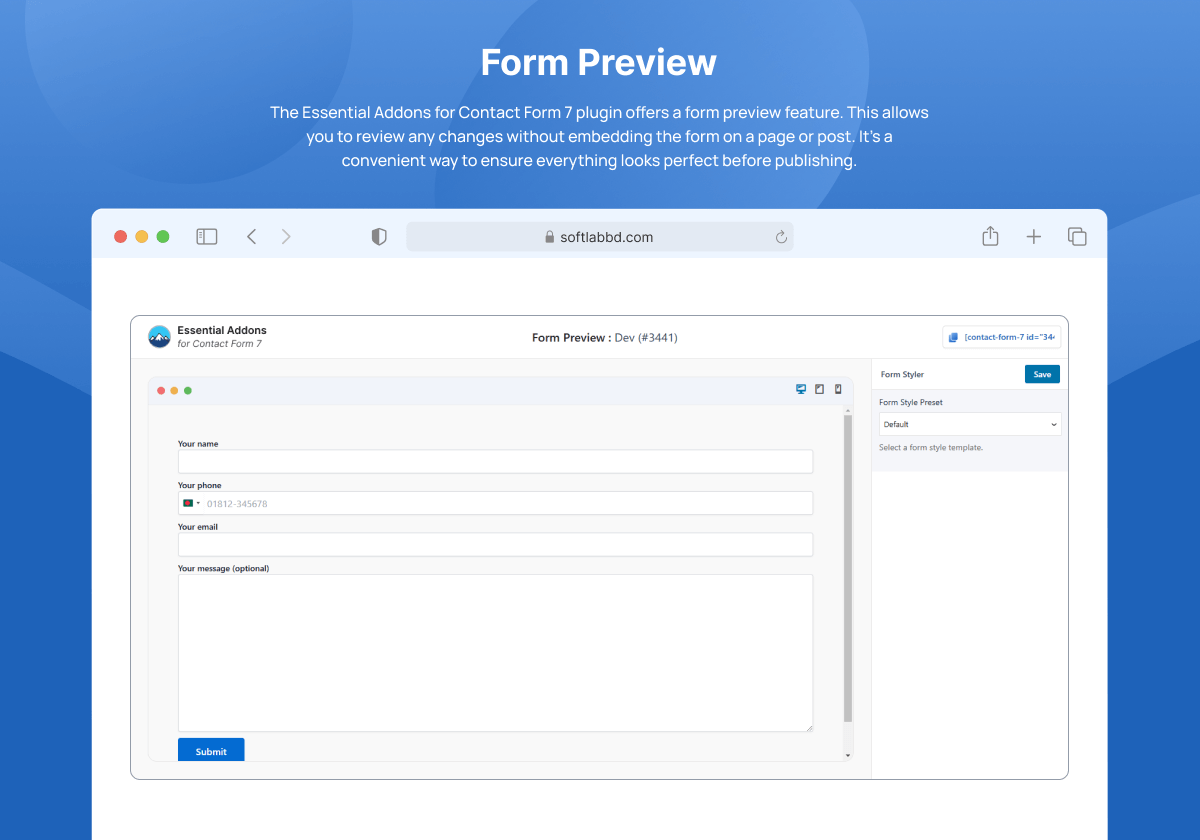
Form Preview
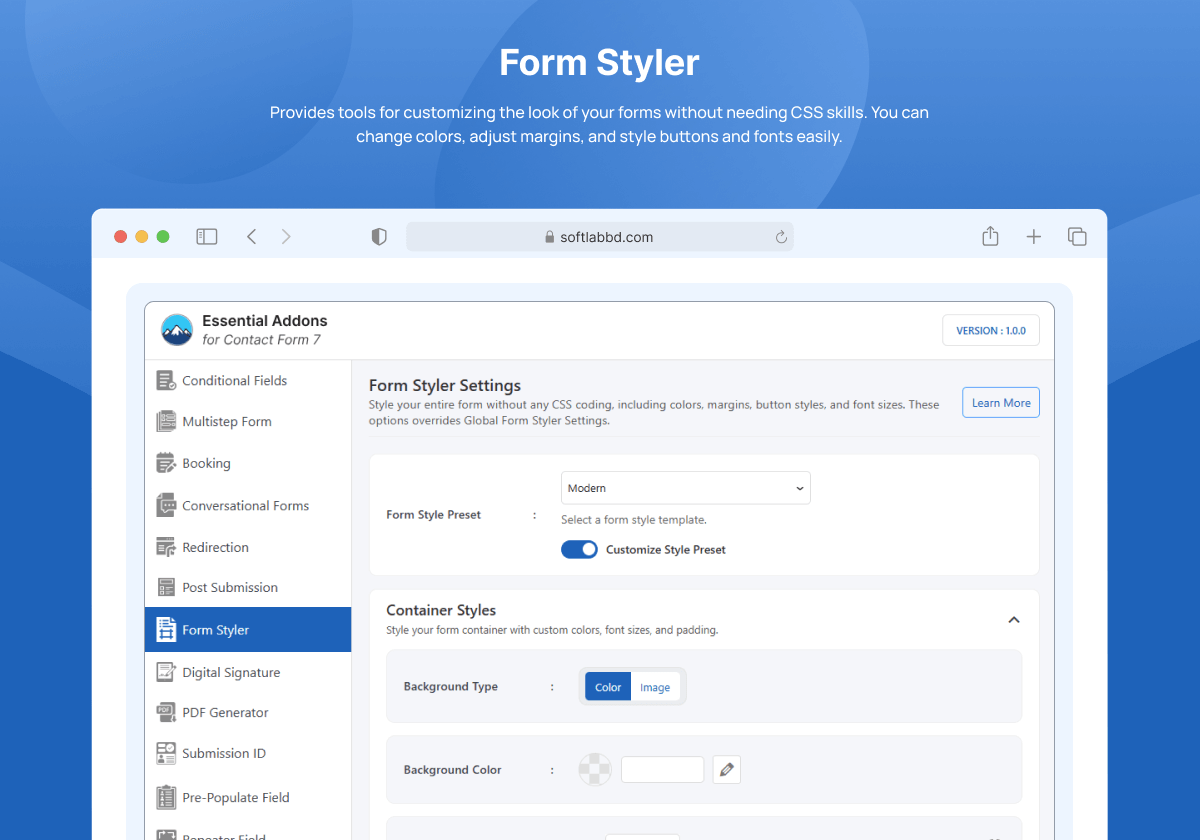
Form Styler

Database Entries

Booking / Appointment Form

Multi-Step Form
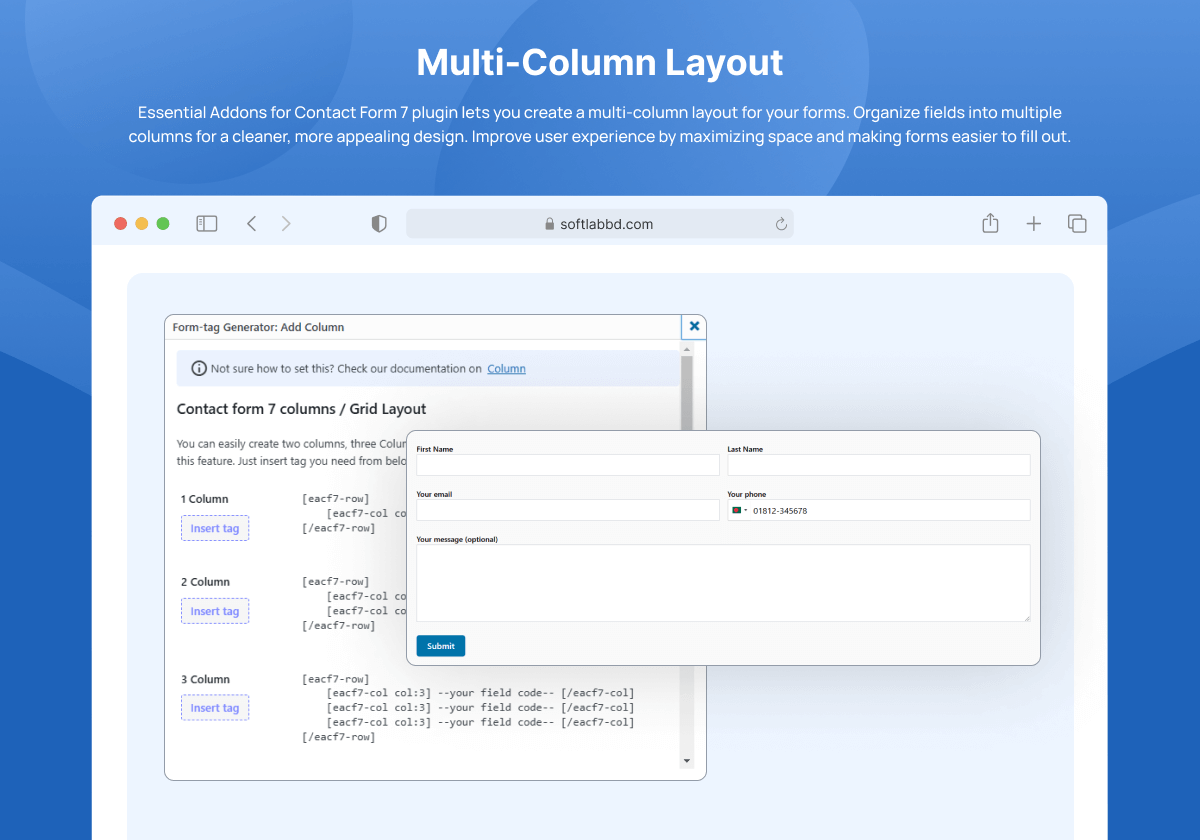
Multi-Column Layout
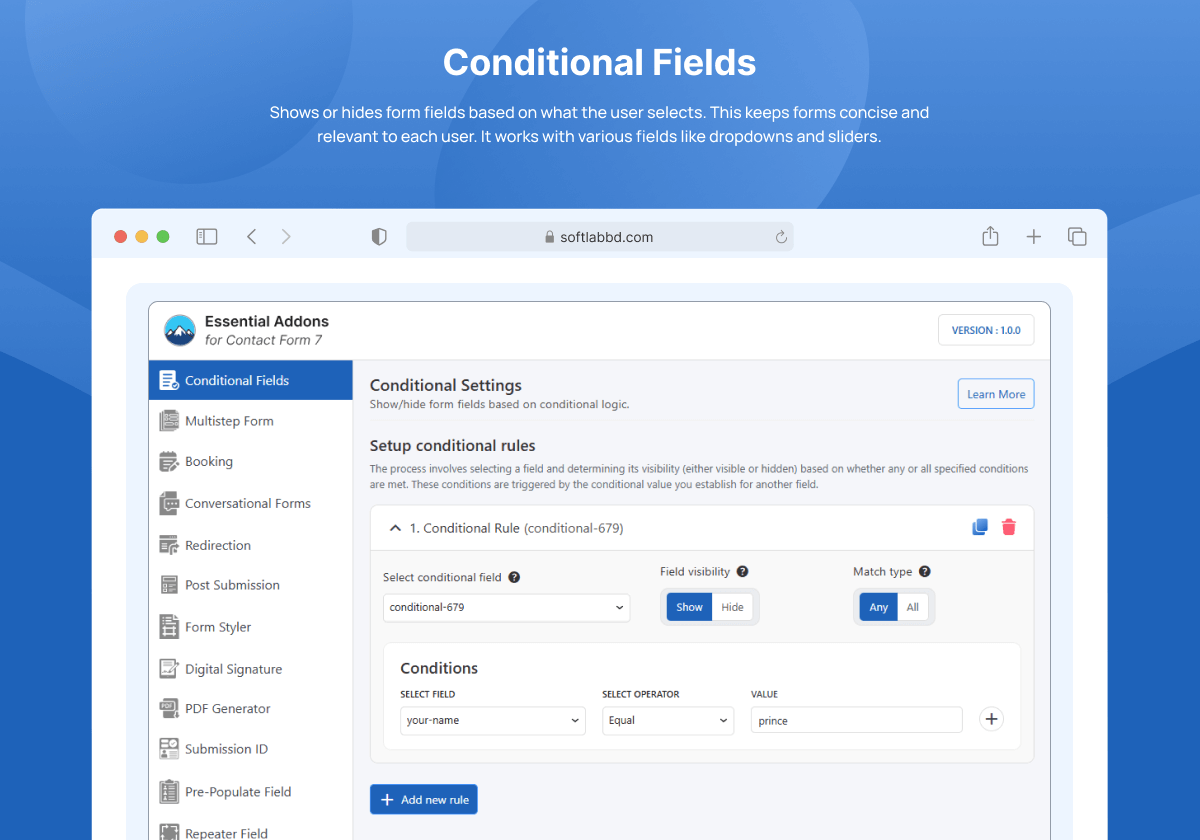
Conditional Logic

Drag & Drop File Upload

Redirection

Integrations
Changelog
1.1.0 (2025-10-14)
- New: Added Entry Restrictions.
1.0.9 (2025-10-14)
- New: Added ActiveCampaign, Brevo, Drip, FluentCRM, HubSpot, MailerLite, MailPoet, PayPal & Slack integrations.
- Fix: Fixed image and file attachment issues in upload fields.
1.0.8 (2025-09-12)
- Update: Improved performance and stability.
- Fix: Minor bug fixes.
1.0.7 (2025-08-28)
- New: Added Form Submission Preview and Email Summaries.
- Fix: Fixed dashboard blank screen issue.
1.0.6 (2025-07-31)
- Fix: Resolved CSS style conflicts.
1.0.5 (2025-07-09)
- Fix: Elementor Fatal Error fixed.
- Update: Improved script loading performance.
1.0.4 (2025-07-02)
- New: Added Spam Blocker feature.
- Fix: Fixed “Save Later” data issue.
- Fix: Fixed Database Entries bug.
1.0.3 (2025-03-18)
- New: Added Export/Import for Entries, Forms, and Settings.
- New: Added Popup Trigger Options.
- Fix: Conditional fields not appearing in email.
- Update: Enhanced Form Generator & Templates.
- Update: Improved Entries Chart & Filtering.
1.0.2 (2025-01-15)
- New: Added Form & Tag Generator, Range Slider, Star Rating, and WooProduct Dropdown updates.
1.0.1 (2024-11-24)
- New: Introduced 20+ new fields and features (Math Captcha, Digital Signature, Booking Form, Repeater, PDF Generator, Google Drive Integration, etc.)
- Update: Added CF7 v6.0 compatibility.
1.0.0
- Initial Release