

Event SEO: Event Schema / Structured Data: Google Rich Snippet Schema for Event
Automatically generate Google Event Rich Snippet Schema (JSON-LD) for events using popular calendar plugins.
Plugin info
Maintenance & Compatibility
Maintenance score
Maintained • Last updated 124 days ago • Support resolved 100% • 5 reviews
Is Event SEO: Event Schema / Structured Data: Google Rich Snippet Schema for Event abandoned?
Likely maintained (last update 124 days ago).
Compatibility
Languages
Similar & Alternatives
Explore plugins with similar tags, and compare key metrics like downloads, ratings, updates, support, and WP/PHP compatibility.
Description
Generate Google Event Rich Snippet Schema for your calendar and get event promoted in Google search.
This plug-in generates complete JSON-LD based schema (structured data for Rich Snippet) for events and support many leading Event Calendar plugin.
event schema, structured data, event structured data, rich snippets, event rich snippets, Event Marketing, marketing, automation, google, bing, calendar, Event SEO
📄 Documentation | ⭐ Upgrade to Pro | 🛟 Get Support
✅ Standard Google Event Rich Snippet Schema
📄 Event detail page Event schema
⚙️ Automatically create Event Rick Snippet for your event, No Manuall work
🎟️ Events Manager Ticket can be shown in Google Schema
🗓️ For All-In-One Event Calendar by Time.ly supports Event List, Agenda, Day, Month, Week, Posterboard, Stream. (Pro)
🎯 Supported Plugins:
- Events Manager
- All-in-One Event Calendar by Time.ly
- Event Organiser
- EventON
- WP Event Aggregator
- Import Facebook Events
- Import Eventbrite Events
- Import Meetup Events
- WP Events Manager (PRO)
- Events Calendar by FooEvents (PRO)
- Eventin – Event Manager, Event Booking, Calendar, Tickets and Registration Plugin (PRO)
- EventPrime – Modern Events Calendar, Bookings and Tickets (PRO)
🔧 No configuration required – it works automatically!
You can disable schema from Settings Event Schema
🌟 Pro Version with Premium Support:
👉 Event Schema Pro
Installation
📥 This plugin can be installed directly from your site:
- Log in and navigate to Plugins Add New
- Type “Event Schema” in the search input and click Search
- Locate Event Schema and click Install Now
- Click the Activate Plugin link
📁 Or install manually:
- Download the Event Schema plugin from WordPress.org
- Unzip the package and upload to your
/wp-content/plugins/directory - Log in to WordPress and go to Plugins
- Find Event Schema and click Activate
Frequently Asked Questions
Review feed
Screenshots
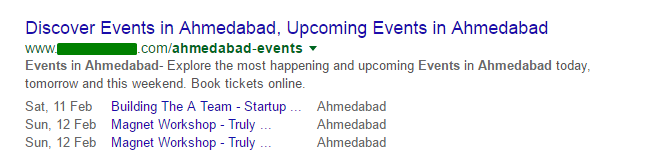
Google Eventlist Rich Snippet

Google Single Event Rich Snippet

Settings
Changelog
1.1.4
- ADDED: Support for below new plugins ( PRO )
- WP Events Manager
- Events Calendar by FooEvents
- Eventin – Event Manager, Event Booking, Calendar, Tickets and Registration Plugin
- EventPrime – Modern Events Calendar, Bookings and Tickets
1.1.3
- IMPROVEMENT: Updated support page UI for better user experience
- IMPROVEMENT: Enhanced security with improved XSS protection
- IMPROVEMENT: Added compatibility support for WordPress 6.8
- FIXED: Minor bugs and code improvements
1.1.2
- FIXED: Description issue
- IMPROVEMENTS: Support for PHP 8.2
- IMPROVEMENTS: Support for WP 6.7
1.1.1
- Some bug fixes and improvements
1.1.0
- Added support for below new plugins
- Import Facebook Events
- Import Eventbrite Events
- Import Meetup Events
- WP Event Aggregator
- Added Event Manager tickets support
- Added Events list support for “All-in-One Event Calendar” for below View (PRO)
- Agenda
- Day
- Month
- Week
- Posterboard
- Stream
- Some bug fixes and improvements
1.0.0
- Initial Version.