

AH Sidebar Box
This widget adds a tabbed sidebar box with recent posts, last comments, categories, popular posts, a tag cloud and the archives to the sidebar.
Plugin info
Maintenance & Compatibility
Maintenance score
Possibly abandoned • Last updated 3113 days ago • 1 reviews
Is AH Sidebar Box abandoned?
Possibly abandoned (last update 3113 days ago).
Compatibility
Similar & Alternatives
Explore plugins with similar tags, and compare key metrics like downloads, ratings, updates, support, and WP/PHP compatibility.
Description
Creates a new and simple to use widget that adds a tabbed sidebar box with recent posts, last comments, categories, popular posts, a tag cloud and the archives to the sidebar. No Options. This widget is perfect for light-colored themes.
To use the widget, go to Appearance -> Widgets and add “AH Sidebar Box” widget.
Installation
- Upload contents of the directory to /wp-content/plugins/ (or use the automatic installer)
- Activate the plugin through the ‘Plugins’ menu in WordPress
- In Appearance->Widgets, add »AH Sidebar Box« widget to any sidebar.
Frequently Asked Questions
None at this point.
Installation Instructions
- Upload contents of the directory to /wp-content/plugins/ (or use the automatic installer)
- Activate the plugin through the ‘Plugins’ menu in WordPress
- In Appearance->Widgets, add »AH Sidebar Box« widget to any sidebar.
Review feed
Screenshots
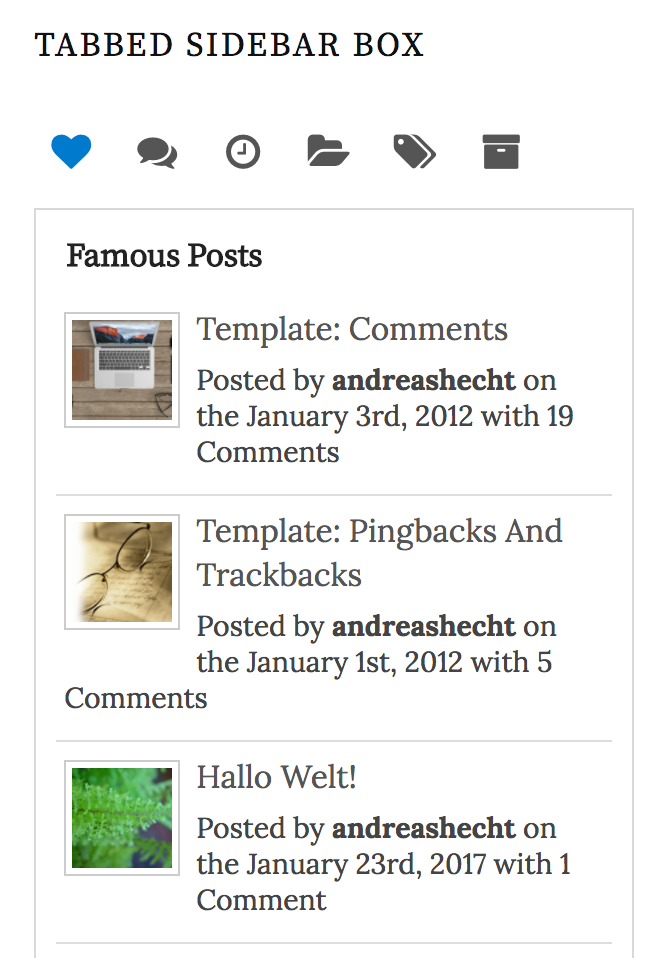
The Widget. screenshot-1(png).

The Widget. screenshot-2(png).

The Widget. screenshot-3(png).

The Widget. screenshot-4(png).

The Widget. screenshot-5(png).

The Widget. screenshot-6(png).
Changelog
1.1.2
- WP 4.8.2 – stable version
1.1.1
- WP 4.8 – stable version
1.1.0
- completely rewritten
- No timthumb.php
1.0.7
- timthumb.php updated on version 2.8.13
- translated to Serbo-Croatian
1.0.6
- Get better thumbnails
- some styling issues
1.0.5
- Fixing html error
1.0.4
- Some styling changes
- Adding thumbnails
1.0.3
- Initial release