

Expiry Time Coupon for WooCommerce
Add a time-of-day component to WooCommerce coupon expiry that works together with the built-in expiry date.
Plugin info
Maintenance & Compatibility
Maintenance score
Stale • Last updated 184 days ago
Is Expiry Time Coupon for WooCommerce abandoned?
Likely maintained (last update 184 days ago).
Compatibility
Similar & Alternatives
Explore plugins with similar tags, and compare key metrics like downloads, ratings, updates, support, and WP/PHP compatibility.
Description
WooCommerce lets you set a coupon “Expiry date” but not an exact time.
This lightweight plugin adds a “Coupon expiry time” field (HH:MM, 24h) to the coupon edit screen.
When both date and time are set, the coupon will expire on that date at the time you specify.
Key points
* Works alongside WooCommerce’s native coupon expiry date.
* Time is stored internally as seconds since midnight and combined with the date.
* No changes to your theme or checkout templates required.
Usage
- Set Expiry date as usual in WooCommerce.
- Set Coupon expiry time in
HH:MM(24-hour) format, for example17:30. - The coupon will be valid until the combined timestamp; after that, it will be treated as expired.
Installation
- Upload the plugin folder to
/wp-content/plugins/or install the ZIP via Plugins Add New Upload. - Activate Expiry Time Coupon for WooCommerce.
- Edit or create a coupon in Marketing Coupons, set an Expiry date and a Coupon expiry time.
Frequently Asked Questions
No. If you don’t set a time, WooCommerce’s default date-only logic applies. If you set a time without a date, the time is ignored.
The field accepts a simple HH:MM string. If a time picker is available in your admin, it will be used; otherwise you can type the time.
No. It only adds a small check during coupon validation.
Review feed
Screenshots
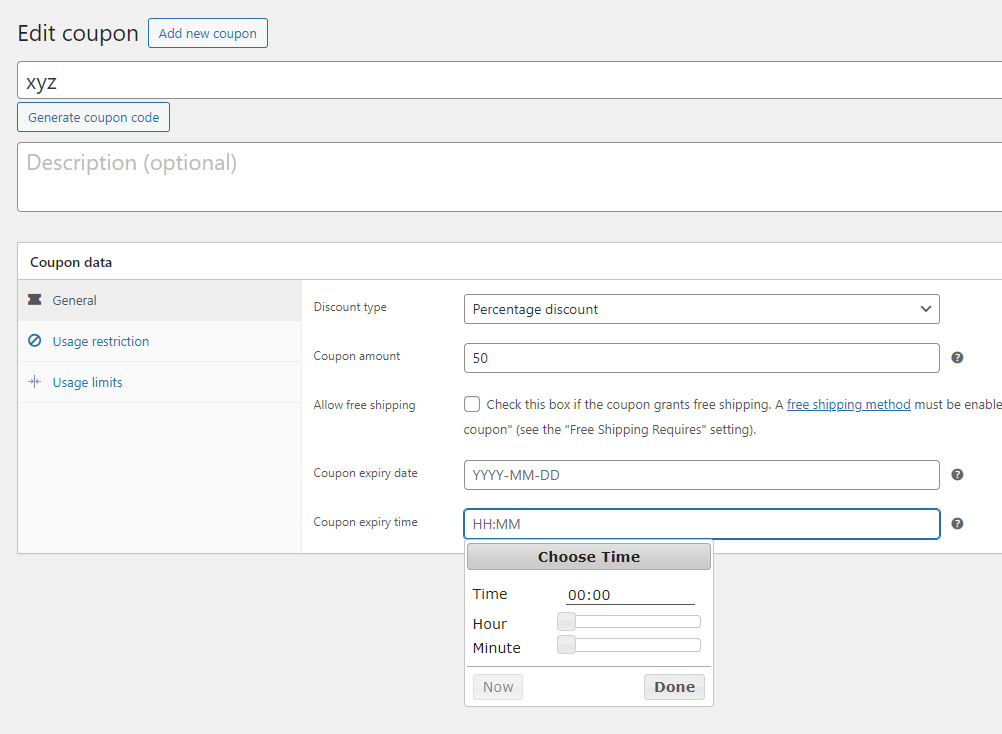
Timepiker coupon for WooCommerce
Changelog
1.0.0
- Initial release: add time-of-day to coupon expiry.