

Export media with selected content (by DKZR)
Include all relevant attachments in your export.
Plugin info
Maintenance & Compatibility
Maintenance score
Maintained • Last updated 120 days ago • Support resolved 100% • 92 reviews
Is Export media with selected content (by DKZR) abandoned?
Likely maintained (last update 120 days ago).
Compatibility
Similar & Alternatives
Explore plugins with similar tags, and compare key metrics like downloads, ratings, updates, support, and WP/PHP compatibility.
Description
When selecting one post type in the WordPress export screen, by default the linked media (attachments) are not included.
This plugin adds an “Export media with selected content” option. When checked, the plugin tries to find featured images and included media in the post_content, adding them to the export file.
Installation
- Upload the plugin files to the
/wp-content/plugins/export-media-with-contentdirectory, or install the plugin through the WordPress plugins screen directly. - Activate the plugin through the ‘Plugins’ screen in WordPress
Frequently Asked Questions
This plugin hooks into the WordPress export routine and tries to find images related to the post (page, etc.). It does so by looking for “attached” (uploaded to) media and it searches the body of the post (the post_content) for image files.
It’s possible that themes or plugins use different ways of referencing media to your post. This plugin will not find those.
In eg. the Gutenberg gallery block, when you select an image size (for the gallery) the images with that size are ‘hard-coded’ in the html.
The WordPress import routine downloads the original image of the ‘export site’ and re-creates the configured image sizes. When your configured image sizes differ, you might end up with broken galleries.
So make sure both sites have the same image sizes configured. See the Media settings in both sites and check if themes or plugins use add_image_size() reference.
Yes! The plugin features two filter hooks:
* export_query
* export_query_media_ids
Please browse the code to see what they do, I guess export_query_media_ids is easiest to use as it requires you to just add more attachment IDs to an array.
Review feed
Works perfectly
Massive time saver
Awesome, Useful Plugin.
Should be in core
Screenshots
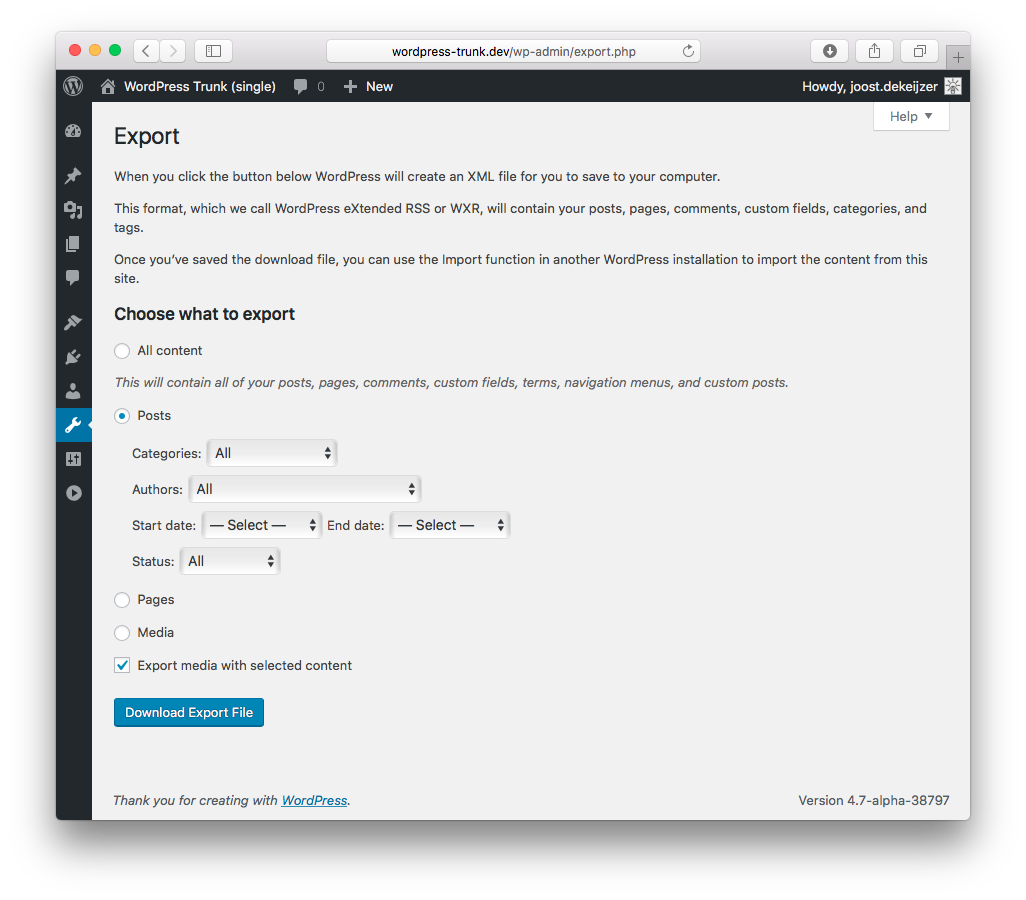
"Export media with selected content" checkbox option now available in the Export screen.
Changelog
2.1.3
- prevent sql error when ID turns out to be NULL (props donnyoexman)
2.1.2
- Stupid debug error fix
2.1.1
- Added php 7.0 requirement to plugin header
- Replaced short array notation with full notation so plugin could work on lower php versions (untested)
2.1
- Performance: split queries & prepare attachments_map (props Albitos)
- Feature: support for [playlist] shortcode
- Feature: support for Gutenberg Audio and Video blocks
- Tested with WordPress 5.6.2
2.0
- Feature: support for Gutenberg notation of images and gallery
- Feature: added
export_query_media_idsfilter - Tested with WordPress 5.2.3
1.1
- Tested with WordPress 5
- Includes “Uploaded to” media
1.0
- Bugfix when only posts from 1 category must be selected
- Feature: introduced
export_queryfilter to allow for hooking into this plugin
0.9.1
- Sanitize input
0.9
- Initial release