

Export Plugins and Templates
Export Plugins and Templates allows you to export any template or plugin already installed in your WordPress.
Maintenance 30/100602d since update
Active installs
1,000
Downloads
33,713
Reviews
12
Age
10.7y
Plugin info
Total downloads: 33,713
Active installs: 1,000
Total reviews: 12
Average rating: 4.4
Support threads opened: 0
Support threads resolved: 0 (0%)
Available in: 1 language(s)
Contributors: 1
Last updated: 8/9/2024 (602 days ago)
Added to WordPress: 8/4/2015 (10 years old)
Minimum WordPress version: 4.0
Tested up to WordPress version: 6.6.4
Minimum PHP version: 5.6
Maintenance & Compatibility
Maintenance score
Possibly abandoned • Last updated 602 days ago • 12 reviews
30/100
Is Export Plugins and Templates abandoned?
Possibly abandoned (last update 602 days ago).
Compatibility
Requires WordPress: 4.0
Tested up to: 6.6.4
Requires PHP: 5.6
Similar & Alternatives
Explore plugins with similar tags, and compare key metrics like downloads, ratings, updates, support, and WP/PHP compatibility.
WP Theme Exporter
Rating 3.7/5 (3 reviews) • Active installs 100
Description
In this plugin you will be able to export your plugins and templates by easy way so, the file after export it will be zip file you can upload zip file to another sites if you want that’s.
Features
- Export Your Plugins.
- Export Your Templates.
Usage
Export Plugins
- After installing the plugin, you need to go to the “Export Plugins” subsection in the “Plugins” menu.
Just select the plugin you want and then click in the “Export Plugin Now” button. You will get a .zip file to download.
Export Templates
- After installing the plugin, you need to go to the “Export Templates” subsection in the “Appearence” menu.
Just select the template you want and then click in the “Export Template Now” button. You will get a .zip file to download.
Installation
Installation Automatically
- Click Plugins in the menu dashboard.
- Click Add New.
- Upload and choose “export-plugins-and-templates.zip” file and activate directly.
- After activated plugin you can see export plugin in “Plugins” menu and export templets in “Appearance” menu.
Installation Manually
- Download the plugin to your computer.
- Unzip the file and upload it to the “/wp-content/plugins/” from FTP or Cpanel.
- Activate the plugin through the ‘Plugins’ menu in WordPress dashboard.
- After activated plugin you can see export plugin in “Plugins” menu and export templets in “Appearance” menu.
Frequently Asked Questions
No FAQ available
Review feed
Alobaidi
Great Plugin
Thanks Mr.Mohammed.
Juan Pablo
Perfect
Perfect. Thanks
Screenshots
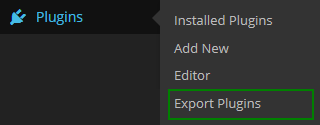
Option of "Export plugins" in the "Plugins" menu.

Export plugins page.

Option of "Export Templates" in the "Appearence" menu.

Export Templates page.
Changelog
1.3
- Update Zip Module to 2.8.4.
- Some minor fixes.
- Tested with WP 6.6.X
1.2
- Fix some bugs and test in 4.6 WP.
1.1
- Fix some bugs.
1.0
- First released version.