

Export Customers Users & Guest customer to CSV for WooCommerce
Export WooCommerce customer list CSV, export WooCommerce guest customer list CSV, export WordPress users CSV, Product Customer List for WooCommerce
Plugin info
Maintenance & Compatibility
Maintenance score
Maintained • Last updated 132 days ago • 30 reviews
Is Export Customers Users & Guest customer to CSV for WooCommerce abandoned?
Likely maintained (last update 132 days ago).
Compatibility
Similar & Alternatives
Explore plugins with similar tags, and compare key metrics like downloads, ratings, updates, support, and WP/PHP compatibility.
Description
Export WooCommerce customer list or export users with one click.
- Download complete customer list
- Download customer list by skipping rows from the top
- Limit the number of customer list rows in the exported CSV
- Modify the fields that you want in the generated CSV
- You can save the fields needed in the CSV so you don’t have to do this again; from next time onwards, you can directly click download
- Automate the whole customer list exporting process and receive the customer list in your inbox
- Set the email ID on which you want to receive the email
- Export customer user meta data
PRO Version
Here are the features of the PRO version of Export customer list:
Buy PRO version, Limited-period offer | Documentation
- All the features of the FREE version
- It allows you to download customers based on their registration dates
- It allows you to give custom labels to the columns of the generated CSV
- You can download users based on the registration date range
- You can set frequency of the automated email, to be Hourly, Twice Daily, Daily, or Weekly
- The list that you will receive will contain only the users registered during this time period
- You can download Guest customer data in a separate CSV
- You can filter out the guest customer list based on their order status
- You can filter out the guest customer list based on their order placement date
- Export users: You can download any other registered user data by selecting their role, so now you can download WooCommerce customer or normal WordPress user data as well
- Download customer records based on the product they have purchased
- You can make a condition for downloading the Product Customer List of only those customers who purchased product A and product B together in a single order
- You can control the fields you want to download in the Product Customer List records
-
You can restrict the Product Customer List by date of purchase or order status as well
-
This plugin can export custom data fields stored in:
User meta data, stored in the xx_usermeta table
Order meta data, stored in the xx_postmeta table
For registered customers: The plugin first tries to search for the custom field in user meta data, and if it is not found there, then it searches order meta data to find the value
For guest customers: It directly searches order meta data for the custom field data -
You can receive registered customer, guest customer or both customer records in email attachments
Privacy
If you choose to opt in from the plugin settings, or submit optional feedback during deactivation, this plugin may collect basic technical information, including:
- Plugin version
- WordPress version
- WooCommerce version
- Site URL
- Deactivation reason (if submitted)
This data is used solely to improve plugin quality, compatibility, and features. No personal or user-specific data is collected without consent.
Installation
Frequently Asked Questions
You can find its download page or options page in
Tools >> Export customer
Yes, just click the Download button; it will contain all the fields of the WooCommerce customer
Yes, you can save the fields needed, so next time when you download, only the selected fields will be exported to the CSV
Yes, in the PRO version you can modify the field labels and save them too, so when you download the CSV it will have the modified fields. That way, you can directly use this CSV in your external system
Yes, you can do this. Just enter your email and it will send the exported CSV list as an attachment via email twice daily, and the list will contain all the customers on your site
Yes, in the PRO version you can change the frequency of the customer list email that you receive. You can set the frequency to be Hourly, Twice Daily, Daily, or Weekly
Yes, in the PRO version you will only receive the customers registered during that particular time interval. So if you have set Weekly, you will receive one email at an interval of 7 days, and it will contain a list of customers registered during that 7-day interval
The PRO version allows you to change the subject and message of the email
Yes, you can do that in the PRO version for the downloading part
There is an option to download guest customers as well. In the free version, it will download only 30 at a time; in the PRO version, you can export customers from WooCommerce in one CSV
You can’t modify the columns option in the guest CSV; field modification only works for the registered customer CSV
Yes, as it is extracted from the orders placed by the customer, so if a customer has placed multiple orders, then their record will repeat in the CSV
Yes, you can do that in the PRO version. The PRO version allows you to download guest customers based on their WooCommerce order status
In the PRO version you can do that for registered customers; just leave the ‘Registration done between’ field empty and it will get all customers from WooCommerce
You can do so in the PRO version; it allows you to select the user role whose records you would like to download
In the Pro version, there is an option that allows you to add extra user meta fields in the list of rows to extract in the CSV. Using this option, you can add an extra field that you want to extract (we have given you the list of WooCommerce meta fields)
Step 1: Get the name of the user meta field that you want to add in the CSV (and make sure that field is not present in our given list)
Step 2: Add that name in the left-side form
Step 3: Go to the ‘Select field to add in CSV’
Step 4: Your added field will appear in the list; select it and save it
The PRO version allows you to select which report you want to receive; you can receive registered customer, guest customer, or both customer details in an email attachment (CSV)
This plugin can export custom data fields stored in:
User meta data, stored in the xx_usermeta table
Order meta data, stored in the xx_postmeta table
so confirm with the plugin developer whose data you want to export how they have stored that data.
For registered customers: The plugin first tries to search for the custom field in user meta data, and if it is not found there, then it searches order meta data to find the value
For guest customers: It directly searches order meta data for the custom field data
That can be done in the PRO version
Yes, the free version and PRO version both are HPOS compatible
Review feed
Works like champ!
Screenshots
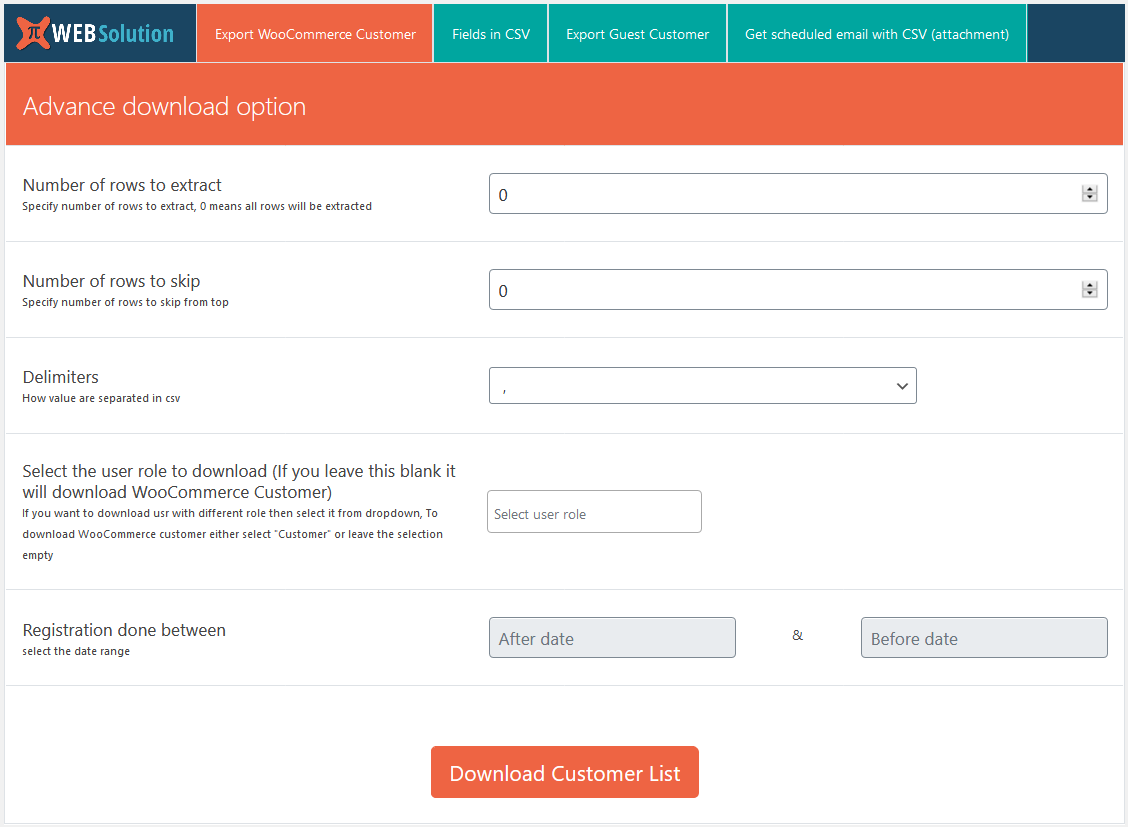
Exporting registered customer list by export WooCommerce customer list plugin

Configure field to be exported

Option to include custom order meta data in export WooCommerce customer list plugin

Exporting guest customer list

Sending customer list in email attachment automatically
Changelog
2.1.77
- code optimized for customer list export
2.1.76
- Tested with WC 10.0.2
2.1.74
- Export customer list WooCommerce plugin tested for WC 9.9.5
- UI improved for export customer list WooCommerce plugin
2.1.73
- Export customer list WooCommerce plugin tested for WC 9.9.3
2.1.72
- Tested with WC 9.8.0
2.1.71
- Translation warning fixed
2.1.70
- Tested with WC 9.7.1
2.1.69
- Tested with WC 9.7.0
2.1.67
- Tested with WC 9.6.2
2.1.66
- Tested with WC 9.6.0
2.1.60
- Tested with WC 9.4.0
2.1.49
- Tested with WP 6.7.0
2.1.46
- Tested with WC 9.3.0
2.1.44
- Tested with WC 9.2.3
2.1.43
- Calendar fixed
- Limit on extraction of guest customers removed in the free version
2.1.42
- Tested with WC 9.2.0
2.1.40
- Tested with WordPress 6.6.1
2.1.19
- Compatible with PHP 8.2
2.0.79
- Backend CSS changes