

F4 Simple Checkout Fields for WooCommerce
Adds custom fields to the WooCommerce checkout.
Plugin info
Maintenance & Compatibility
Maintenance score
Possibly abandoned • Last updated 685 days ago • 1 reviews
Is F4 Simple Checkout Fields for WooCommerce abandoned?
Possibly abandoned (last update 685 days ago).
Compatibility
Developers
Similar & Alternatives
Explore plugins with similar tags, and compare key metrics like downloads, ratings, updates, support, and WP/PHP compatibility.
Description
With F4 Simple Checkout Fields for WooCommerce you can simply add new fields to the WooCommerce checkout. There is no UI to manage the fields, they only can be added with a simple PHP method. That ensures that the plugin is lightweight and easy to handle, even though you need simple PHP knowledge and access to the file system to add the code (preferred your WordPress theme).
Usage
If you first install this plugin, it will do nothing. But it provides a method to add as many custom fields to your checkout as you need. Here’s a sample how you could add a simple text field to the billing and shipping address:
add_action('init', function() {
    F4\WCSCF\Core\Helpers::register_field(array(
        'name' => 'demo-text',
        'type' => 'text',
        'label' => 'Text Field'
    ));
});
Arguments
The register_field method provides a lot of arguments to customize your fields. Some of the arguments are identically to the officiel WooCommerce arguments:
F4\WCSCF\Core\Helpers::register_field(array(
    // (array) Defines where the field should be added
    // billing = billing address, shipping = shipping address
    'target' => array('billing', 'shipping'),

    // (string) The internal name for the field. Must be unique
    'name' => '',

    // (string) The field type (text, textarea, password, select)
    'type' => 'text',

    // (string) The field label
    'label' => '',

    // (string) The description
    'description' => '',

    // (string) The placeholder for the input (only text, textarea or password)
    'placeholder' => '',

    // (boolean) Defines if the field is required or not
    'required' => false,

    // (string) The default value
    'default' => '',

    // (array) An array with css classes that should be added to the field
    'class' => array(),

    // (array) An array with field options (only for field type select)
    // Array key => value pairs: array('value' => 'Label')
    'options' => array(),

    // (string|array) Defines the position, where the field should be added
    // last = append after the last field
    // first = prepend before the first field
    // array('before' => 'fieldname') = prepend before the defined field
    // array('after' => 'fieldname') = append after the defined field
    'position' => 'last', // 'first', 'last', array('before' => ''), array('after' => '')

    // (string) The delimiter that should be used in the formatted address outputs
    'formatted_address_delimiter' => "\n",

    // (boolean) Defines if the field should be displayed after the formatted address in the order backend or not
    'show_after_formatted_admin_order_address' => false,

    // (boolean) Defines if the field label should be prepended before the field value in formatted address
    'show_formatted_address_label' => false,

    // (boolean) Defines if the field should be displayed in the account address forms
    'show_in_address_form' => true,

    // (boolean) Defines if the field should be displayed in the checkout forms
    'show_in_order_form' => true,

    // (boolean) Defines if the field should be displayed in the formatted address
    'show_in_formatted_address' => true,

    // (boolean) Defines if the field should be displayed in the admin user form
    'show_in_admin_user_form' => true,

    // (boolean) Defines if the field should be displayed in the admin order form
    'show_in_admin_order_form' => true,

    // (boolean) Defines if the field should be displayed in the privacy customer data
    'show_in_privacy_customer_data' => true,

    // (boolean) Defines if the field should be displayed in the privacy order data
    'show_in_privacy_order_data' => true
));
Features overview
- Adds custom text, textarea, password and select fields to the checkout
- Easy to use
- Lightweight and optimized
- 100% free!
Planned features
- Full integration into API and REST
Installation
- Upload the plugin files to the
/wp-content/plugins/f4-woocommerce-simple-checkout-fieldsdirectory, or install the plugin through the WordPress plugins screen directly - Activate the plugin through the ‘Plugins’ screen in WordPress
- Add new fields in your theme or plugin with the above mentioned PHP method
Frequently Asked Questions
Review feed
Screenshots

Fields in checkout form

Fields on order confirmation page
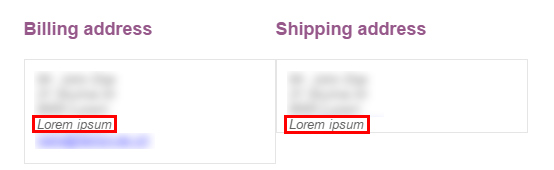
Fields in order confirmation e-mail

Fields on the order admin page

Fields in edit address form
Changelog
1.0.15
- Support WooCommerce 8.7
- Support WordPress 6.5
1.0.14
- Add support for WC “High-Performance Order Storage” feature
- Add support for WC “New product editor” feature
- Support WooCommerce 8.2
- Support WordPress 6.3
1.0.13
- Support WooCommerce 7.1
- Support WordPress 6.1
1.0.12
- Update www.f4dev.ch links
- Support WooCommerce 6.8
1.0.11
- Support WooCommerce 6.5
- Support WordPress 6.0
1.0.10
- Support WordPress 5.9
1.0.9
- Support WooCommerce 5.5
- Support WordPress 5.8
1.0.8
- Support WooCommerce 5.0
- Support WordPress 5.7
1.0.7
- Support WooCommerce 4.8
- Support WordPress 5.6
1.0.6
- Save guest checkout fields in session
1.0.5
- Support WooCommerce 4.4
- Support WordPress 5.5
1.0.4
- Update translations
1.0.3
- Support WooCommerce 4.0
- Support WordPress 5.4
1.0.2
- Fix privacy export and erase
1.0.1
- Add donation link
- Rename plugin according to the new naming conventions
1.0.0
- Initial stable release