

Maintenance 22/1004470d since update
Active installs
30
Downloads
5,697
Reviews
1
Age
13.7y
Plugin info
Total downloads: 5,697
Active installs: 30
Total reviews: 1
Average rating: 5
Support threads opened: 0
Support threads resolved: 0 (0%)
Available in: 1 language(s)
Contributors: 2
Last updated: 1/5/2014 (4470 days ago)
Added to WordPress: 7/25/2012 (13 years old)
Minimum WordPress version: 3.5.1
Tested up to WordPress version: 3.7.41
Minimum PHP version: f
Maintenance & Compatibility
Maintenance score
Possibly abandoned • Last updated 4470 days ago • 1 reviews
22/100
Is FancyTabs abandoned?
Possibly abandoned (last update 4470 days ago).
Compatibility
Requires WordPress: 3.5.1
Tested up to: 3.7.41
Requires PHP: f
Similar & Alternatives
Explore plugins with similar tags, and compare key metrics like downloads, ratings, updates, support, and WP/PHP compatibility.
Radio Buttons for Taxonomies
Rating 5.0/5 (50 reviews) • Active installs 20,000
Category Checklist Tree
Rating 5.0/5 (23 reviews) • Active installs 5,000
WP Admin UI
Rating 3.9/5 (22 reviews) • Active installs 2,000
Fancy Admin UI
Rating 4.4/5 (14 reviews) • Active installs 2,000
Classic Addons – WPBakery Page Builder
Rating 5.0/5 (1 reviews) • Active installs 2,000
Collapsible Categories in the Dashboard
Rating 5.0/5 (9 reviews) • Active installs 600
Description
Create navigable tabs to hide/show in-page content.
Use the following shortcode:
[fancytabs]
[tab title="Title 1"]
Hello world
[/tab]
[tab title="Title 2"]
Hello again, world
[/tab]
[/fancytabs]
If you wish to make adjustments to the styles, you can copy the fancytabs.css from the plugin directory and add it to your theme folder.
Coming Soon
- Options page for setting colors/styles
Installation
- Download FancyTabs Plugin.
- Decompress and upload the contents of the archive into /wp-content/plugins/.
- Activate the Plugin through the ‘Plugins’ menu in WordPress
Frequently Asked Questions
None yet!
Review feed
No reviews available
Screenshots
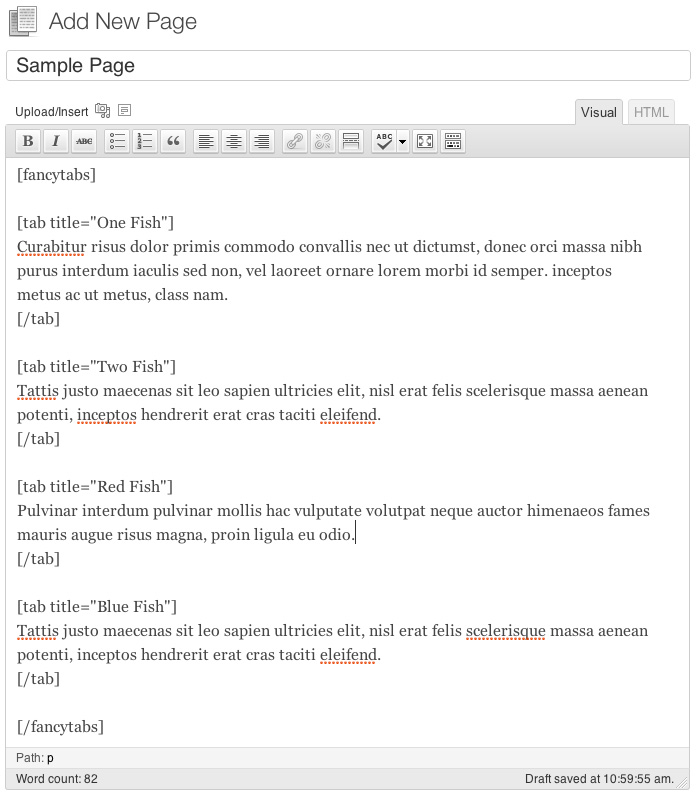
This screen shot shows the basic shortcode usage within the editor. Notice the attribute "title" is important.

This shot shows the end result

This shot also shows the end result
Changelog
1.1.0
- Greatly cleanup jQuery, add to
fancytabs.js - Styles now happen solely in
fancytabs.css - Ability for user to copy stylesheet to theme/stylesheet directory for customization
1.0.2
- Improve appearance (CSS)
1.0.1
- Added screenshots
1.0
- Initial release