
FAQ Magic
Generate FAQ schema (JSON-LD) automatically and display your FAQs in a styled layout or accordion for better SEO and AI Ranking.
Plugin info
Maintenance & Compatibility
Maintenance score
Maintained • Last updated 128 days ago • 1 reviews
Is FAQ Magic abandoned?
Likely maintained (last update 128 days ago).
Compatibility
Similar & Alternatives
Explore plugins with similar tags, and compare key metrics like downloads, ratings, updates, support, and WP/PHP compatibility.
Description
Easily create WebPage and FAQ schema with AI suggestions built in.
FAQ Magic is a lightweight plugin that helps you create structured Page and FAQ content and schema with optional AI suggestions and styled layouts. With just a few clicks, you can generate valid WebPage and FAQ JSON-LD schema that helps search engines and AI platforms better understand your content.
Features
- Add FAQs via a simple meta box in the post editor.
- Use on WordPress Posts, Pages and Products.
- Generate WebPage schema (JSON-LD) for better AI and search engine visibility.
- Also generate FAQ schema (JSON-LD) for better AI and search engine visibility.
- Use the free AI Suggest feature to generate Page title and page description AI.
- Display FAQs on the front end with the
[faq_magic]shortcode. - Choose between the standard layout or accordion toggle style for these FAQ’s.
- Show all Page | Post | Product FAQs combined for a site FAQ page using a shortcode.
- Configure schema and display options in the Tools FAQ Magic menu.
Background
Search Engines and AI crawlers rely on structured information on your page in order to more effectively index the page for SEO and AI tools.
The addition of FAQ’s into the page provides more detail about the page for visitors and for AI or search engines to determine what the page is all about.
The benefit to you is that your website is more likely to be found by people using AI or searching the web.
External services
This plugin connects to an external service provided by Hub5050 (https://hub5050.com) in order to provide AI-generated suggestions for the “WebPage” form fields (specifically the suggested title and description for a page schema). The service is optional and is free to all users.
What the service is and what it is used for
The service is an API endpoint hosted at hub5050.com, which returns suggested values for the “Name” (title) and “Description” fields used in the WebPage JSON-LD schema. This feature is optional and is triggered only when the user clicks the “🤖 AI Suggest” button in the plugin’s metabox.
What data is sent and when
When the “🤖 AI Suggest” button is clicked, the plugin sends:
– The URL of the page being edited (base64 encoded).
– A fixed five-digit code string which identifies which Hub5050 service to use.
No personal data, user information, or other identifiers are ever sent. The page URL is used only to generate suggested content and is not stored on Hub5050 servers.
The request is only made when the button is clicked. The values returned are shown in the form for the user to review and edit or discard. Nothing is saved automatically on the site.
Control over this feature
This AI Suggest feature can be disabled from the plugin’s settings page. When disabled, no data is ever sent to hub5050.com.
Service provider
This service is provided by Hub5050 (https://hub5050.com), owned and operated by the plugin author.
– Terms of Service: https://hub5050.com/terms/
– Privacy Policy: https://hub5050.com/privacy/
– Specific information: https://hub5050.com/faq-magic-terms-and-privacy-policy/
Installation
- Upload the plugin files to the
/wp-content/plugins/faq-magic/directory, or install the plugin through the WordPress plugins screen directly. - Activate the plugin through the Plugins screen in WordPress.
- Go to Tools FAQ Magic to configure the settings.
- Edit any post/page and add FAQs using the FAQ Magic Schema Generator meta box.
- Insert
[faq_magic]shortcode into your post/page content to display FAQs.
Frequently Asked Questions
Edit a post or page, scroll to the “FAQ Magic Schema Generator” meta box, and use the interface to add questions and answers.
Use the [faq_magic] or [faq-magic] shortcode inside your content. You can also add attributes, for example:
[faq_magic title=”My FAQs” class=”custom-faq”]
Yes, this plugin generates valid FAQPage JSON-LD schema that can help search engines display rich FAQ snippets in search results.
Yes, this plugin generates valid JSON-LD schema for the page and for the FAQ’s. These help AI Bots to discover and use your site information.
Yes, AI results usually cite the source in the results when these come from the web.
Yes, in the plugin settings, you can toggle between normal FAQ blocks and an accordion view.
Yes, the plugin is theme independent.
Yes, the AI suggestions are optional and can be switched off in the settings menu.
No, the AI Suggestions transfer directly to your input form and will only be accepted if you choose to use (submit) these.
Yes, the FAQs shown in the metabox include drag-handles (⋮⋮) that allow you to drag-and-drop any FAQ to reorder the list.
Yes, add the [all_magic_faqs] or [all-magic-faqs] shortcode on you page or pages where you want these to appear.
A lot of work may be involved by the user in setting up FAQ’s and Page information. If the plugin is uninstalled for some reason, the user is given the option not to lose this work (the default).
There is also an option in the settings page called “Remove faq-magic metadata from every post on uninstall”.
– If this switch is enabled, all FAQ Magic metadata (WebPage, FAQs, Schema) will also be deleted from your posts and pages.
– If this switch is disabled, your metadata will remain in the database after uninstall (useful if you want to reinstall the plugin later).
Google provides a utility for testing your schema. Just type the page URL in the Google Rich Results Test program.
Sorry! This will be available in the next version, and we are working on it already. The first version could not include internationalization due to the need to get this to market due to demand for these essential AI features.
Review feed
Screenshots

Settings for the plugin.
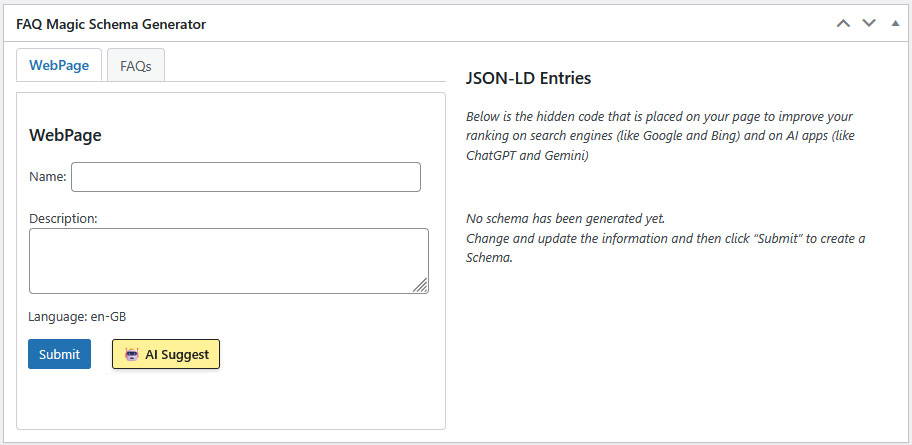
The FAQ Magic meta box in the post editor.

Parts of the FAQ Magic meta box (WebPage Tab).

Parts of the FAQ Magic meta box (FAQ Tab).
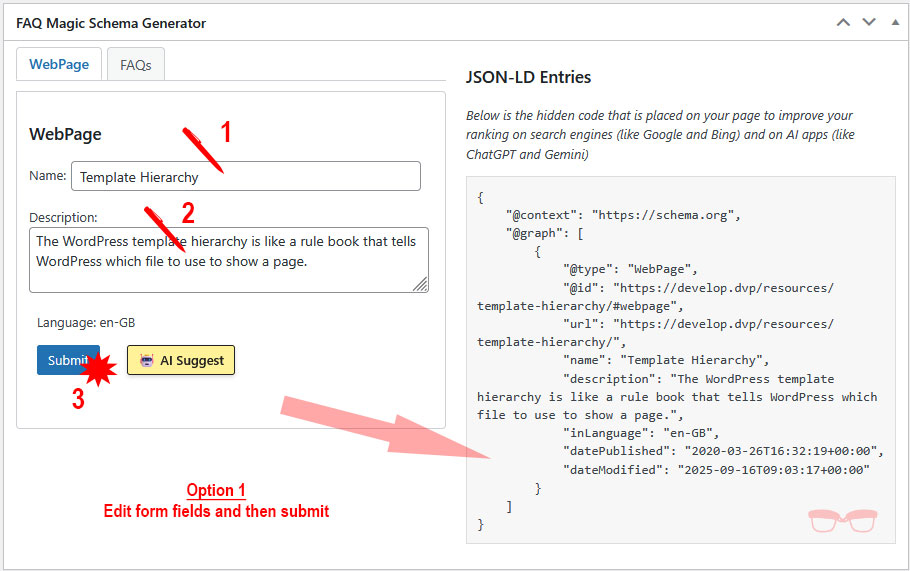
Steps to manually add the Webpage Schema.

Steps to add the Webpage Schema using the AI Agent.

The hidden Webpage Schema on your page.

Steps to submit a new frequently asked question.

The hidden Webpage Schema with FAQ's.

Adding a shortcode.

Standard FAQ layout on the front-end.

Accordion FAQ layout on the front-end.
Changelog
1.4.0
- Accordion open and close improved
- Refresh licence icon added
- FAQs reorder using drag and drop added
- FAQ use this button user error proofed
1.3.7
- Duplicate FAQPage when using a shortcode resolved
1.3.6
- Include error fixed
1.3.5
- Shortcode added to show all FAQs on the site
- Shortcode help documentation added
1.3.4
- Improved licence code refresh
1.3.3
- Help and additional UI improvements
1.3.2
- UI Improvements
1.3.0
- AI rollout for premium FAQ functionality
1.2.2
- AI security roll-out. Code related to the domain improved to ensure valid access to AI
- Added uninstall.php cleanup file.
- Plugin now removes all settings/logs automatically on uninstall.
- New option to remove all FAQ Magic metadata on uninstall (user-controlled).
1.2.1
- Enable the FAQ metabox for products as well as posts and pages.
- Updates to readme and help images. Error in shortcode help fixed.
1.2.0
- AI Suggest service added to suggest the Title and Description for the WebPage schema.
1.1.0
- Production release with schema generation, meta box, shortcode, and accordion/standard layouts.
- JSON-LD webpage schema functionality for every page on the site included
- Basic FAQ shortcode provided with JSON-LD integration
0.1.1
- Test release with schema generation, meta box, shortcode, and accordion/standard layouts.
- Launch version checks
0.0.1
- Pilot testing September 2025