

Plugin info
Maintenance & Compatibility
Maintenance score
Possibly abandoned • Last updated 3588 days ago • 21 reviews
Is FD Footnotes Plugin abandoned?
Possibly abandoned (last update 3588 days ago).
Compatibility
Similar & Alternatives
Explore plugins with similar tags, and compare key metrics like downloads, ratings, updates, support, and WP/PHP compatibility.
Description
AS OF MAY 2016, THIS PLUGIN IS NOT BEING MAINTAINED AND WILL NOT RECEIVE ANY FUTURE UPDATES.
CONTACT ME IF YOU’D LIKE TO LIST AN ALTERNATIVE HERE.
Alternatives:
– https://wordpress.org/plugins/footnotation/
This plugin provides an extremely easy way to add elegant looking footnotes to
your posts. The syntax is natural, simple to understand, and degrades
gracefully if the plugin is removed. Footnotes are linked unobtrusively and the
note itself links back to the original text where the footnote is referenced.
Adding footnotes to a post is simple. Just type them inline in your post in
square brackets like this:
[1. This is a footnote.]
Each footnote must have a number followed by a period and a space and then the
actual footnote. They don’t have to be unique but it is recommended. It doesn’t
matter what the numbers are since the footnotes will be automatically
renumbered when the post is displayed.
Footnotes can contain anything you’d like including links, images, etc.
Footnotes are automatically linked back to the spot in the text where the note
was made.
Settings
Only show footnotes on single post/page: This option will hide
footnotes on the main blog page. Footnote numbers will still appear
but link to the individual post/page URL.
Collapse footnotes until clicked: When checked, footnotes are
hidden until manually expanded or a footnote number is clicked.
Note: Do not include square brackets [] inside the footnotes themselves.
Note: Footnote numbers don’t need to be unique but it is recommended,
especially if the text is identical for multiple footnotes. If you have
multiple footnotes with the exact same text and number then you’ll get weird
and incorrect footnotes on your post.
Installation
- Copy the fd-footnotes directory into wp-content/plugins
- Activate the plugin through the ‘Plugins’ menu in WordPress
Frequently Asked Questions
Review feed
Screenshots
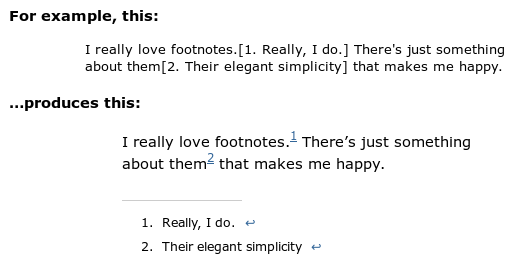
Sample of post and resulting display on blog.
Changelog
1.36
- Fixed “Notice: Undefined variable” https://wordpress.org/support/topic/line-130-error
1.35
- Added German translation by Mark Sargent
1.34
- Fixed jQuery script dependency
1.33
- Added Greek translation by Dimitrios Kaisaris (http://www.foodblogstarter.com)
1.32
- Fixed issue when non-breaking space used between footnote number and footnote text
1.31
- Fixed issue when non-breaking space used between footnote number and footnote text
1.3
- Added option for collapsing footnotes into a single line until manually
expanded. - Added option to only show footnotes when viewing a single post/page.
- Added translation files. Send .po translation files to me for inclusion
in future releases. Thanks.
1.21
- Fixed problem where sometimes WordPress would not correctly add the closing
paragraph tag in posts with footnotes. This is a stable workaround for a
wpautop() bug in WordPress. Thanks to Roger Chen for the tip.