

Feslider – Featured Slider
Image slider that act like featured image, its featured slider!
Maintenance 22/1001142d since update
Active installs
80
Downloads
5,856
Reviews
5
Age
9.3y
Plugin info
Total downloads: 5,856
Active installs: 80
Total reviews: 5
Average rating: 5
Support threads opened: 0
Support threads resolved: 0 (0%)
Available in: 1 language(s)
Contributors: 3
Last updated: 2/15/2023 (1142 days ago)
Added to WordPress: 11/29/2016 (9 years old)
Minimum WordPress version: 4.0
Tested up to WordPress version: 6.1.9
Minimum PHP version: f
Maintenance & Compatibility
Maintenance score
Possibly abandoned • Last updated 1142 days ago • 5 reviews
22/100
Is Feslider – Featured Slider abandoned?
Possibly abandoned (last update 1142 days ago).
Compatibility
Requires WordPress: 4.0
Tested up to: 6.1.9
Requires PHP: f
Similar & Alternatives
Explore plugins with similar tags, and compare key metrics like downloads, ratings, updates, support, and WP/PHP compatibility.
No similar plugins found yet.
Description
FESlider is fast and responsive slider that act like featured image. You can just directly add the slides from your post editor page.
Features :
- Fast and responsive slider
- Rich of setting options
- Slide caption
- As easy as featured image
- Ability to replace the featured image
- Enable for all post type
Usage Instruction
- After installation, go to your post editor, you will notice a new FESlider metabox
- Add your image(s) for use as slides. You can add multiple images by hold CTRL while select/click the images
- Add the slide text if you wish by edit the caption field on the wordpress media library editor
- The slideshow will automatically appears on the top of the post. You can also place the slideshow manually by put the shortcode
[feslider]on the current post content - Visit the slideshow settings page by click the settings button on post editor or click the FESlider menu on wordpress admin sidebar
- Slideshow settings values will working on all FESlider slideshow on the site.
Installation
- Grab the plugin from from wordpress plugin directory or Upload the feslider folder to the /wp-content/plugins/ directory
- Activate the plugin
Frequently Asked Questions
- Can’t use “Replace Featured Image” option on my theme?
The ability to replace the featured image is working only if your theme use a proper way to display the featured image, with the_post_thumbnail or get_the_post_thumbnail
Review feed
Haris
Hello World!
If you enjoy this plugin, please rate me 5 star :)
Screenshots

Feslider in action.

Feslider metabox on admin post editor.
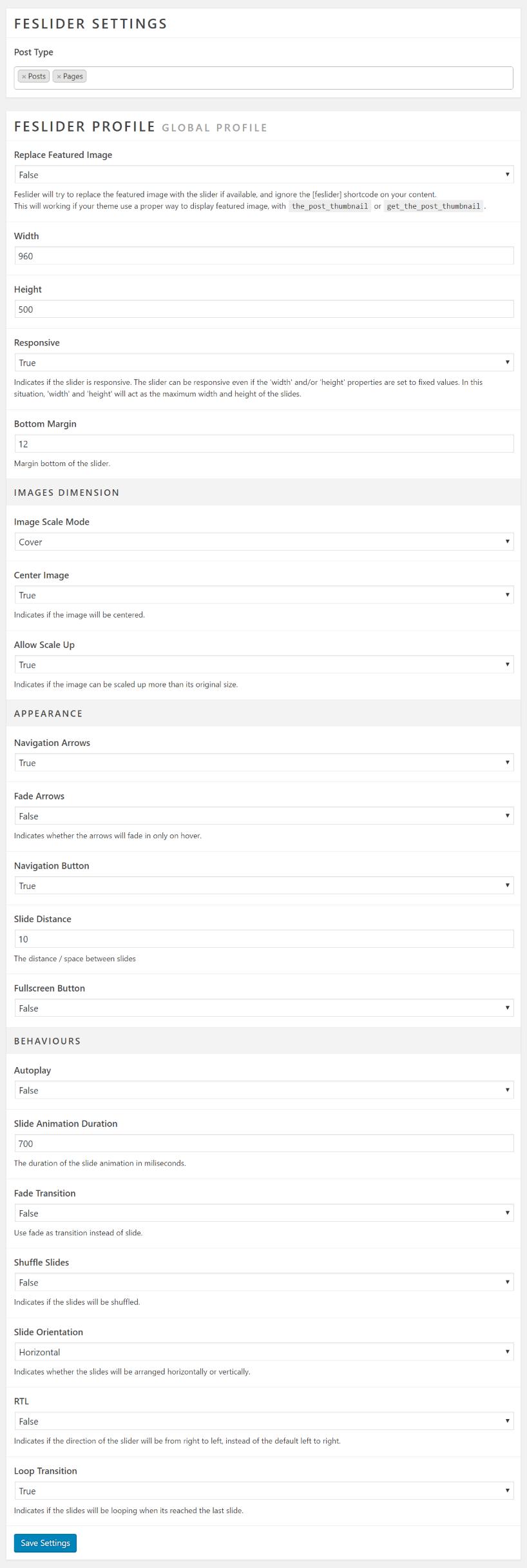
Feslider settings page.
Changelog
1.3
- Bug fixed: Cannot completely remove all images from the slider
- Bug fixed: The slider is not working on some themes
- Bug fixed: There are some array_map() warning
- Updated the Slider Pro to v1.6.0
1.2
- Bug fixed “jQuery not found” on frontend
- Tested on WordPress 5.2
1.1.5
- Added new ability to replace the featured image
1.1.2
- Bug fixed on post type(s) selection
- Bug fixed on sanitize input
1.1
- Add post type selection in settings
1.0
- Initial launch