
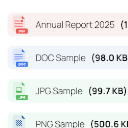
FileGlow Enhanced File Downloads
Transform your WordPress file downloads with elegant file type icons and smart size displays.
Plugin info
Maintenance & Compatibility
Maintenance score
Possibly abandoned • Last updated 449 days ago
Is FileGlow Enhanced File Downloads abandoned?
Possibly abandoned (last update 449 days ago).
Compatibility
Similar & Alternatives
Explore plugins with similar tags, and compare key metrics like downloads, ratings, updates, support, and WP/PHP compatibility.
Description
FileGlow automatically adds visual indicators and file size information to your downloadable content, making your site more professional and user-friendly.
Make your file downloads more intuitive and professional with FileGlow – the simple way to enhance your WordPress file blocks.
Transform your WordPress file downloads with elegant file type icons and smart size displays. FileGlow automatically adds visual indicators and file size information to your downloadable content, making your site more professional and user-friendly.
FEATURES
- Automatic file type detection and icon display
- Smart file size display (B, KB, MB, GB)
- Clean integration with WordPress block editor
- Supports common file formats (PDF, DOC, ZIP, MP3, MP4, and more)
- No configuration needed – works right out of the box
- Lightweight and performance-optimized
- Compatible with all WordPress themes
PERFECT FOR
- Document repositories
- Digital product stores
- Educational websites
- Portfolio sites
- Business websites
- Any site offering file downloads
Credits
In plugin are used icons by Graphy Design, which are distributed under the terms of the CC BY 4.0 license.
Installation
Install the plugin either via the WordPress plugin directory by searching the plugin’s name “FileGlow” or by uploading the files to your server at wp-content/plugins.
Frequently Asked Questions
Review feed
Screenshots
Changelog
1.0.0
- Initial release