

Filter AI
AI tools inside WordPress — generate meta, ALT text, product descriptions, images and rewrite content from the editor.
Plugin info
Maintenance & Compatibility
Maintenance score
Actively maintained • Last updated 84 days ago
Is Filter AI abandoned?
Likely maintained (last update 84 days ago).
Compatibility
Languages
Similar & Alternatives
Explore plugins with similar tags, and compare key metrics like downloads, ratings, updates, support, and WP/PHP compatibility.
Description
Filter AI brings AI-powered content tools directly into the WordPress admin so you can scale content production, improve SEO, and maintain a consistent brand voice without leaving your site.
Key capabilities include:
-
Brand voice and stop words
Configure a brand voice and global stop words so every AI result follows your style and avoids unwanted terms. -
Post and page titles
Generate SEO-friendly, click-focused titles based on the content’s core value proposition. -
ALT text generation
Automatically create descriptive ALT text on image upload and bulk-generate ALT text for existing media to improve accessibility and SEO. -
Yoast SEO metadata
Generate meta titles and descriptions (single or batch), respecting character constraints and best-practice recommendations for SEO plugins such as Yoast. -
WooCommerce product descriptions
Produce product descriptions that highlight benefits, address customer needs and include natural SEO keywords. -
Image generation
Create images from prompts, save to the Media Library with metadata, and use them instantly in posts and products. -
Content rewriting and tone adjustment
Expand, condense, summarise or rewrite content and change tone while preserving context and meaning. -
Excerpts and tag suggestions
Auto-generate concise excerpts and suggest relevant tags to improve discoverability and site structure. -
Choice of AI provider and BYO API key
Bring your own API key and choose from supported providers; switch providers without disrupting workflows. -
Batch processing and workflow controls
Apply actions across many posts, pages or media items to save time and ensure consistent output.
Filter AI is designed to integrate with the WordPress editor and common workflows. You remain in control of every output with editable suggestions, prompt templates and global defaults.
About Filter
Filter is a leading digital agency dedicated to creating innovative solutions that help businesses leverage technology effectively. We’re deeply invested in helping businesses leverage AI effectively, developing custom solutions that solve real business challenges.
Our approach to AI focuses on practical, implementable solutions that solve real business challenges – and Filter AI embodies this philosophy perfectly. By making AI accessible within the familiar WordPress environment, we’re helping content teams work more efficiently without sacrificing quality or control.
Check out our other WordPress plugin, PersonalizeWP, which allows you to display personalised content on your WordPress website using the Block Editor.
Installation
- Upload the
filter-aifolder to the/wp-content/plugins/directory, or install via the WordPress plugin installer. - Activate the plugin through the ‘Plugins’ menu in WordPress.
- Navigate to Settings Filter AI and add your AI provider API key(s).
- Configure brand voice, stop words, prompt templates and defaults.
- Use the new Filter AI controls on posts, pages, products and media to generate and apply content.
Frequently Asked Questions
No. Filter AI acts as a connector — you provide and manage your own AI provider API key(s).
Filter AI supports major providers — OpenAI, Anthropic, Gemini, xAI, Perplexity and Mistral — and can be extended to others.
No. Generated text is provided as editable suggestions; you must confirm or save changes.
Yes. Batch processing is available for meta data, ALT text and other supported operations.
Yes. The ALT text generation feature is designed to improve accessibility by producing descriptive ALT attributes for images.
Review feed
Screenshots

Filter AI settings: brand voice, API keys and prompt templates.
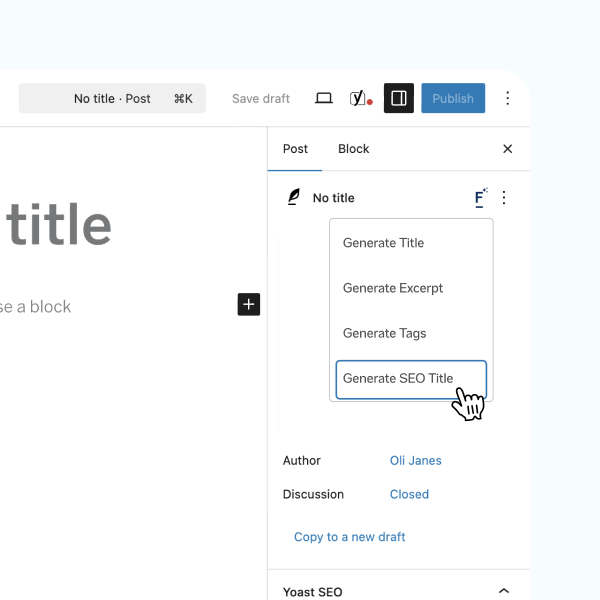
Post editor: generate meta title and description.

Media library: generate ALT text for images (single and bulk).

WooCommerce product page: generate product description.

Image generator UI with prompt and generated options.
Changelog
1.4.0
Enhancements:
- New generate FAQs block
- New options to select AI service per feature
- Improvements to the generate image user journey
- Manage API keys directly within Filter AI settings
- Update to the plugin branding
Bug fixes:
- Fix
Function _load_textdomain_just_in_time was called incorrectly - Improve support with the classic editor
- Improve messaging on the batch generation pages
- Improve developer setup process
1.3.1
Bug fixes:
- Improve messaging across the settings and generation pages
1.3.0
Enhancements:
- Custom image generation
- Dynamically replace missing alt text
- Automatic plugin updates
1.2.2
Bug fixes:
- Standardise location of composer/package files for WooCommerce Action Scheduler
1.2.1
Enhancements:
- Update Github actions to automatically trigger on releases
- Update composer setup to support releasing onto Packagist.org
1.2.0
Enhancements:
- Add features to generate Yoast SEO title and meta descriptions including batch generation
- Add feature to generate image ALT text on upload
- Add option to add stop words to the AI prompt
- Add option to add a brand voice to the AI prompt
- Generating modal UI improvements
Bug fixes:
- Update settings page features to respond to status of required plugins
- Code stability improvements
1.1.0
Enhancements:
- Improved text generation prompts for AI requests
- Settings screen UX improvement
- Improved compatibility with AI Services plugin
- Improved general database performance when batch updating images
- Decreased timeout issues arising from batch updating images
Bug fixes:
- Correct link to edit an image that doesn’t have its alt text updated during batching
1.0.0
- Initial public release of Filter AI