

Plugin info
Maintenance & Compatibility
Maintenance score
Possibly abandoned • Last updated 3672 days ago • 1 reviews
Is FlickrEyeCandy abandoned?
Possibly abandoned (last update 3672 days ago).
Compatibility
Similar & Alternatives
Explore plugins with similar tags, and compare key metrics like downloads, ratings, updates, support, and WP/PHP compatibility.
Description
flickr_eyecandy is a very simple WordPress Plugin.
It provides a WordPress Widget that selects and displays one random photo from Flickr
in the sidebar, each time the page loads. The plugin uses the Flickr API, and authenticates via
an API key that YOU (the installer) acquire via the Yahoo API Console.
It does not present a gallery. It’s just one photo. The photo changes when you reload the page, but it does not change while the page is being displayed.
You specify a tag or set of tags to filter the photos.
For example, if you specify “usa,flag”, you will get only photos tagged
with “usa” and “flag”.
Dependencies
- This plugin depends on and uses the published Flickr REST API.
- It also relies on and uses the Curl library within PHP.
- It makes outbound http connections from the WordPress/PHP server. Most hosters allow this, so it won’t be a problem.
Thanks
Thanks for your interest!
You can make a donation at http://dinochiesa.github.io/FlickrWidgetDonate.html
Check out all my plugins:
https://wordpress.org/extend/plugins/search.php?q=dpchiesa
-Dino Chiesa
Installation
-
Download flickr-eyecandy-wp-plugin.zip and unzip into the
/wp-content/plugins/ directory -
From the WordPress admin backend, Activate the plugin through the
‘Plugins’ menu -
From the WordPress admin backend, in the Widgets menu, drag-and-drop
the widget to your sidebar. You can place it in any position you
like. -
Specify the settings for the widget:
Title, API Key, and the tag(s). For the tags, you can specify :-
a single word, like “fish”. This will retrieve a random
image tagged with the word “fish”. -
a comma-separated list. This retrieves a photo tagged
with all of the terms in the list. -
a pipe-separated list of the above. For example, if you specify
“fish|leaf|blue,water”, then you will get a photo that is tagged
with either “fish” or “leaf” or “blue and water”. The plugin randomly
selects which term to use for a Flickr search, and then randomly
selects one of the returned photos for display.
-
That’s it !
Frequently Asked Questions
Will this plugin cycle through photos, like a slideshow?
No. It grabs a list of photos from Flickr, based on search terms you provide, and then selects one of those photos on the rendered page. It does not cycle through photos.
If you refresh the page, it will randomly select a photo again. It will probably be a different photo, but not always.
Where do I get an API Key?
To get an API Key, you need to visit
http://www.flickr.com/services/apps/create/apply/
Walk through the steps.
Copy and paste the API Key to the appropriate place in the Widget
configuration menu. You don’t need the secret.
Why do I need an API Key?
You need an API key from Yahoo so that the requests that your wordpress
page sends to Yahoo, will be tracked and allowed. Every time the
page loads, it sends out a request to Yahoo, and gets a list of
photos. Yahoo wants to know who’s asking for this information, and
the API key lets them track that.
Will I be charged by Yahoo for the requests?
No. The API key is free to get; I don’t speak for Yahoo, but it seems
to me they use the key only for tracking purposes.
Yahoo may throttle the level of requests if you use this plugin on a
heavily loaded site. In that case you may need to use OAuth2.0, which I
have not yet built into the plugin. But I could be convinced, for the
right price. 😉
Can I set the visual style of the widget from the admin backend?
No, I haven’t built that capability into this simple plugin, just yet.
Let me know if you have strong requirements in this area.
Does the plugin use caching?
Yes, the plugin will cache results for each search term. The responses from Flickr can be 15-20k. The response won’t change from one page view to the next, so caching makes sense.
The search response cache is keyed on the search term. If your picture term is “pizza|beer”, there will be two distinct cache files maintained.
You can configure the lifetime of items in the cache, via the configuration panels in the wordpress backend.
Review feed
Screenshots
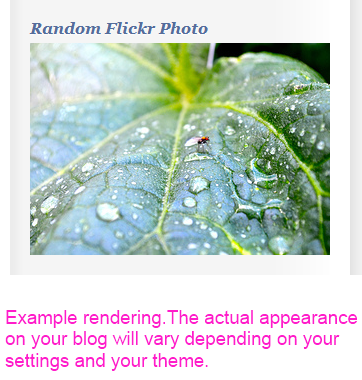
This shows the rendering of the Widget in the sidebar of a WP blog.

This shows how to Activate the plugin in the Plugins menu in the WP Admin backend

Configuring the settings for the flickr_eyecandy widget in the WP Admin backend.
Changelog
2016.01.30
- displayed the image from flickr with https if is_ssl() returns true.
- updated “tested up to” to 4.4.1
2014.07.04
- no code changes from 2014.07.03
- updated “tested with” to 3.9.1
- updated brief description.
2014.07.03
- update to use https with flickr’s API – this is apparently now required.
- tested and works with WordPress v3.9.1
2012.07.18
- catch exceptions on unexpected missing attributes on a photo.
2012.06.04
- clean up some small things in the admin form
2012.06.03
- implement caching of the search results
- a fix for the readme.
2012.5.18
- initial release