

FnF.FM Radio
FnF.FM is an Online Radio Station that can be used as either a widget or Short code.
Plugin info
Maintenance & Compatibility
Maintenance score
Possibly abandoned • Last updated 3512 days ago • 5 reviews
Is FnF.FM Radio abandoned?
Possibly abandoned (last update 3512 days ago).
Compatibility
Similar & Alternatives
Explore plugins with similar tags, and compare key metrics like downloads, ratings, updates, support, and WP/PHP compatibility.
Description
FnF.FM is an Online Radio Station that can be used as either a widget or Short code. Now you can engage your visitors into your website.
Key Feature
-
FnF.FM Radio is a Wonderful Radio Player that plays Popular Songs 24/7.
-
Fully responsive, work with all kind of web browsers and mobile device.
-
You can use This Radio Player in any Posts or Pages of Your website using Short code. In Posts/Pages the player will display song title, artist name and album cover.
-
After Installing, a new widget named ‘FnF.FM Radio’ will be created. You can use this widget in your website sidebar or any other areas.
-
After Installing, just use this short code to display the radio player [fnffm]
-
Here is live demo: http://wp.fnf.fm/wp-radio
-
FnF.fm Website: http://www.fnf.fm
Support
For receiving any type of support, submit your Query Here:
http://www.fnf.fm/p/contact.html
Installation
-
Install from WordPress admin panel >> Plugins >> Add new plugin >> Search for `FnF.FM Radio’ plugin. After the installation, activate the plug-in.
-
After successfully installing & activating this Plugin, you need to use Shortcode to display the player. Use [fnffm] Shortcode to display the player anywhere in your website. (E.g.: Post/Page or Widget Area)
Frequently Asked Questions
Can I use my existing WordPress theme?
Of course! It works with nearly every WordPress theme.
How can I update the radio station?
You don’t need to update anything, we will automatically update the radio station.
How can I display the player?
You can display this player by Shortcode or widget. For Shortcode, use this [fnffm].
Review feed
Screenshots
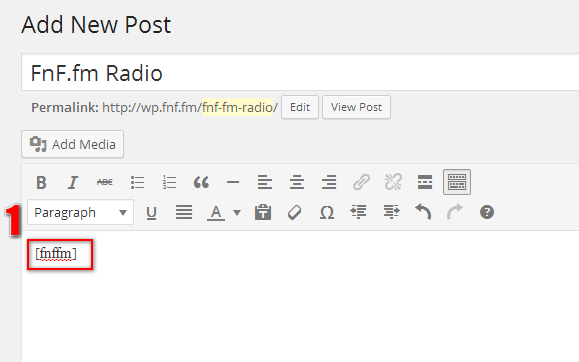
Adding Shortcode in Post/Page

Have a look at the player in Post/Page

In Widget

Have a look at the player in Sidebar
Changelog
1.1 – August 21 2016
- Added radio player.
- Resize widget player.
- Fixed compatibility with WordPress 4.6
1.0 August 1 2014
- Initial release
- Tested with WordPress 4.0