

Form Submission Email Reports
A lightweight plugin that retrieves form submission data from popular form plugins and emails scheduled reports (daily, weekly, and monthly).
Plugin info
Maintenance & Compatibility
Maintenance score
Maintained • Last updated 134 days ago
Is Form Submission Email Reports abandoned?
Likely maintained (last update 134 days ago).
Compatibility
Similar & Alternatives
Explore plugins with similar tags, and compare key metrics like downloads, ratings, updates, support, and WP/PHP compatibility.
Description
Form Submission Email Reports collects and consolidates entries from popular form plugins like Contact Form 7 & Gravity Formsand delivers them to your inbox on a schedule—so nothing slips through the cracks.
Supported sources
– Contact Form 7
– Gravity Forms
– Database for Contact Form 7, WPforms, Elementor forms (by CRM Perks)
– Advanced Contact Form 7 DB (by Vsourz Digital)
Key Features:
– Supports Contact Form 7 and Gravity Forms.
– Retrieves and consolidates form submission data.
– Scheduled email reports: Daily, Weekly, and Monthly (new).
– Automatically sends reports to the site admin’s email.
– Simple and user-friendly configuration.
– Compatible with popular database plugins for form entries.
– Lightweight and optimized for performance.
– Download submission records as CSV files.
Why you’ll like it
– Saves time compiling submissions from multiple plugins.
– Reduces missed messages with automated delivery.
– Easy CSV download for audits and sharing.
Installation
- Install and activate at least one source plugin:
– Contact Form 7 or Gravity Forms
– For CF7 storage:
– Advanced Contact Form 7 DB
– or Database for Contact Form 7
2. Download the plugin zip file.
3. Go to Plugins > Add New in your WordPress admin.
4. Click Upload Plugin, select the downloaded zip file, and click Install Now.
5. Activate the plugin through the Plugins menu in WordPress.
6. Go to Settings Form Submission Reports.
7. Choose your sources, forms, and schedule (Daily / Weekly / Monthly).
8. Save. Reports will be sent to the site admin email (or a custom email set in the plugin).
Frequently Asked Questions
No. You only need the plugins you actually use. This plugin reads from Contact Form 7 or Gravity Forms; for CF7 storage, use Advanced CF7 DB or the CRM Perks DB plugin.
No, this plugin is designed to send only emails to the administrator. As for storage, you can use “Database for Contact Form 7 by CRM Perks or Advanced Contact Form 7 DB” for Contact Form 7 or the native functionality of Gravity Forms for Gravity Forms.
The plugin uses the site admin email by default. You can update this in the plugin settings under Settings > Form Submission Reports.
Yes. The emailed report includes a secure link to download CSV files.
Yes. The plugin uses cryptographically secure HMAC tokens so links remain valid without relying on session state.
Review feed
Screenshots
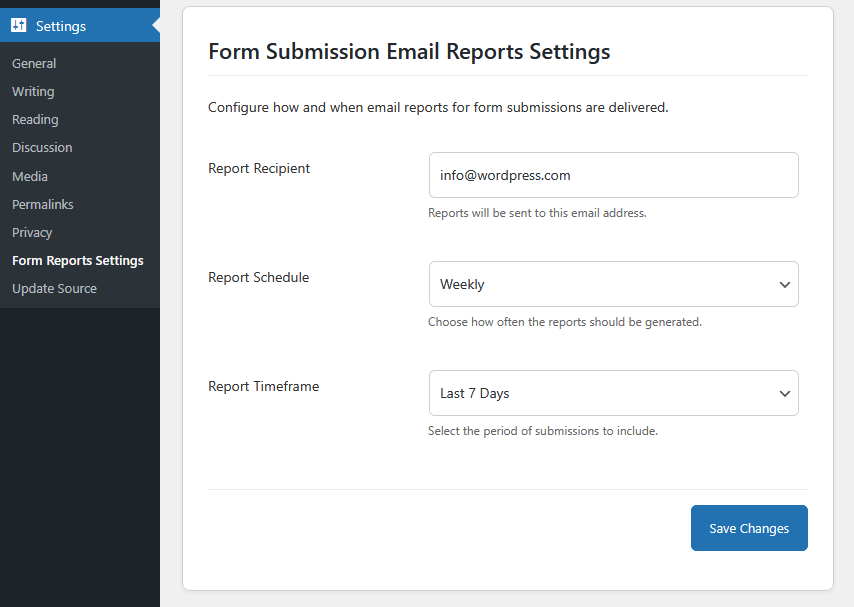
Settings Page - Configure report preferences and admin email.
Changelog
1.7
- Improvement: Enhanced CSV export formatting for better readability, including proper handling of empty fields and special characters.
1.6
- New: Support for sending submission reports to multiple email addresses.
- Enhancement: Updated settings page to allow multiple recipients separated by commas.
- Improvement: Minor code optimizations for email handling and CSV generation.
- Misc: Bug fixes and performance improvements.
1.5
- New: Monthly email schedule for reports.
- Enhancement: Settings page refreshed with clearer layout, help text, and validations.
- Improvement: CSV export now humanizes headers and normalizes multiselect values across CRM Perks and Advanced CF7 DB.
- Fix: Ensured report counts match CSV rows by aligning filters with
submit_time(when available) and ignoring malformed/empty timestamps. - Performance: Optimized queries and reduced memory footprint for large exports.
- Misc: Minor code clean-ups and bug fixes.
1.4
- Fixed minor bugs related to form submission display.
- Improved performance of the report generation module.
1.3
- Replaced session-based nonce tokens with persistent HMAC tokens to ensure CSV download and view links work reliably after login.
- Improved public link handling for unauthenticated users.
- Fixed JavaScript auto-fill issue on redirect after login.
1.2
- Added CSV download feature for form submissions.
- Minor code optimizations.
1.1
- Added compatibility with Advanced Contact Form 7 DB plugin.
- Improved report generation and email formatting.
- Minor performance optimizations.
1.0
- Initial release.
- Added support for retrieving submissions from Contact Form 7 and Gravity Forms.
- Email reporting functionality included.