

Forms Overview for Elementor
A powerful dashboard to monitor all Elementor form submissions across your WordPress site with date filtering and submission status tracking. 📊
Plugin info
Maintenance & Compatibility
Maintenance score
Maintained • Last updated 151 days ago • 1 reviews
Is Forms Overview for Elementor abandoned?
Likely maintained (last update 151 days ago).
Compatibility
Similar & Alternatives
Explore plugins with similar tags, and compare key metrics like downloads, ratings, updates, support, and WP/PHP compatibility.
Description
Forms Overview for Elementor provides a centralized dashboard to monitor all your Elementor form submissions in one convenient location. Perfect for administrators who need to track form performance and identify submission issues quickly! 🚀
This plugin is created by Kreatix WordPress Agency, experts in custom WordPress development and Elementor solutions.
✨ Key Features
🎯 Unified Dashboard – View all Elementor form submissions from across your entire site in one place
📅 Date Range Filtering – Filter submissions by custom date ranges to analyze specific time periods
⏮️ Previous Month Button – Quick access to last month’s submissions with one click
✅ Submission Status Tracking – Separate tracking of successful and failed submissions
🎨 Visual Indicators – Green checkmarks (✓) for successful submissions, red X (✗) for failed ones
📊 Totals Summary – Automatic calculation of total successful and failed submissions
🎭 Clean Interface – Seamlessly integrates with WordPress admin design
⚡ AJAX-Powered – Fast, responsive interface without page reloads
🚀 Performance Optimized – Built-in caching for improved performance
💼 Perfect For
✓ Website administrators managing multiple forms
✓ Monitoring form performance and success rates
✓ Identifying forms with high failure rates
✓ Quick submission reporting for specific date ranges
✓ Tracking form usage patterns over time
✓ Agency owners managing client websites
✓ E-commerce stores with multiple contact forms
🎬 How It Works
- Install & Activate – Simply install the plugin and activate it
- Access Dashboard – Find “Forms Overview for Elementor” in your WordPress admin menu
- Select Date Range – Choose your desired date range or click “Previous Month”
- View Results – See all your form submissions with success/failure counts
📋 Requirements
- WordPress 5.0 or higher
- Elementor Pro (with Form widget)
- PHP 7.2 or higher
🔒 Privacy & Security
- No External Connections – All data stays on your server
- Read-Only Access – Only reads existing Elementor data, never modifies it
- No Additional Database Tables – Uses Elementor’s existing submission data
- Secure by Design – Follows WordPress coding standards and security best practices
Additional Information
🤝 Support & Feedback
For support, feature requests, or bug reports, please use the WordPress.org support forum for this plugin. We’re here to help!
⭐ Like This Plugin?
If you find this plugin helpful, please consider:
– ⭐ Leaving a 5-star review on WordPress.org
– 💬 Sharing it with fellow WordPress users
– 🐛 Reporting any bugs you find to help us improve
🔗 Links
⚠️ Disclaimer
This plugin is not affiliated with or endorsed by Elementor or Elementor Pro. Elementor and Elementor Pro are trademarks of Elementor Ltd.
📄 License
This plugin is licensed under GPL v2 or later. You are free to use, modify, and distribute this plugin according to the GPL license terms.
Installation
🚀 Automatic Installation (Recommended)
- Log in to your WordPress admin panel
- Go to Plugins > Add New
- Search for “Forms Overview for Elementor”
- Click Install Now then Activate
- Navigate to Forms Overview for Elementor in your WordPress admin menu
- Select your date range and click “Get Form Submissions” to view results
📦 Manual Installation
- Download the plugin zip file
- Log in to your WordPress admin panel
- Go to Plugins > Add New > Upload Plugin
- Choose the downloaded zip file and click Install Now
- Click Activate Plugin after installation
- Navigate to Forms Overview for Elementor in your WordPress admin menu
📁 FTP Installation
- Upload the
forms-overview-for-elementorfolder to the/wp-content/plugins/directory - Activate the plugin through the Plugins menu in WordPress
- Navigate to Forms Overview for Elementor in your WordPress admin menu
Frequently Asked Questions
No, this plugin requires Elementor Pro as it relies on the Form widget and submissions database tables that are only available in Elementor Pro. The free version of Elementor does not include form functionality.
Currently, the plugin displays data in the WordPress admin dashboard. Export functionality (CSV/Excel) is planned for a future release. If this feature is important to you, please let us know in the support forum!
No, this plugin only reads existing Elementor form submission data. It does not create any additional database tables or store any data of its own. Your data remains exactly as Elementor stores it.
Make sure you:
– Have Elementor Pro installed and activated
– Have at least one form created with Elementor
– Have form submissions within your selected date range
– The forms are on published, private, or draft pages
– The forms have the “Collect Submissions” action enabled in Elementor
This plugin provides an overview of submission counts per form. For detailed submission data (individual field values, submission times, etc.), use Elementor’s built-in form submissions feature found in the WordPress admin under Elementor > Submissions.
The plugin follows standard WordPress admin design patterns. The interface automatically adapts to your admin color scheme. Custom styling options may be added in future releases.
No! The plugin includes built-in caching and only loads on its own admin page. It has minimal impact on your site’s performance and uses AJAX for a smooth, fast experience.
When you deactivate the plugin, it simply stops running. All Elementor submission data remains intact as it’s stored by Elementor Pro. If you reactivate the plugin later, all your data will still be there.
Deleting the plugin removes all plugin files but does NOT delete any Elementor submission data. Your form submissions remain safe in the Elementor database.
Yes! You can select any custom date range using the date pickers, or use the convenient “Previous Month” button for quick access to last month’s data.
This plugin focuses on providing an overview and reporting interface. For submission notifications, use Elementor Pro’s built-in email notification actions or a dedicated form notification plugin.
Yes! The plugin is fully internationalized and ready for translation. Translation files are included in the /languages/ folder.
For support, feature requests, or bug reports, please use the WordPress.org support forum for this plugin. We monitor the forums regularly and are happy to help!
Review feed
Screenshots

Results table displaying multiple forms with successful and failed submission counts, visual indicators (green checkmarks and red X marks), and a totals summary row
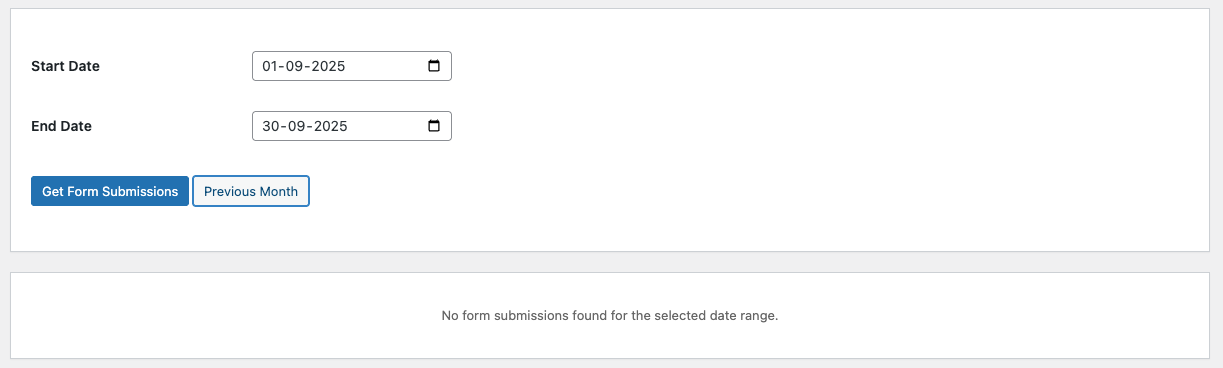
Empty state message when no form submissions are found within the selected date range

Plugin dashboard showing date selection fields and action buttons (Get Form Submissions and Previous Month) in the initial state
Changelog
1.2.0 – 2025-10-17
- ✨ New: Added “Previous Month” button for quick date range selection
- 🚀 Improved: Enhanced data caching for better performance
- 🔒 Security: Enhanced security with proper data escaping
- 🌍 Fixed: Resolved missing textdomain issues
- 💻 Improved: Code improvements for WordPress.org compliance
1.1.1
- 📋 Updated for WordPress plugin repository compliance
- 🌍 Added internationalization support
- 📝 Improved code documentation
- 🔒 Enhanced security checks
1.1.0
- ✨ New: Failed Submissions column to track submissions where all actions failed
- 📊 New: Totals row at the bottom showing sum of successful and failed submissions
- 🎨 New: Visual icons (green checkmark ✓ for success, red X ✗ for failed)
- 🎭 Improved: Separated CSS into external file for better performance
- 📝 Changed: Renamed “Submission Count” to “Successful Submissions” for clarity
- 🎨 Improved: Added subtle box shadows to UI elements
- 📱 Improved: Better responsive design for mobile devices
- 🐛 Fixed: Partially successful submissions now correctly count as successful
1.0.0
- 🎉 Initial release
- 📊 Basic form submissions overview with date filtering
- 📄 Support for published, private, and draft pages
- ⚡ AJAX-powered results loading
- 🎭 Clean admin interface matching WordPress design