

Plugin info
Maintenance & Compatibility
Maintenance score
Possibly abandoned • Last updated 4110 days ago • 24 reviews
Is Fotorama abandoned?
Possibly abandoned (last update 4110 days ago).
Compatibility
Similar & Alternatives
Explore plugins with similar tags, and compare key metrics like downloads, ratings, updates, support, and WP/PHP compatibility.
Description
Fotorama is a simple, stunning, powerful jQuery gallery.
- All Browsers. From IE 7 to Safari on iOS. Including Android and Windows Phone.
- Neat and transparent. Looks great by default, even better with your settings.
- Compact in-page and epic fullscreen mode.
- Touch gestures. Fine response to drag and swipe.
- Seamless responsive.
- Fast CSS3 transitions.
- Save Bandwidth. Fotorama lazy loads only one image ahead.
- Let Fotorama play photos automatically. The show will stop on touch.
- Thumbnails, shuffle, keyboard navigations, loop, and more…
Licensed under the MIT.
Installation
- Install Fotorama either via the WordPress.org plugin directory, or by uploading the files to your server.
- After activating Fotorama your galleries turn into fotoramas.
- Say Hi to Fotorama!
Customize
Control a single fotorama using standard gallery shortcode:
[gallery ids="1,2,3"]
Shortcode will take the following core attributes: ids, orderby, order, id, include, and exclude.
Disable fotorama and use standard gallery with fotorama="false":
[gallery ids="1,2,3" fotorama="false"]
Fotorama’s default settings are good, so there’s no need to mess with them. Still, you can fine-tune. Add any attributes that are listed in the original documentation, but without data- prefix.
Thumbnails
Change navigation style from iPhone-style dots to thumbnails by adding nav="thumbs":
[gallery ids="1,2,3" nav="thumbs"]
Fullscreen
Allow fotorama to enter fullscreen using allowfullscreen:
[gallery ids="1,2,3" allowfullscreen="true"]
Fit
There are 4 ways to fit an image into a fotorama: contain, cover, scaledown, and none. Choose one:
[gallery ids="1,2,3" fit="cover"]
Transition
Define which transition to use — slide or crossfade — using transition:
[gallery ids="1,2,3" transition="crossfade"]
Hash
Attribute hash="true" lets the page change its URL upon switching images. To send a link to a specific photo to a friend 🙂
[gallery ids="1,2,3" hash="true"]
Better be used with only one fotorama per page.
Loop
Loop the last and the first frame for seamless transition using loop="true":
[gallery ids="1,2,3" loop="true"]
Autoplay
Let Fotorama play photos automatically using autoplay="true". By default, a pause between images is 5 seconds. Set any interval in milliseconds, for example, 3 seconds:
[gallery ids="1,2,3" autoplay="3000"]
The show stops on touch. Change this with stopautoplayontouch="false".
Shuffle
Shuffle frames by adding shuffle="true":
[gallery ids="1,2,3" shuffle="true"]
Keyboard
Turn on keyboard navigation with the arrows by adding keyboard="true":
[gallery ids="1,2,3" keyboard="true"]
Works only for the first fotorama on page.
Arrows, click, swipe
Control the way your users interact with the fotorama with three attributes arrows, click, and swipe:
[gallery ids="1,2,3" arrows="true" click="true" swipe="false"]
Navigation position
To move dots or thumbs on top, use navposition="top":
[gallery ids="1,2,3" navposition="top"]
Hide navigation with nav="false".
Frequently Asked Questions
Installation Instructions
- Install Fotorama either via the WordPress.org plugin directory, or by uploading the files to your server.
- After activating Fotorama your galleries turn into fotoramas.
- Say Hi to Fotorama!
Customize
Control a single fotorama using standard gallery shortcode:
[gallery ids="1,2,3"]
Shortcode will take the following core attributes: ids, orderby, order, id, include, and exclude.
Disable fotorama and use standard gallery with fotorama="false":
[gallery ids="1,2,3" fotorama="false"]
Fotorama’s default settings are good, so there’s no need to mess with them. Still, you can fine-tune. Add any attributes that are listed in the original documentation, but without data- prefix.
Thumbnails
Change navigation style from iPhone-style dots to thumbnails by adding nav="thumbs":
[gallery ids="1,2,3" nav="thumbs"]
Fullscreen
Allow fotorama to enter fullscreen using allowfullscreen:
[gallery ids="1,2,3" allowfullscreen="true"]
Fit
There are 4 ways to fit an image into a fotorama: contain, cover, scaledown, and none. Choose one:
[gallery ids="1,2,3" fit="cover"]
Transition
Define which transition to use — slide or crossfade — using transition:
[gallery ids="1,2,3" transition="crossfade"]
Hash
Attribute hash="true" lets the page change its URL upon switching images. To send a link to a specific photo to a friend 🙂
[gallery ids="1,2,3" hash="true"]
Better be used with only one fotorama per page.
Loop
Loop the last and the first frame for seamless transition using loop="true":
[gallery ids="1,2,3" loop="true"]
Autoplay
Let Fotorama play photos automatically using autoplay="true". By default, a pause between images is 5 seconds. Set any interval in milliseconds, for example, 3 seconds:
[gallery ids="1,2,3" autoplay="3000"]
The show stops on touch. Change this with stopautoplayontouch="false".
Shuffle
Shuffle frames by adding shuffle="true":
[gallery ids="1,2,3" shuffle="true"]
Keyboard
Turn on keyboard navigation with the arrows by adding keyboard="true":
[gallery ids="1,2,3" keyboard="true"]
Works only for the first fotorama on page.
Arrows, click, swipe
Control the way your users interact with the fotorama with three attributes arrows, click, and swipe:
[gallery ids="1,2,3" arrows="true" click="true" swipe="false"]
Navigation position
To move dots or thumbs on top, use navposition="top":
[gallery ids="1,2,3" navposition="top"]
Hide navigation with nav="false".
How not to repeat the same attributes in each [gallery]? Is it possible to override the defaults?
Yes, there is a hack for that. Create file fotoramaDefaults.js in the /wp-content/plugins/ directory and list your options like so:
fotoramaDefaults = {
  nav: 'thumbs',
  allowfullscreen: 'native',
  transition: 'crossfade',
  loop: true,
  keyboard: true
}
Fotorama will try to fetch the options from the /wp-content/plugins/fotoramaDefaults.js.
Review feed
Screenshots

Fotorama post with responsive “Twenty Thirteen” theme

Neat with “Twenty Twelve”
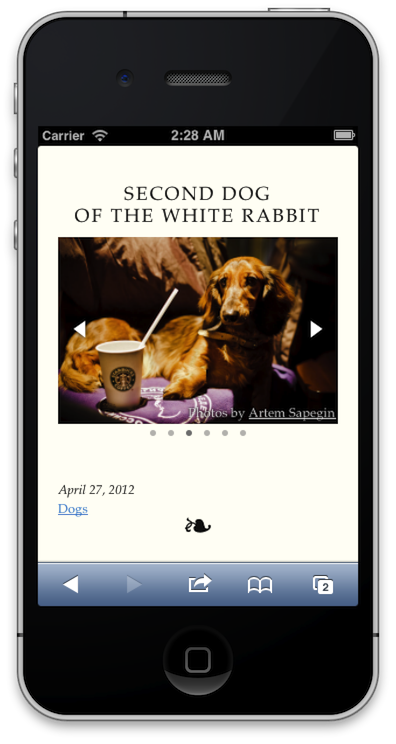
Seamless responsive

Looks well with every background